
MD.ai
MD.ai, Inc. · Image
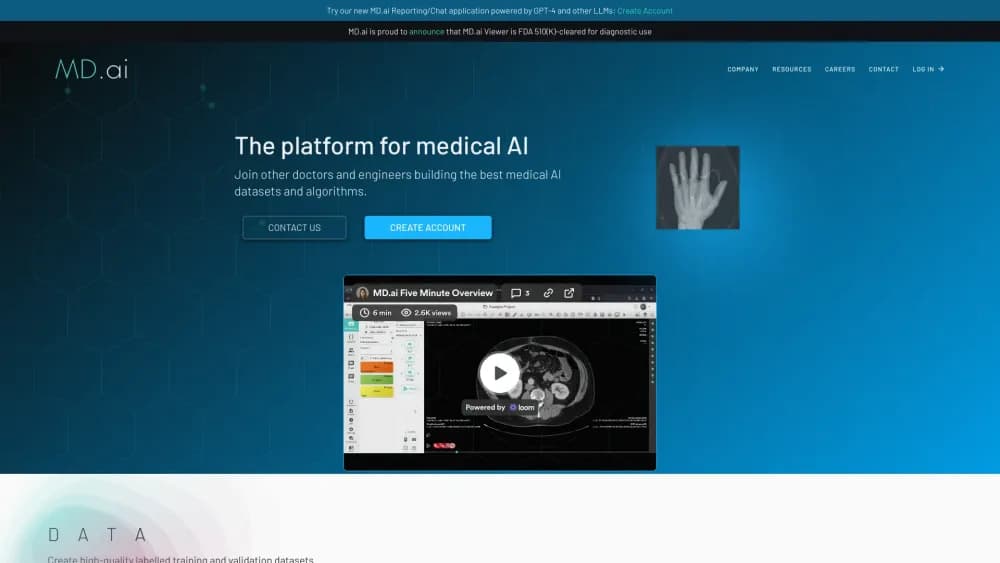
MD.ai is a DICOM-native platform where radiology teams label imaging data to train AI models and draft clinical reports with LLM assistance from one browser.
About MD.ai
What Is MD.ai
MD.ai is a cloud platform for medical imaging work, built by physicians trained at Harvard, Duke, and Columbia. It ships two products. Annotator is where teams upload exams and draw labels, masks, and study-level findings to build training data. Reporting is where radiologists dictate findings and get language-model help turning them into a signed clinical report.
The two halves solve different problems for the same customer. Research groups and imaging AI startups need clean, expert-labeled datasets plus a way to run their models against that data. Hospitals and radiology practices need to write reports faster without changing their PACS or EHR. MD.ai sells both, which is unusual, most companies pick one side.
The limits are worth knowing before you sign up. There's no published price list or self-serve checkout, so you have to talk to sales to get in. Annotator runs entirely in a browser and depends on network and memory, phones and tablets handle study-level labels only. And the platform is tuned for imaging: outside a radiology workflow, most features have no use.
Getting Started
- Create an account at md.ai with your email, Google, or Microsoft sign-in, or open the project link from an emailed invitation.
- Ask an administrator for access to a project or dataset, since new users join through invitations rather than open registration.
- Upload studies directly, connect a cloud bucket, or push exams over DICOM C-STORE into a dataset.
- In Annotator, open a case, pick a label group, and draw masks or add study-level findings, in Chrome on a desktop with 16 GB of RAM or more.
- Export the JSON for medical image labeling and training, or deploy a model to pre-annotate the remaining cases.
- In Reporting, pick a template or let the system suggest one, dictate key findings, review the generated impression, and sign.
Product Information
A quick look at MD.ai's pricing, supported platforms, and performance.
Best for
The users, tasks, and scenarios where this tool fits best.
Users
- Radiologists
- Imaging AI researchers
- AI startups building imaging models
- Medical students and fellows
Tasks
- Building training datasets
- Pre-annotating with a model
- Training a model in the platform
- Multi-site model validation
- Writing radiology reports
- De-identifying imaging data
Scenarios
- A research lab curating a lung CT dataset
- A radiology department running an AI pilot
- A busy reading room with a reporting backlog
- A startup preparing a regulatory submission
Key features
DICOM-native datasets
MD.ai works as a radiology annotation tool and a viewer on the same data. The platform handles DICOM from the ground up rather than as an import format. You add exams by direct upload, by connecting a cloud bucket on Google Cloud, Amazon S3, or Azure, or by pushing them over DICOM C-STORE. JPEG, PNG, TIFF, and video files can also come in through a patient-centric folder layout, which matters when a study mixes imaging and clinical clips.
FDA 510(k)-cleared web viewer
The viewer carries FDA 510(k) clearance, so clinical interpretation, review, and reporting happen in a cleared tool rather than a research viewer with a disclaimer. It supports standard zoom, pan, and windowing, hanging protocols, multiplanar reconstruction, and measurement tools. Annotations sit in the same workspace as the image, so you label and read in one screen.
AI-assisted annotation
You can deploy your own model and run distributed inference on the dataset. Output arrives as a pre-annotation that the annotator accepts, adjusts, or rejects. Models can be deployed per project with their own settings, and the platform records model performance against the human labels, which is the feedback loop most annotation tools leave out.
Federated validation across sites
Federated annotation lets several institutions join one AI model validation run without pooling patient data. Each site labels or runs inference locally, and only the results travel. For a vendor that needs external validation before a submission, this is often the only way to get multi-site evidence without months of data-sharing agreements.
PHI detection and de-identification
Built-in PHI detection scans images and metadata for identifying information and strips it before export. Pixel-level de-identification handles burned-in text where it appears on the image itself. It's the step that decides whether a dataset can leave a hospital at all, and having it in the platform saves a separate compliance project.
LLM-assisted reporting
As radiology reporting software, MD.ai uses language models for the tasks that eat a radiologist's day: picking the right template, mapping dictated findings into the right fields, drafting the impression, proofreading, and generating billing codes at signature. You can run it as a guided, AI-driven mode or stick to a traditional dictation mode and call the assistance when you want it.
Clinical guidelines and prior comparison
Reports can pull in guideline logic for BI-RADS, LI-RADS, TI-RADS, and other systems, and you can add your own custom guidelines. The system also compares the new study with prior reports and flags what changed. Both features cut the back-and-forth that makes a report take longer than the reading itself.
Developer APIs and integrations
A CLI tool and a Python client library let teams create projects, upload data, pull annotations, and manage users from code. Reporting connects to EHR, HIS, and RIS through HL7 and DICOM, and can be embedded in another application with an iframe using token-based access, so the report opens inside the hospital's own workflow.
Pros and cons
Pros
- Annotation and reporting live in one platform, so a research team and a clinical team can share the same viewer and data layer instead of buying two systems.
- The viewer has FDA 510(k) clearance, which matters if the same interface has to serve both dataset work and clinical reading.
- Federated validation gives multi-site evidence without moving patient data, a real advantage for model vendors facing regulatory review.
- PHI detection and de-identification run inside the platform, so export compliance is part of the workflow rather than a separate vendor.
- Reporting supports 12 languages with real-time translation and transcription, useful for international teams and multilingual patient messages.
Cons
- There's no published pricing and no self-serve signup, so evaluating the platform means a sales conversation and a custom quote.
- Annotator needs a desktop browser with plenty of RAM and bandwidth, and phones or tablets can apply study-level labels but not draw masks.
- New users join by invitation only, which slows down a team that wants to start a pilot this week.
- The product assumes a radiology context, so the reporting and annotation features have little use outside imaging.
Frequently asked questions
MD.ai serves two ends of medical imaging AI. Its Annotator lets clinicians and researchers label DICOM studies to build training and validation datasets, and its Reporting tool helps radiologists dictate, structure, and sign clinical reports with language-model assistance.
Related content
Explore related tools, skills, and articles for MD.ai.
MD.ai Alternatives

Google EmbeddingGemma 2
Google DeepMind · Writing · Image · CodingGoogle EmbeddingGemma 2 is a 740M-parameter open model that turns text, code, images, audio, and video frames into vectors in one 768-dimension space, running on phones and laptops.

Tractionwave
TractionWave · Image · MarketingTractionWave is an AI attention heatmap tool for static ads. Upload a PNG or JPG and it returns predicted attention, ranked hotspots, and fixes before you spend budget.

Imejis.io
Imejis.io · Image · MarketingImejis.io is an AI design studio for agents and marketing teams. Describe an image in plain words, and it writes the copy, builds the layout, reflows it to every size, then exports a finished file.