

Mentor
mentor · Productivity
Mentor is an AI goal coach and productivity app that breaks big ambitions into milestones, tasks, and daily steps, then guides you through them.
About Mentor
What Is Mentor
Mentor is an AI-powered goal management app from the team behind the goalmentor.app platform. You type in what you want to achieve, and it turns that vague ambition into a plan you can actually start on today. That's the whole point. Most goal-setting fails at step one, when "run a marathon" or "start a side hustle" sits there with no first move attached to it. Mentor answers a few questions about your situation, then hands you a breakdown you can act on. It's that simple.
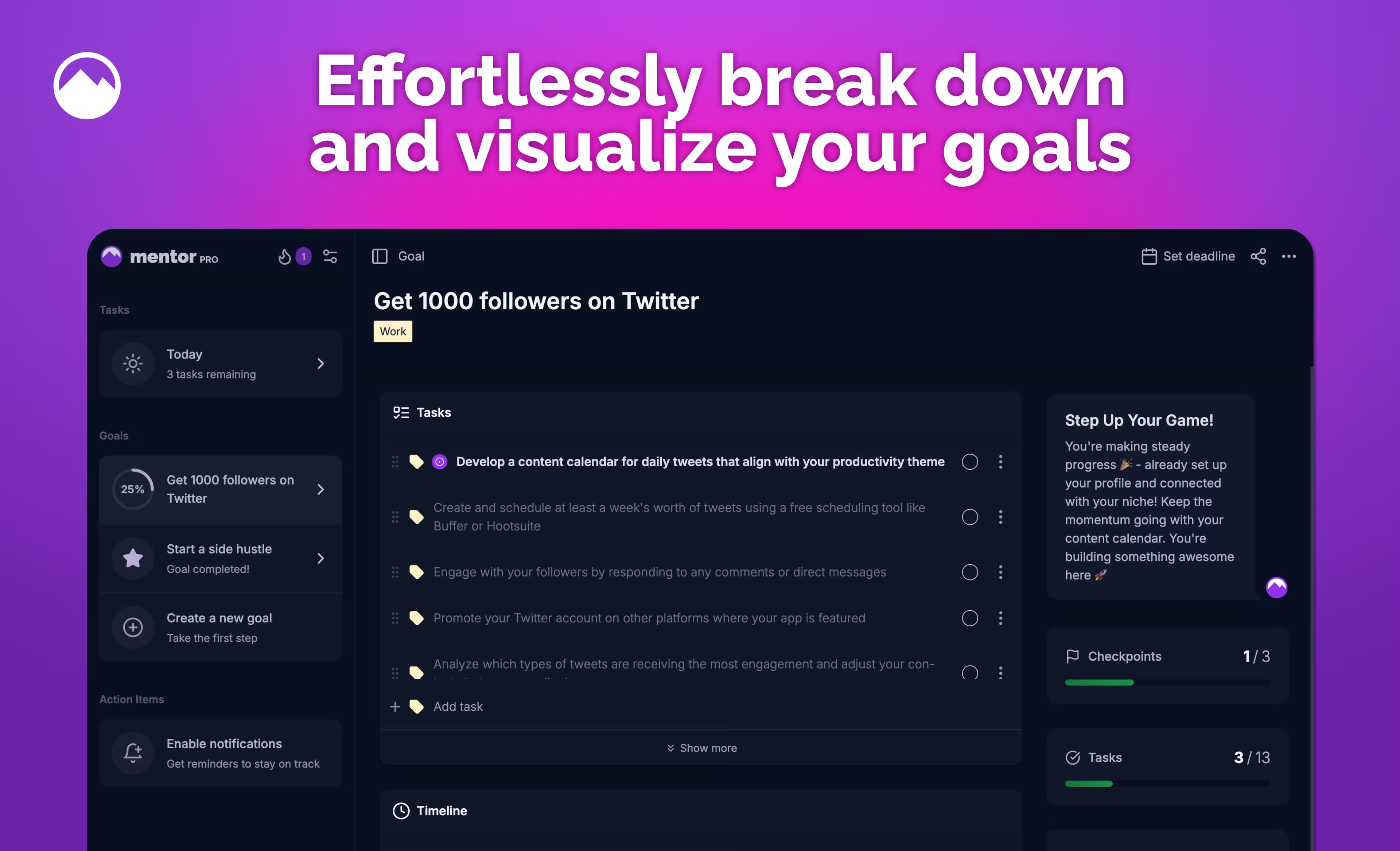
The structure runs from big to small: a goal holds milestones, each milestone holds tasks, and each task comes with its own workspace. Inside that workspace you get step-by-step guides, resources, a rich text editor for notes, and a chat with Mentor itself when you get stuck. The AI coach element matters here, because the common failure isn't laziness. It's not knowing the next concrete move. Mentor tries to close that gap instead of just storing your good intentions.
If you've tried a goal tracking app before and drifted away from it, the difference here is that Mentor helps you break down goals into tasks instead of waiting for you to type the steps in yourself. It also acts as a lightweight AI productivity assistant, nudging you with daily tasks and reminders when your attention wanders.
It won't do the work for you, and it won't replace a human coach for something like elite athletic training. The plans are only as good as what you tell it during setup, and vague goals produce vague plans. Garbage in, garbage out. Mentor also leans on external resources and community for accountability, so if you want a human partner watching your progress, you'll need the Discord community or your own person. For personal goals, learning projects, and freelance or career ambitions, that trade-off usually works fine.
Getting Started
- Open goalmentor.app in a browser and create a free account, then hit Create Goal on your dashboard.
- Enter your goal in plain words, such as "learn a new language," and confirm it.
- Answer the follow-up questions Mentor asks about your situation, since these shape the plan it builds.
- Review the generated milestones and tasks, then adjust, reorder, or add your own as needed.
- Work through tasks in Task focus mode, using resources, the workspace editor, or the chat assistant whenever you get stuck.
Product Information
A quick look at Mentor's pricing, supported platforms, and performance.
Best for
The users, tasks, and scenarios where this tool fits best.
Users
- Goal-setters who stall at the start
- Students and career changers
- Overthinkers and procrastinators
- People juggling several goals
Tasks
- Breaking a goal into milestones and tasks
- Planning a learning project
- Tracking daily progress
- Getting unstuck mid-project
- Staying accountable
Scenarios
- Saving for a specific purchase, like a trip or a down payment, where steps depend on your income and timeline.
- Training for a first race or fitness milestone that needs a gradual, weekly plan.
- Launching a freelance or side-hustle project with no clear sequence of first steps.
- Building a reading or habit goal you keep starting and abandoning.
Key features
AI goal breakdown
You describe a goal in one line, and Mentor expands it into milestones and tasks. It asks follow-up questions first, so the plan reflects your actual situation rather than a generic template. Big difference. That's what separates it from a plain to-do list, which stores steps you already know instead of helping you find them.
Milestones, tasks, and resources
A goal is made of milestones, and each milestone holds tasks, the smallest unit of work. Every task carries resources so you don't have to leave the app to make progress. Mark tasks done and the milestone closes itself once they're all finished, which keeps the structure honest. No guesswork.
Chat with Mentor
When a task or resource isn't enough, you can ask Mentor directly. The AI coach suggests next steps, finds resources, and can break a stubborn task down even further. It works day or night, which matters if your motivation shows up at odd hours rather than during a coach's office hours.
Task workspace with rich text editor
Each task opens into its own workspace with a markdown-friendly editor. You can save notes, lists, and links there, then ask Mentor for help inside the same screen. The idea is that everything for one task lives in one place, so your research and your to-dos don't drift apart.
Progress analytics and streaks
Mentor shows completion stats, progress percentages, and streaks, for one goal or across all of them. Deadlines make it clear if you're still on track. The numbers give you a reason to keep going on days when motivation runs dry. That's the point.
Today View and reminders
Today View pulls the tasks you should tackle right now into one daily list. Combined with reminders, it turns a long plan into a short, doable session, which is where most people actually make progress. Miss a day and the streak makes the cost visible.
Cross-device sync and offline mode
Mentor runs as a Progressive Web App you install straight from your browser, so it works on iOS, Android, Windows, macOS, and Linux without an app store download. It syncs in real time, supports offline use, and sends push notifications. One plan, every device.
Pros and cons
Pros
- Turns vague goals into concrete milestones and tasks through a short, guided setup.
- The AI chat helps when you're stuck instead of leaving you alone with a blank task.
- Free to use, with no paywall standing between you and the plan.
- Runs as an installable web app across phones and desktops, with offline mode and sync.
- Progress analytics and streaks give you feedback that sustains momentum.
Cons
- Plan quality depends on your answers, so sketchy input leads to a sketchy plan.
- There's no published public API, which limits use for anyone wanting to build on top of it.
- Human accountability lives in the Discord community rather than built-in coaching, so you'll have to seek out a partner yourself.
- The interface is currently English. Mentor still replies in your own language, but a fully localized UI isn't there yet.
Frequently asked questions
Mentor is an AI goal coach and goal management app. You enter a goal, answer a few questions, and it turns that ambition into milestones, tasks, and step-by-step guidance you can start working through right away.
Related content
Explore related tools, skills, and articles for Mentor.
Mentor Alternatives

Udon
Udon · Coding · ProductivityUdon turns an Apple Silicon Mac into a home server you run from a browser, with container controls, file shares, and an optional AI sysadmin.

offstage
offstage cloud · Coding · Productivityoffstage gives AI coding agents and CI jobs a real Mac: a fresh macOS account on Apple silicon, driven over an API and billed by the second.

BotBus
Chengdu Tuyang Tusen Technology Co., Ltd. · Coding · ProductivityBotBus lets you control AI coding agents from your phone and watch: approve commands, start tasks and read results while the code stays on your desktop.