

MePic-AI Photo Video Generator
MePic · Image
MePic-AI Photo Video Generator is an Android app that turns ordinary photos into polished AI artwork. It combines text-to-image generation, portrait enhancement, avatar creation, and photo animation in a single editor, so you can restyle a selfie, build a cartoon avatar, or animate a still shot without switching between apps. The draw here is speed. Pick a style, upload a picture, and let the AI do the heavy lifting.
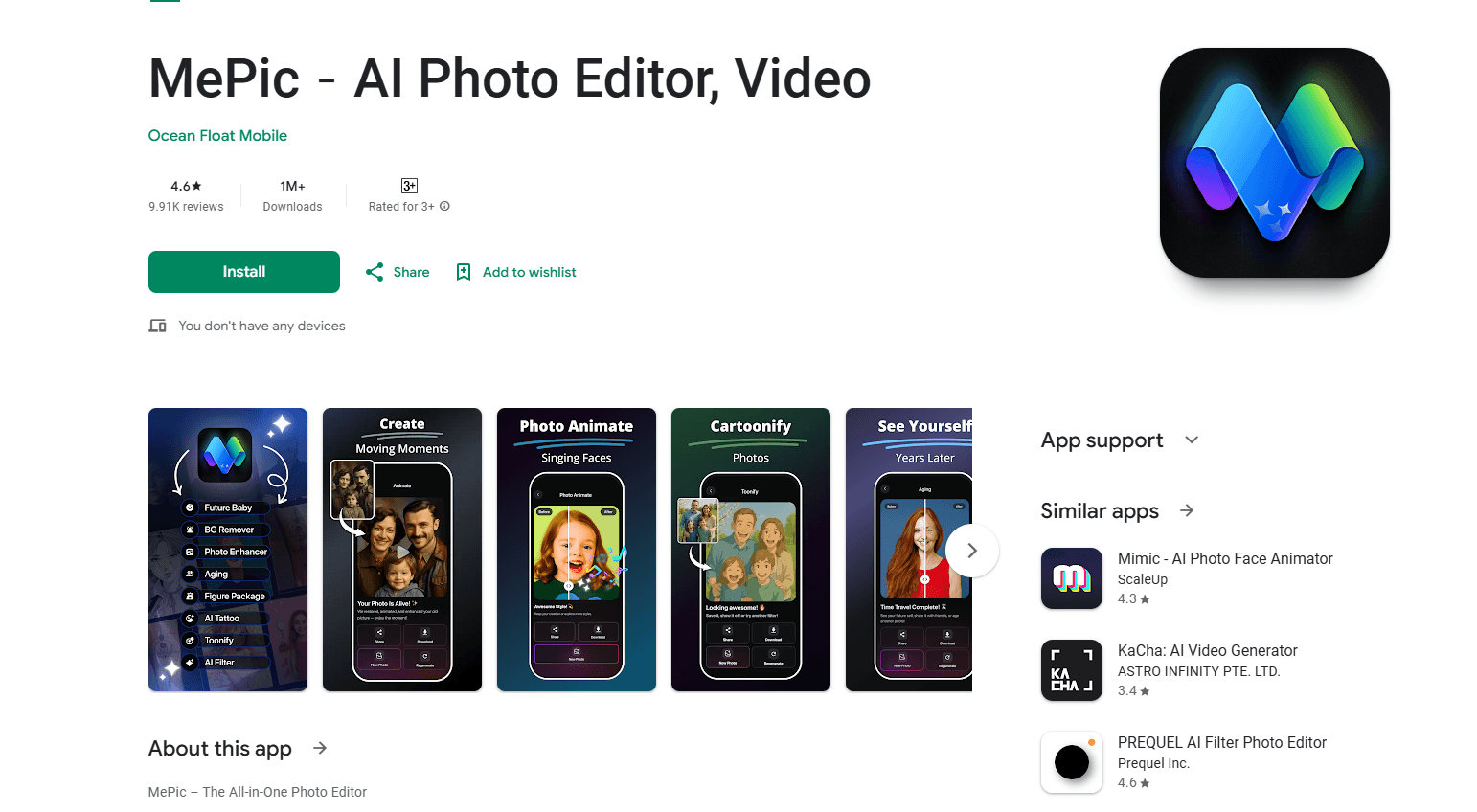
About MePic-AI Photo Video Generator
What Is MePic-AI Photo Video Generator
MePic is a mobile-first AI photo editor built around one promise: give everyday users the kind of results that used to need a designer. You feed it a selfie or a phone photo, choose a look, and the app generates a new image or short video in seconds. How fast? Most generations land in under a minute. It's aimed at people who post to social media and want something eye-catching without learning professional editing software. If that's you, the pitch is hard to ignore.
The app packs several AI tools into one place. Text-to-image generation builds a picture from a written prompt. Portrait enhancement cleans up skin, lighting, and detail. Avatar creation turns a face into a stylized character. Photo animation adds motion to a static shot. Having all of that under one roof matters if you don't want five subscriptions on your phone.
The trade-offs are worth knowing up front. It's Android-focused, so iPhone users are out of luck. Most of the interesting effects sit behind a subscription, and free users usually get a limited number of generations per day. Image quality also depends heavily on the source photo, so blurry input gives blurry output, and no amount of preset magic will rescue a shot that was badly lit or badly framed to begin with. Did you read the plan details before paying? Worth it. Otherwise the limits can catch you mid-project.
Getting Started
- Install MePic from Google Play on an Android device and open the app.
- Create an account or sign in, then grant photo access so the editor can read your gallery.
- Pick a tool, such as text-to-image or avatar creation, and upload a selfie or reference photo.
- Choose a style or type a prompt, then tap generate and wait for the result.
- Save or share the finished image or clip, or open the premium options if you need more credits.
Product Information
A quick look at MePic-AI Photo Video Generator's pricing, supported platforms, and performance.
Best for
The users, tasks, and scenarios where this tool fits best.
Users
- Social media creators
- Casual selfie editors
- Small business owners
Tasks
- Restyling selfies into art
- Making avatars and profile pictures
- Animating still images
- Generating images from text
Scenarios
- Filling a week of social posts in an evening
- Updating profile pictures across platforms
- Testing a creative idea before committing
Key features
Text-to-Image Generation
Type a description and the app builds an image from it. This is useful when you want a specific scene or mood but don't have a photo that fits. It also works as a starting point, letting you generate a base image that you can then push through the other tools, which is handy when a prompt gets you close but not all the way there.
AI Avatar Maker
The avatar tool turns a portrait into a stylized character, and the resulting selfie to art conversion keeps the face recognizable while swapping the entire visual style. Upload a clear face shot, choose a style, and the app renders a consistent look you can reuse as a profile picture. Because it leans on facial features, front-facing, well-lit photos produce the best results.
Portrait Enhancement
Portrait enhancement sharpens detail and evens out lighting and skin tone. For people who don't edit photos often, it's a way to get a cleaner look without touching sliders. The effect is subtle on already good photos and more noticeable on shots taken in poor light.
Photo Animation
This feature adds motion to a static image, turning a still into a short animated clip. It's aimed at short-form video and reels, where a moving image holds attention better than a frozen one. Output length and quality depend on your plan.
One-Tap Style Presets
Preset styles let you apply a full look without configuring anything. You pick a style and the app handles the rendering, which keeps the learning curve low for beginners. No sliders, no layers, no manuals. The variety of presets is part of the appeal for anyone who treats an AI art generator as a toy as much as a tool.
Built-in Photo Editor
Beyond the AI tools, MePic includes standard editing basics so you can crop, adjust, and touch up before or after generating. Keeping light edits in the same app saves the round trip to a separate editor for small fixes, and for a lot of casual users that extra app was the only reason they never finished an edit in the first place.
Pros and cons
Pros
- Puts several AI photo and video tools in one Android app, so you don't juggle multiple subscriptions.
- Preset styles and one-tap tools keep the learning curve low for beginners.
- Text-to-image generation covers cases where you don't have a suitable photo.
- Avatar and animation features are aimed squarely at social media output.
Cons
- Android only, so iPhone users can't use it at all.
- Most of the strong effects sit behind a subscription, and free use is limited.
- Output quality depends on the source photo, so weak input produces weak results.
- Credits can run out fast if you generate a lot in one session.
Frequently asked questions
MePic is an Android app for AI photo editing and generation. It turns selfies and phone photos into art, avatars, and short animated clips using tools like text-to-image generation and portrait enhancement.
Related content
Explore related tools, skills, and articles for MePic-AI Photo Video Generator.
MePic-AI Photo Video Generator Alternatives

Google EmbeddingGemma 2
Google DeepMind · Writing · Image · CodingGoogle EmbeddingGemma 2 is a 740M-parameter open model that turns text, code, images, audio, and video frames into vectors in one 768-dimension space, running on phones and laptops.

Tractionwave
TractionWave · Image · MarketingTractionWave is an AI attention heatmap tool for static ads. Upload a PNG or JPG and it returns predicted attention, ranked hotspots, and fixes before you spend budget.

Imejis.io
Imejis.io · Image · MarketingImejis.io is an AI design studio for agents and marketing teams. Describe an image in plain words, and it writes the copy, builds the layout, reflows it to every size, then exports a finished file.