

MeshifAI
MeshifAI · Image · Coding
MeshifAI is a text-to-3D platform that turns short prompts into 3D models you can view or download, and ships a JavaScript SDK for adding generation to apps, games and sites.
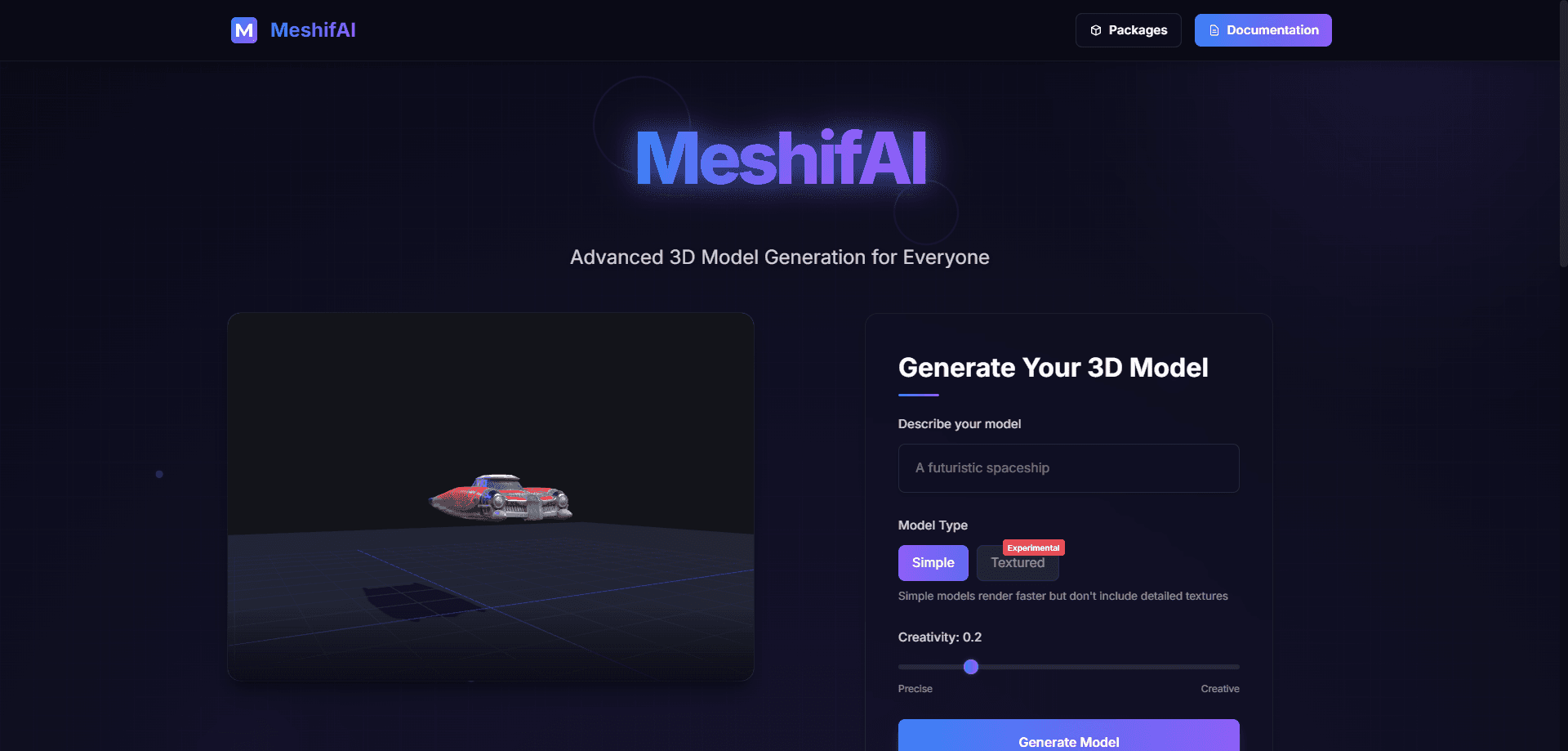
About MeshifAI
What Is MeshifAI
MeshifAI is a text-to-3D generation platform built for people who need 3D models without opening a modeling suite. You type a description, and the service returns a 3D object you can inspect in a viewer, rotate with the mouse, and export for use elsewhere. The company pitches it at developers first, since the same engine is reachable through a JavaScript SDK rather than only through a website.
That SDK is the part that sets it apart from a plain idea-to-model demo. A web team can call the generation service from its own front end and place finished models straight into a product page, a game scene or an interactive site, without a manual export-and-reupload step in between. The site frames this as "a text-to-3D generation platform for everyone," and the mix of casual prompt-to-model use and embeddable tooling is what that line is getting at.
A few limits are worth knowing up front. Generation quality depends heavily on how specific your prompt is, and simple, low-detail objects tend to render faster and cleaner than busy, detailed scenes. Anything headed for a studio pipeline still needs a pass in a real editing tool for topology and material work, so treat the output as a starting point rather than a finished asset. Think of it as an AI 3D model generator that gets you to a first draft, not a final one.
Getting Started
- Open meshifai.com and create an account, then sign in to the generation workspace
- Type a prompt describing the object you want, including shape, style and color where it matters
- Review the result in the built-in 3D viewer, rotating and zooming to check the shape
- Download the model for your 3D software, or wire the JavaScript SDK into your project to pull models in code
Product Information
A quick look at MeshifAI's pricing, supported platforms, and performance.
Best for
The users, tasks, and scenarios where this tool fits best.
Users
- Game developers who need quick prototype assets
- Web and app developers
- Designers working on concepts
- Educators
- Hobbyists and beginners
Tasks
- Generating a 3D model from a text prompt
- Prototyping game props and characters
- Adding 3D to a website
- Building AR and VR placeholders
- Testing an idea fast
- Making simple models for 3D printing
Scenarios
- A studio needs scene filler
- A landing page wants a hero object
- A classroom covers 3D
- A solo developer is short on art
- A print hobbyist wants a rough draft
Key features
Text to 3D Generation
The core of the product is a single prompt box. You describe what you want, and the platform returns a 3D object rather than an image, so you skip the usual modeling steps of blocking out geometry by hand. Detail follows your prompt, so a specific description of shape, style and color lands closer to what you pictured than a vague one.
Built-In 3D Viewer
Every result opens in a viewer on the site. You rotate the model, zoom in and out, and check it from different angles before you keep it or try again. This is where the platform earns its keep for beginners: you judge a model on screen in seconds instead of importing it into another program just to see whether the shape is right.
JavaScript SDK
The JavaScript SDK lets your own code talk to the generation service. A web app can request a model and place it in a scene without a person manually exporting and uploading files. For teams already shipping a JavaScript front end, that means 3D generation becomes one more function call in the codebase rather than a separate manual workflow.
Exportable Models
Generated models come out in a form you can move into other tools, so a concept can flow into a game engine, a design program or a viewer without being trapped in the platform. This matters for pipelines where the AI output is a first pass and a human finishes the topology and materials.
Fast Rendering on Simple Shapes
Simple models render faster than dense ones, and the platform leans on that. For quick development work like populating a scene or testing a layout, a lighter model that appears in seconds beats a heavy one that takes minutes. Speed here is the difference between iterating on an idea and giving up on it.
Low Setup for Non-3D Users
MeshifAI asks for a browser and a prompt. There is nothing to install, no GPU to buy and no modeling software to learn, so someone with an idea but no 3D background can produce a model anyway. That low floor is the point for people who were blocked by the learning curve of traditional tools.
Pros and cons
Pros
- Turns a text prompt into a 3D model without any modeling software
- The JavaScript SDK lets developers embed generation directly in their own apps and sites
- A built-in viewer means you can check a model right away instead of exporting it first
- Simple shapes render quickly, which suits fast prototyping and scene fillers
- Generated models can move into other tools for further editing
Cons
- Quality depends on prompt detail, so vague descriptions return rough or off-target models
- Detailed or complex scenes are harder to get right and take longer to render
- Output still needs cleanup in a modeling tool for topology and materials before production use
- Pricing and free-tier limits are not published on the site, so you cannot budget before signing up
- Available output formats are not clearly documented, which can trip up teams with strict pipeline requirements
Frequently asked questions
MeshifAI generates 3D models from text. You describe an object, and the platform returns a 3D result you can view, rotate and export, or pull into your own project through its JavaScript SDK.
Related content
Explore related tools, skills, and articles for MeshifAI.
MeshifAI Alternatives

Google EmbeddingGemma 2
Google DeepMind · Writing · Image · CodingGoogle EmbeddingGemma 2 is a 740M-parameter open model that turns text, code, images, audio, and video frames into vectors in one 768-dimension space, running on phones and laptops.

Tractionwave
TractionWave · Image · MarketingTractionWave is an AI attention heatmap tool for static ads. Upload a PNG or JPG and it returns predicted attention, ranked hotspots, and fixes before you spend budget.

Imejis.io
Imejis.io · Image · MarketingImejis.io is an AI design studio for agents and marketing teams. Describe an image in plain words, and it writes the copy, builds the layout, reflows it to every size, then exports a finished file.