

Mida
Mida · Image · Coding
Mida is a lightweight A/B testing platform for marketers. It runs tests from a 15KB script, builds variants with AI or a visual editor, and reports results without engineering tickets.
About Mida
What Is Mida
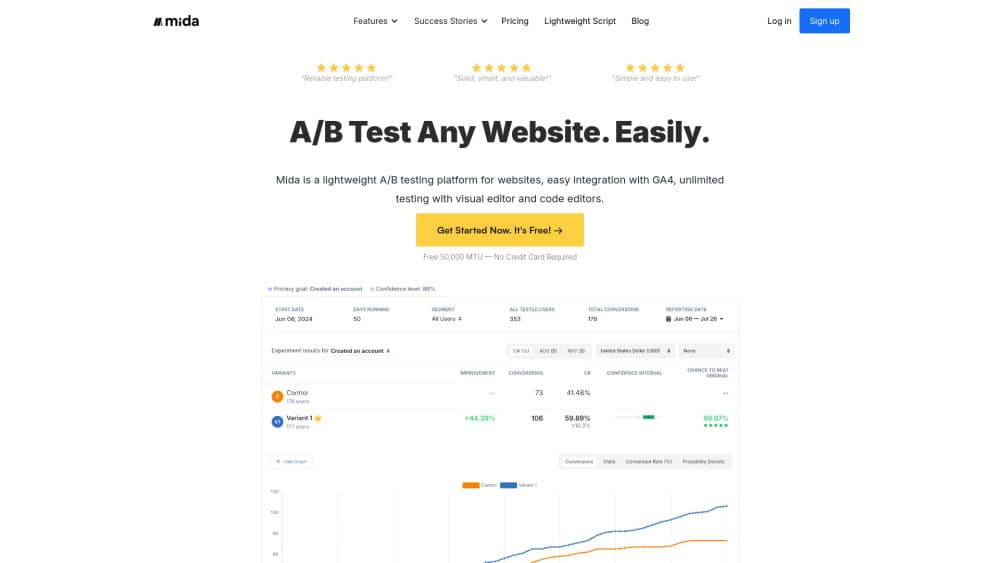
Mida is a browser-based A/B testing tool built for the people who own conversion numbers, not the people who own the codebase. You paste one snippet into the head of your site, and from there you write variants in a visual editor or with your own JavaScript and CSS. Split testing goes live in minutes, and the page loads in the same shape for every visitor, so there's no flicker between the control and the variant.
The pitch is narrow and it holds up: small script, fast test delivery, honest reports. Mida's own script is 15KB compressed, and the company compares load times against other testing tools in public benchmarks. It sits in the CRO software category rather than the analytics suite category, and that focus shows in what's missing as much as what's included. It connects to GA4, Google Tag Manager, Slack, and webhooks, plus a list of site builders that includes Shopify, WordPress, Webflow, WooCommerce, Wix, and ClickFunnels.
The limits matter as much as the features. Mida runs in the browser, so it needs a site where you can inject custom HTML into the head section. Hosted checkouts and some locked-down platform pages won't take it. And the free Sandbox plan caps live tests at three per project, which is fine for validation and tight for a team running a queue of experiments.
Getting Started
- Create a Mida account and add a project, which gives you one tracking snippet for one site.
- Paste the snippet into the head section of your site, either by hand or through Google Tag Manager.
- Open the visual editor, pick the element you want to change, and write your variant. Custom JavaScript and CSS are available when the editor isn't enough.
- Define the goal, set the traffic split, and launch. Mida counts a visitor once per month when they enter a running test.
Product Information
A quick look at Mida's pricing, supported platforms, and performance.
Best for
The users, tasks, and scenarios where this tool fits best.
Users
- Growth marketers at small and mid-sized teams
- CRO agencies managing client sites
- Shopify and WordPress store owners
Tasks
- Testing headlines, hero copy, and button labels
- Measuring revenue per visitor instead of raw clicks
- Running tests across a marketing site and an app subdomain
Scenarios
- A landing page that underperforms after a paid campaign launch
- A team replacing the A/B testing tool Google retired in 2023
- An agency pitching CRO work to a new client
Key features
Visual editor with custom code fallback
Mida's editor is no-code A/B testing for the everyday case. You click an element, rewrite the copy, swap an image, or adjust styles, then save it as a variant. When the change is beyond what the editor covers, you can drop in your own JavaScript and CSS, so a single test can mix visual edits with logic a developer would normally write.
AI test creation and an MCP server
Mida connects to Claude, ChatGPT, and Cursor through an MCP server at mcp.mida.so. You can describe a test in a prompt and get variants, goals, and a traffic split drafted for you, then ship the winner from the same conversation. Slack alerts fire when a test hits the confidence threshold your team set.
Bayesian and frequentist reporting
The reporting layer supports Bayesian A/B testing alongside a frequentist model, which matters if your team already has a house rule about when a test is called. Reports include revenue per visitor and exportable share links for client calls, so you're not screenshotting dashboards.
No-flicker test delivery
Mida loads A/B test variants before the page paints, so visitors don't see the control flash and then change. That single behavior protects the experiment from a known bias source, and it's the reason a 15KB script matters more than it sounds: less weight means the variant arrives sooner.
On-site surveys alongside tests
Surveys run in the same project as your experiments and can be triggered by the same audience rules. A visitor who is shown a survey counts as tracked user once in that month, so you can ask why a variant lost without opening a second tool and a second bill.
Goal tracking with GA4, GTM, and webhooks
Pageviews, clicks, custom events, and revenue can all act as goals, and the data flows into GA4 and GTM if you already report there. Webhooks push results into Slack or your own systems, which keeps the experiment log in the place your team actually looks.
Pros and cons
Pros
- Setup is a single snippet in the head section, and most site builders publish a specific walkthrough for it.
- The 15KB script and no-flicker delivery keep tests from skewing their own results.
- The free Sandbox plan is genuinely usable: 100,000 monthly tracked users and no credit card, which makes it easy to test on a real site first.
- Statistical options, revenue per visitor reporting, and share links cover the parts of CRO work that usually need a second tool.
Cons
- You need access to the head section of the site. Locked hosted checkouts and some platform pages can't run tests at all.
- Testing happens in the browser, so decisions made on the server, like pricing rules or inventory logic, sit outside what Mida can change.
- The Sandbox plan allows three live tests per project, and Growth includes five projects, so agencies with a long client list end up negotiating the Agency plan.
- There's no native mobile app SDK, which leaves app store funnels to a different tool.
Frequently asked questions
Mida is a website experimentation platform that runs A/B tests on live traffic and reports which variant performed better. You inject a snippet, build variants without touching the codebase, and read results in the dashboard or in GA4.
Related content
Explore related tools, skills, and articles for Mida.
Mida Alternatives

Google EmbeddingGemma 2
Google DeepMind · Writing · Image · CodingGoogle EmbeddingGemma 2 is a 740M-parameter open model that turns text, code, images, audio, and video frames into vectors in one 768-dimension space, running on phones and laptops.

Tractionwave
TractionWave · Image · MarketingTractionWave is an AI attention heatmap tool for static ads. Upload a PNG or JPG and it returns predicted attention, ranked hotspots, and fixes before you spend budget.

Imejis.io
Imejis.io · Image · MarketingImejis.io is an AI design studio for agents and marketing teams. Describe an image in plain words, and it writes the copy, builds the layout, reflows it to every size, then exports a finished file.