

Midjourney Sref Code Library
Romain Simon · Image
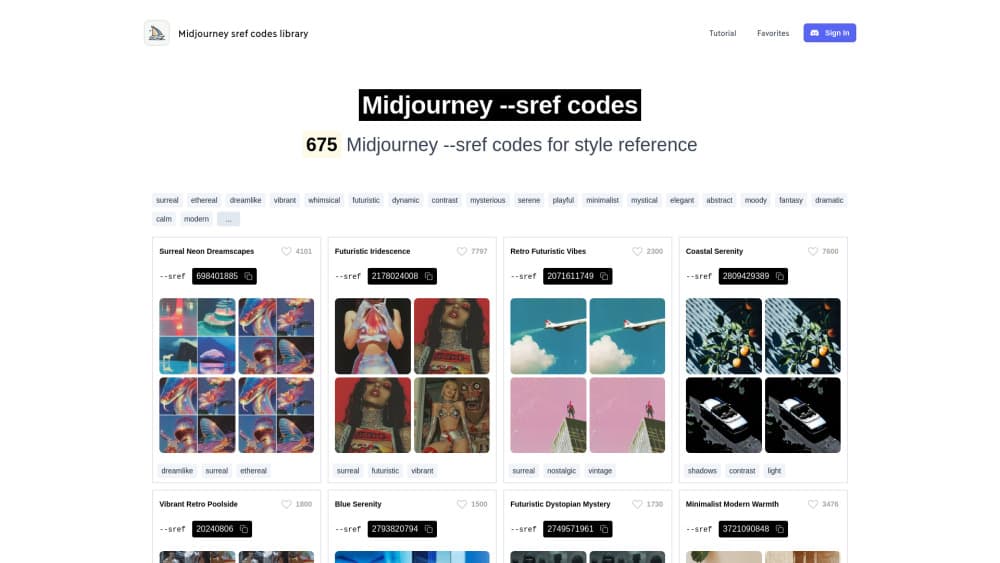
Midjourney Sref Code Library is a curated catalogue of 5,677 --sref codes, each with preview images, tags and filters. Copy a code, paste it into a prompt, keep the look.
About Midjourney Sref Code Library
What Is Midjourney Sref Code Library
Midjourney can borrow a look from a picture. Point --sref at an image and the model pulls its colour palette, texture and lighting into your prompt. A style code does the same job with a number instead of a file, which is why people trade codes like recipe cards.
Midjourney Sref Code Library is a browsable gallery of style reference codes, the numbers people trade in place of image files. It is the largest and oldest library of its kind, run by Romain Simon, an entrepreneur who builds AI filmmaking tools at Melies. He started by collecting the best sref threads from X, then generated thousands of his own codes with --sref random to find styles nobody had posted yet.
The catalogue's main selling point is comparison. Most of the self-generated entries use the single word "portrait" as the prompt, so you see how each style transforms the same subject before you commit. Newer entries add more complex prompts to show range. Every code ships with a four-image preview, tags, and a copy button.
There is one thing it will not do. The site is a reference shelf, not an image generator. You still need a paid Midjourney subscription to render anything, and roughly 1,386 of the codes sit behind a one-time Premium unlock.
Getting Started
- Open sref-midjourney.com in any browser. No account is needed to browse the public library.
- Narrow the list with a tag such as Anime, Watercolor, Retro or Comic, or use the search field if you already know the style name.
- Open a code you like, check the four sample images, then hit copy. The number goes straight to your clipboard.
- Paste it at the end of a prompt in Midjourney:
a stone cottage in a birch forest --sref 3193102811 --sw 300. - Raise or lower
--swbetween 0 and 1000 to decide how hard the style pushes against your own wording.
Product Information
A quick look at Midjourney Sref Code Library's pricing, supported platforms, and performance.
Best for
The users, tasks, and scenarios where this tool fits best.
Users
- Midjourney subscribers who run the same project for weeks
- Illustrators and concept artists
- Social media creators and small studios
Tasks
- Picking a direction for a batch of images
- Holding a series together
- Matching a client reference
- Building a personal shortcut list
Scenarios
- Starting a children's book
- Late-night iteration
- Handing work to a teammate
Key features
5,677 Codes With Four-Image Previews
Every entry shows four renders of the same prompt, so you can see how the style handles skin, fabric, sky and shadow before you use it. Many creators sort by likes first and treat the previews as a shortlist.
Tag, Category and Search Navigation
Styles are grouped into buckets such as Anime, 3D, Cartoon, Whimsical, Realistic, Illustration, Vintage, Watercolor, Retro and Comic, with keyword search on top. The filters cut a five thousand entry list into something you can scan in a couple of minutes.
One-Click Code Copy
The number sits under the preview with a copy button beside it. No screenshots, no retyping long integers, no hunting through old Discord threads for the code someone mentioned last month.
`--sref` and `--sw` Ready
The library is built around Midjourney's AI image style reference parameter and its strength dial. Every code works with --sref, and the site's examples show --sw values so you can see how far a style should be pushed.
Favorites and Personal Collections
A free account lets you star codes and keep them in one list. For anyone juggling three projects at once, that is the difference between a bookmark folder and an actual working kit.
Premium Vault and Monthly Drops
About 1,386 codes are held back for Premium members, curated by hand rather than scraped. The update archive runs back to August 2024 and shows what landed each month, so you can tell whether the library is still alive.
Pros and cons
Pros
- The previews answer the real question: what does this style do to a face, a texture, a sky.
- Copy and paste takes seconds, which matters when you are testing ten styles in one sitting.
- Consistent "portrait" samples make side-by-side comparison honest.
- Free browsing covers thousands of codes before you pay anything.
- Monthly additions and a contribution leaderboard keep the catalogue from going stale.
Cons
- There is no generate button, so you still pay Midjourney for every image you test.
- Around 1,386 codes stay locked until you buy the lifetime Premium plan, and several of the best-looking entries are in that group.
- A code that looks great on V7 can shift noticeably on Niji or an older model, and the site does not label every entry by model version.
Frequently asked questions
Browsing, searching and copying most codes costs nothing and needs no account. A one-time Premium purchase unlocks the roughly 1,386 reserved codes and the saved favorites collection.
Related content
Explore related tools, skills, and articles for Midjourney Sref Code Library.
Midjourney Sref Code Library Alternatives

Google EmbeddingGemma 2
Google DeepMind · Writing · Image · CodingGoogle EmbeddingGemma 2 is a 740M-parameter open model that turns text, code, images, audio, and video frames into vectors in one 768-dimension space, running on phones and laptops.

Tractionwave
TractionWave · Image · MarketingTractionWave is an AI attention heatmap tool for static ads. Upload a PNG or JPG and it returns predicted attention, ranked hotspots, and fixes before you spend budget.

Imejis.io
Imejis.io · Image · MarketingImejis.io is an AI design studio for agents and marketing teams. Describe an image in plain words, and it writes the copy, builds the layout, reflows it to every size, then exports a finished file.