
MimicBrush AI
MimicBrush.app · Image
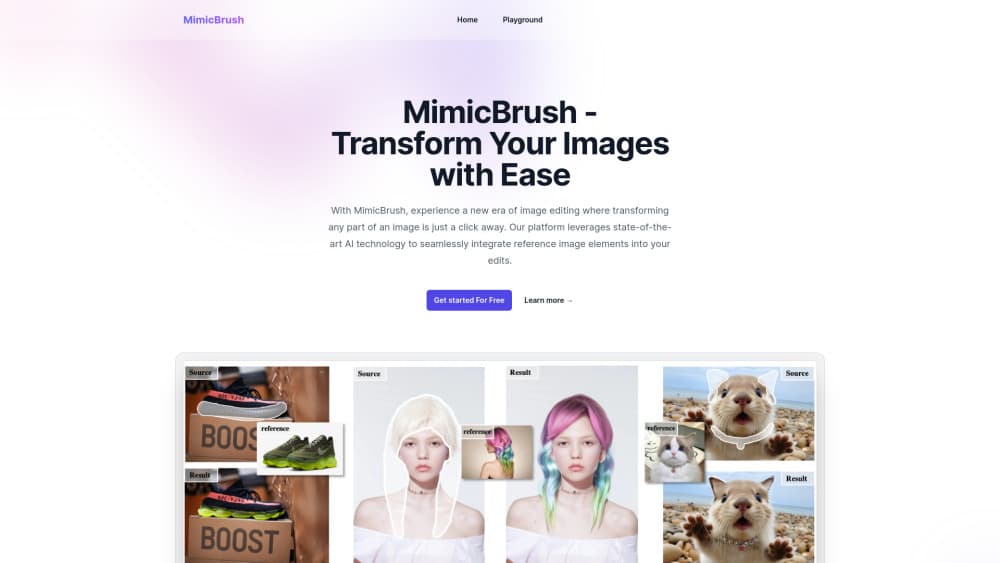
MimicBrush AI is an AI image editing tool that copies the look of a reference photo onto a masked area of your own picture, so clothes, textures and backgrounds change without redrawing them.
About MimicBrush AI
What Is MimicBrush AI
MimicBrush AI is an AI photo editor built around one idea: instead of describing an edit in words, you show it a picture. You paint a mask over the part of your photo you want to replace, upload a reference image, and the model rebuilds the masked region to match what it finds in the reference. The technique behind it is called imitative editing.
The model comes out of a 2024 research project by a team at Alibaba Group, published under the title "Zero-shot Image Editing with Reference Imitation". Training pairs two frames from the same video, masks one, and forces the model to rebuild the masked area from the other frame. That's how it learns the semantic link between two unrelated images. The website wraps this model in a simple browser interface with a free tier and a paid upgrade.
The limits matter as much as the features. Imitative editing works best when the reference and the target area share a subject: a shirt goes on a shirt, a wood grain goes on a wall. Ask it to move a dress onto a face and the output turns muddy. Fine text, logos and hands are also weak spots, which is normal for diffusion based editors.
Getting Started
- Open mimicbrush.app in any modern browser and sign up with an email address. The free tier works without a payment method.
- Upload the source photo, then paint a white mask over the region you want to replace. Keep the mask tight around the object.
- Upload a reference image that shows the texture, garment or background you want. Crop it close to the relevant detail before uploading.
- Run the edit, then compare the result at full size. If the seam looks wrong, shrink the mask and run it again.
- Download the output, or push it through the upscale and variation tools if you need a cleaner file.
Product Information
A quick look at MimicBrush AI's pricing, supported platforms, and performance.
Best for
The users, tasks, and scenarios where this tool fits best.
Users
- Online sellers
- Social media creators
- Hobbyist retouchers
Tasks
- Local image editing on a single object
- Texture transfer between photos
- Cleaning up AI output
Scenarios
- Building a seasonal product catalog
- Testing a design idea before production
- Rescuing an almost good photo
Key features
Imitative Editing from a Reference Photo
The core feature lets you borrow an appearance from any image you find and apply it to your own. You skip prompt writing entirely, which removes the usual trial and error of guessing the right wording. Point at a picture, mask an area, and the model handles the rest.
Mask Based Local Edits
Only the painted region changes. Everything outside the mask stays pixel for pixel the same, so faces, text and composition survive the edit. This is the practical difference between local image editing and a full regeneration, and it's why the tool fits into existing photo workflows.
Shape Preserving Texture Transfer
When the model pulls a texture across, it keeps the silhouette of the original object. A jacket stays a jacket even after it takes on the weave of a completely different garment. That constraint is what makes the output usable for product photos rather than just mood boards.
Image Inpainting and Outpainting
Beyond the reference workflow, the editor lists standard inpaint and outpaint options. Inpainting fills a hole or removes an object, and outpainting extends the canvas past the original border. Both are available on the free tier, which is unusual for a tool at this price.
Upscale, Variation and Image Prompt
The free plan also includes upscaling, generating variations of a result, and image prompts, where an uploaded picture steers the generation. These are the small utilities that decide whether you can finish a job inside one tool or have to export and switch.
Runs in the Browser, Nothing to Install
There's no desktop app and no plugin. The whole AI image editor online lives on a web page, so a phone works as well as a laptop. Files are processed remotely, which is worth knowing if your images are sensitive.
Pros and cons
Pros
- Reference driven editing removes the guesswork of prompt wording, which is the part most people struggle with.
- The shape of the original object survives a texture swap, so product shots stay recognizable.
- A usable free tier covers inpainting, outpainting, variations and upscaling without a card on file.
- Advanced is $9.9 per month for unlimited runs, far below what most AI photo editors charge.
- Masking keeps the rest of the frame untouched, so you can edit one part of a photo you already like.
Cons
- Quality drops fast when the reference and the target don't share a subject, and there's no warning before a bad result.
- Text, hands and fine details often come back smeared, so the tool can't carry a whole retouching job.
- Small or fuzzy reference images produce soft patches, which means you need decent source material.
- There's no public API documentation, so teams that want the model inside their own product can't plan around it.
Frequently asked questions
It swaps part of a photo for a look taken from another image. People use it to change a garment's fabric, replace a background, move a texture onto a surface, or repair a rough patch in an AI generated picture.
Related content
Explore related tools, skills, and articles for MimicBrush AI.
MimicBrush AI Alternatives

Google EmbeddingGemma 2
Google DeepMind · Writing · Image · CodingGoogle EmbeddingGemma 2 is a 740M-parameter open model that turns text, code, images, audio, and video frames into vectors in one 768-dimension space, running on phones and laptops.

Tractionwave
TractionWave · Image · MarketingTractionWave is an AI attention heatmap tool for static ads. Upload a PNG or JPG and it returns predicted attention, ranked hotspots, and fixes before you spend budget.

Imejis.io
Imejis.io · Image · MarketingImejis.io is an AI design studio for agents and marketing teams. Describe an image in plain words, and it writes the copy, builds the layout, reflows it to every size, then exports a finished file.