

Molypix
MolyPix · Image
Molypix is a browser based AI design tool that turns one sentence into editable posters, invitations, logos and social images, delivered as layered files you can adjust by hand.
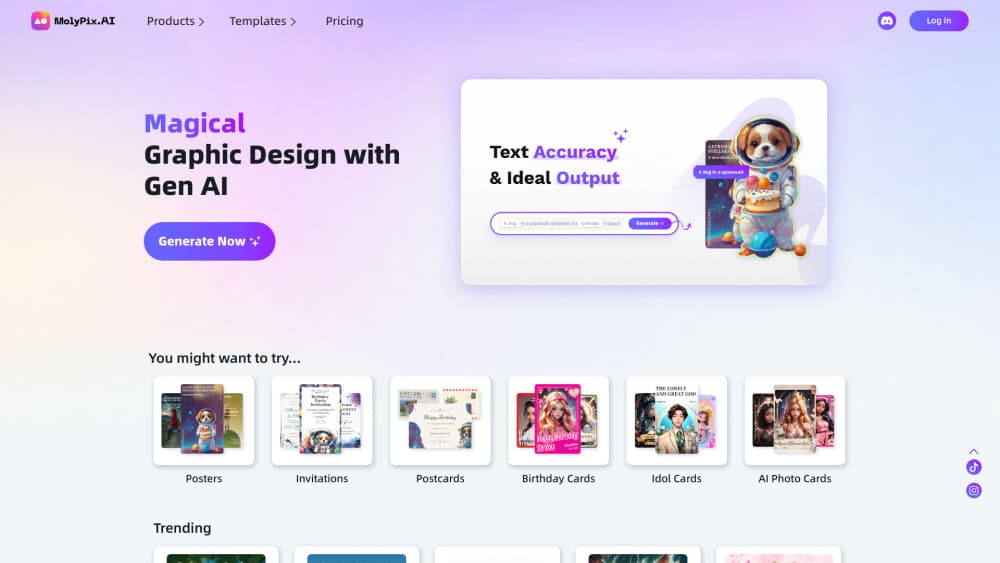
About Molypix
What Is Molypix
Molypix (also written MolyPix.AI) is an online AI graphic design tool for people who need finished artwork but don't want to learn design software. You type a sentence, pick a format such as a poster, invitation, postcard, logo or LinkedIn image, and the platform returns a design you can open in its editor.
The pitch differs from most AI image tools. Output arrives as a layered, fully editable layout instead of one flat picture. Text stays as text, elements stay separate, and you can move, restyle or replace parts without starting over. That makes these editable AI designs closer to a template you own than to a generated JPEG.
Limits are worth knowing before you commit. It runs only in a browser, so there's no desktop app or mobile app. Advanced tools such as Magic Edit and background removal sit behind a paid plan, and the free tier meters output with daily credits rather than unlimited runs.
Getting Started
- Sign in with a Google account, which is the only login method the platform offers.
- Choose a product type from the dashboard, for example Posters, Invitations, Postcards, Logos, Images or LinkedIn.
- Describe the design in one sentence, or press Enhance Prompt to let the tool expand a short idea into a fuller brief.
- Generate, then open the result in the editor to change text, swap images, add elements or adjust layers.
- Download the file when it looks right. Finished work is saved under History, split into Generated, Edited and Project folders.
Product Information
A quick look at Molypix's pricing, supported platforms, and performance.
Best for
The users, tasks, and scenarios where this tool fits best.
Users
- Small business owners
- People making personal cards
- Social media marketers
Tasks
- Building a promo poster from a written brief
- Making invitations and greeting cards
- Drafting a starter logo
- Resizing a single design for LinkedIn or print
Scenarios
- A campaign that has to go live tomorrow and no designer is free
- A weekend event with printed invitations
- A small shop refreshing its look across social posts
- Turning one approved template into ten localized versions
Key features
Editable Layered Output
Every generation lands in the editor as separate layers, not a flattened image. Text blocks stay editable, so you can rewrite a headline, change a font size or move a product shot without touching the rest of the composition. This is the feature that separates Molypix from a plain text to image generator, and it's the reason a rough result is still fixable.
Scene Based Product Types
The dashboard splits work by what you're making rather than by model. Posters, Invitations, Postcards, Birthday Cards, Idol Cards, Logos, Images and LinkedIn each load their own starting setup and aspect ratios. Picking a scene first saves the prompt gymnastics that a general image model demands. Treat it as an AI poster maker or an AI invitation maker that already knows the usual canvas sizes.
Remix and AI Templates
Remix turns any design you like into a reusable template and keeps its layout and original prompt. You can regenerate instantly for a similar look, or edit the prompt first for a variation. It's the quickest path when a client approves a direction and then asks for eight more versions of it.
Brand Kit
The Brand Kit stores your logo, colors and brand name, then applies them to new designs automatically. For a small team posting several times a week, this removes the repetitive step of adding a logo and checking hex codes on every export. It's a paid feature, so budget for it if consistency matters.
AI Editing Tools
Beyond generation, the paid tier adds cleanup tools: Magic Erase removes unwanted objects, Magic Edit repaints a selected area from a prompt, AI Expand extends the canvas, Remove BG cuts out subjects and Image HD upscales the final file. These are the fixes you'd otherwise open Photoshop for, and having them one click away shortens the loop between draft and delivery.
Multi Model Engine
Molypix routes prompts through several image models, including Gemini, GPT, FLUX and Seedream, and picks one per generation. You don't choose the model yourself, which keeps the interface simple but removes fine control over style and rendering. In practice, the AI design generator handles typography heavy layouts better than most raw image models because the text layer is rebuilt rather than painted.
Editor and Design History
The built in editor covers text, elements, backgrounds, layers, image upload and resizing at no cost. Every design saves automatically and appears in History under Generated, Edited or Project. That structure matters once you have fifty files, because finding last month's approved poster takes seconds instead of scrolling a grid.
Pros and cons
Pros
- Layered, editable output means a generated draft can be corrected rather than thrown away.
- One sentence is enough to get four poster options, so first drafts take about a minute.
- The free tier covers the editor and every product type, which is enough to judge output quality before paying.
- Brand Kit and Remix make repeat work fast for teams running weekly campaigns.
- Commercial use is allowed, and you keep the rights to designs you create.
Cons
- You can't pick the image model, so style control depends on what the platform routes your prompt to.
- Advanced tools such as Magic Edit, Remove BG and Image HD require a paid plan, which limits what free users can finish.
- It's web only. No desktop or mobile app means offline work is impossible.
- Logos come out as raster designs, so a final identity still needs a vector redraw elsewhere.
Frequently asked questions
It generates and edits marketing and personal graphics: posters, invitations, postcards, birthday cards, idol cards, logos, images and LinkedIn visuals. You describe the design in a sentence and then refine it in the browser editor.
Related content
Explore related tools, skills, and articles for Molypix.
Molypix Alternatives

Google EmbeddingGemma 2
Google DeepMind · Writing · Image · CodingGoogle EmbeddingGemma 2 is a 740M-parameter open model that turns text, code, images, audio, and video frames into vectors in one 768-dimension space, running on phones and laptops.

Tractionwave
TractionWave · Image · MarketingTractionWave is an AI attention heatmap tool for static ads. Upload a PNG or JPG and it returns predicted attention, ranked hotspots, and fixes before you spend budget.

Imejis.io
Imejis.io · Image · MarketingImejis.io is an AI design studio for agents and marketing teams. Describe an image in plain words, and it writes the copy, builds the layout, reflows it to every size, then exports a finished file.