

Monivity
Monivity · Productivity
Monivity is an AI productivity tracker for Windows, macOS, and Linux. It logs what you do on your desktop, sorts time into productive and distracted blocks, then suggests how to focus better.
About Monivity
What Is Monivity
Monivity is a desktop productivity tracker that runs quietly in the background and records how you spend computer time. It watches which apps you open, how long you stay in them, and how often you jump between tasks. Then it turns that raw activity into a daily score and a written summary you can actually read.
The pitch is simple: most people have a rough idea of where their day goes and no real data. Monivity fills that gap on your own machine instead of guessing from a to-do list. It sorts apps into productive, neutral, and non-productive buckets, so a coding session and a YouTube detour don't look the same on the dashboard.
Two limits matter up front. First, the product is in early access, and the Team plan plus several features are still marked coming soon. Second, tracking only covers desktop apps, so phone habits and browser tabs outside the client fall outside the picture. You also need to create an account and generate an access token before the client can sync anything.
Getting Started
- Create a free Monivity account with your email or a Google login.
- Download the desktop client for Windows, macOS, or Linux.
- Generate an access token in your account and paste it into the client to link the two.
- Leave the client running while you work, then open the dashboard to see your daily score.
- Review the AI summary and suggestions, then adjust your schedule around your most productive hours.
Product Information
A quick look at Monivity's pricing, supported platforms, and performance.
Best for
The users, tasks, and scenarios where this tool fits best.
Users
- Remote workers and freelancers
- Developers and writers who want focus data
- Students studying at a computer
- Managers who want personal, not team, numbers
Tasks
- Auditing where work hours go
- Cutting context switching
- Spotting your peak hours
- Turning a vague habit into a fix
Scenarios
- A freelancer checks whether billable work filled the day before sending an invoice.
- A writer notices focus collapsing after lunch and reshuffles deep-work blocks toward the evening.
- A student reviews the hourly chart on a Sunday to plan the week's study sessions.
Key features
Productivity Tracking
Monivity records how long you spend in productive, neutral, and non-productive apps and rolls it into a daily score. You get hourly bars, a total tracked time figure, and a percentage breakdown of where the minutes landed. For anyone who's never seen their day as data, the first dashboard is usually a surprise.
Context Switching Analysis
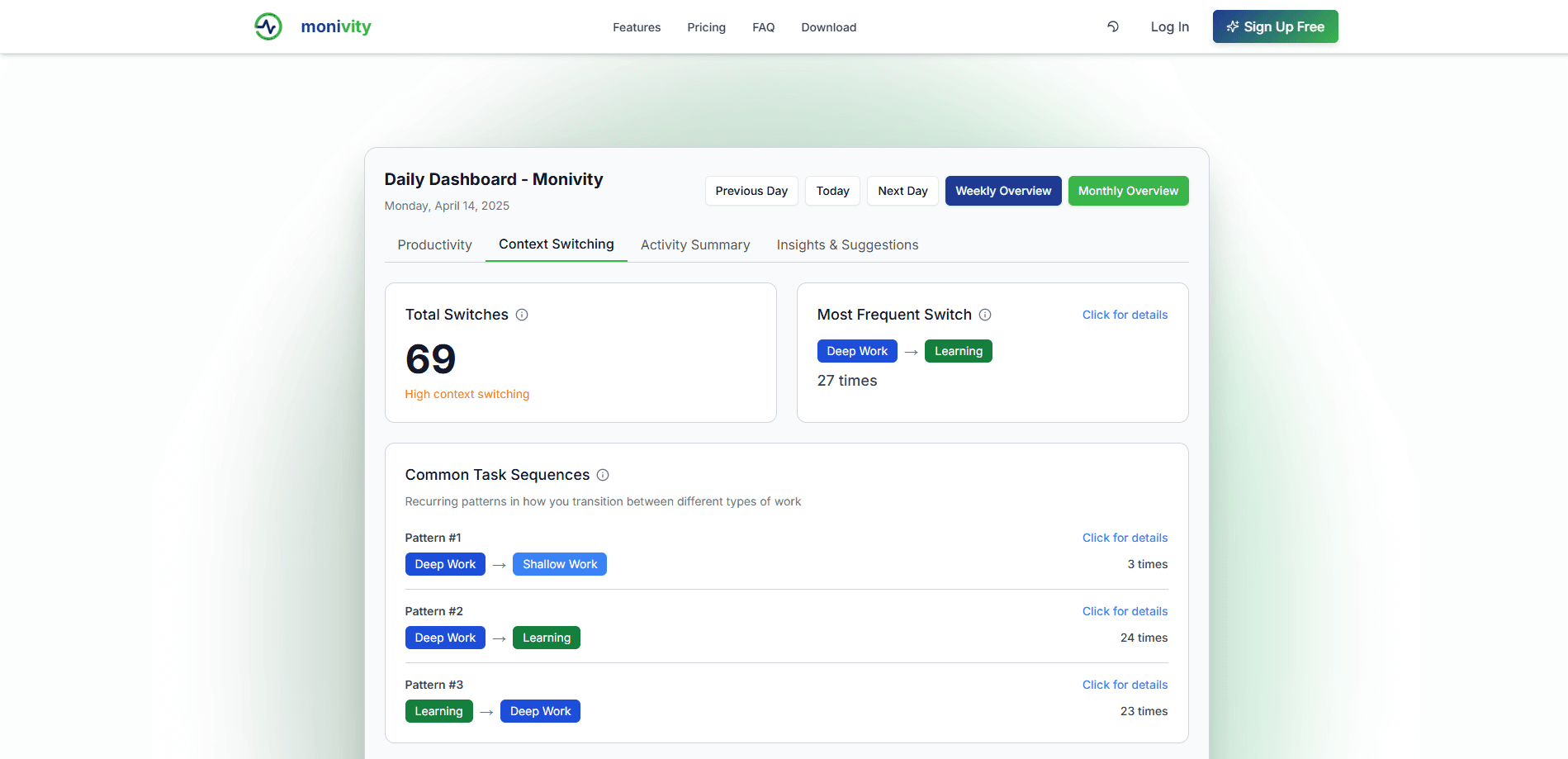
The tool counts how many times you move between apps and task types, then ranks your most frequent switches. It also surfaces recurring patterns, like deep work flipping into shallow work several times a day. This is the feature that shows why a busy day can still feel unproductive: the log traces the interruptions back to their source.
AI Activity Summary
Monivity writes a plain-language recap of your day instead of leaving you with charts alone. It names what you focused on, when you were sharpest, and where you struggled, with an hourly breakdown under each point. You can regenerate the summary if a day looks off, which makes it easy to compare one workday against another.
Insights and Suggestions
Beyond the summary, the tool offers recommendations tied to your patterns. It might point out that productivity climbs in the evening and suggest moving key tasks there, or flag that chat apps are eating a chunk of your switches. Each suggestion comes with a short explanation, so it reads like advice rather than a lecture.
Cross-Platform Desktop Tracking
One client covers Windows, macOS, and Linux, and the download page pitches cross-platform tracking as a core promise. Your start-up flow is the same on each: install, paste an access token, and let it run. Linux support is listed as coming soon, so the two fully available platforms today are Windows and macOS.
Achievements and Gamification
The guide mentions achievements and a leaderboard alongside the analytics. The idea is to keep you returning to the dashboard and competing on consistency, not just reading a report once. It's a lighter layer on top of the tracking, aimed at people who stay motivated by streaks.
Pros and cons
Pros
- Turns desktop activity into a readable daily score with hourly detail, so patterns are visible fast.
- Context-switching counts name the specific app hops that break focus, which is more useful than a raw time total.
- The AI summary and suggestions give plain-language takeaways instead of leaving you to interpret charts.
- Covers Windows, macOS, and Linux from a single client, so a mixed-device setup stays consistent.
- A free tier and a $9.99 Pro plan make it cheap to test before paying, and early access knocks the price down further.
Cons
- The product is in early access, so the Team plan and features like encryption, cross-platform sync, and integrations aren't available yet.
- Tracking is desktop-only, so phone time and offline work never appear in the numbers, which can skew the score.
- You have to create an account and manage an access token before it tracks anything, which adds a setup step for a personal tool.
- There's no public API yet, so the data can't feed another dashboard or an automation.
Frequently asked questions
Monivity is used to track how you spend time on your computer and turn it into productivity data. It logs which apps you use, how long you stay in them, and how often you switch tasks, then reports a daily score and an AI-written summary.
Related content
Explore related tools, skills, and articles for Monivity.
Monivity Alternatives

Udon
Udon · Coding · ProductivityUdon turns an Apple Silicon Mac into a home server you run from a browser, with container controls, file shares, and an optional AI sysadmin.

offstage
offstage cloud · Coding · Productivityoffstage gives AI coding agents and CI jobs a real Mac: a fresh macOS account on Apple silicon, driven over an API and billed by the second.

BotBus
Chengdu Tuyang Tusen Technology Co., Ltd. · Coding · ProductivityBotBus lets you control AI coding agents from your phone and watch: approve commands, start tasks and read results while the code stays on your desktop.