
AI Painting Generator
mburakerman · Image
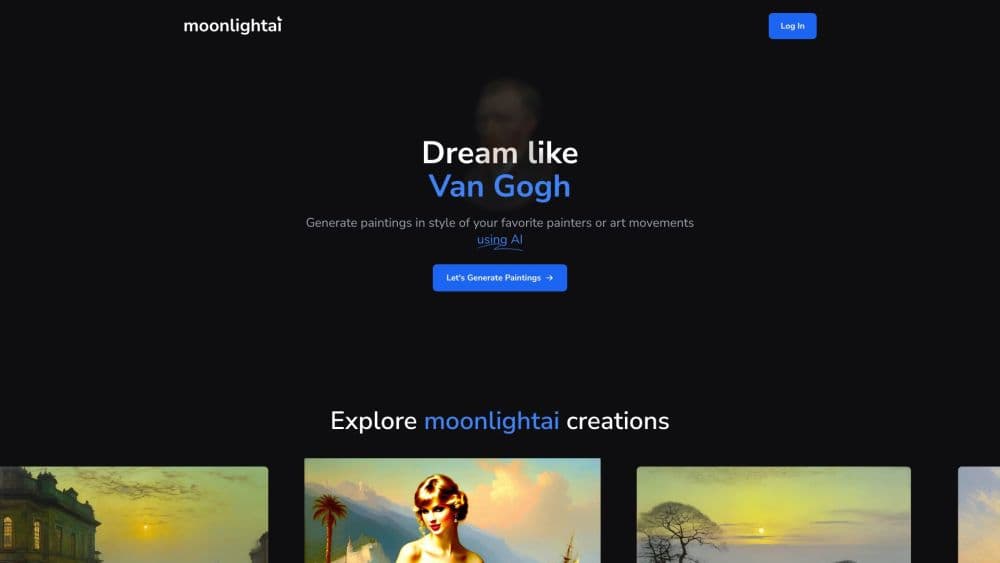
moonlightai is an AI painting generator that turns a written prompt into a painting in the style of famous painters or historic art movements, with 16 fixed styles and credit based access.
About AI Painting Generator
What Is moonlightai
moonlightai is a small web app with one job: it paints. You type a scene, pick a painter or an art movement, and the site returns an image that borrows that style's color, light and brushwork. It doesn't try to be a full design suite, and there's no canvas editor, no layer panel, no export preset library. You get a prompt box, a style list and a generate button.
The appeal sits in the style list. Instead of stacking keywords like "oil painting, moody, moonlight" and hoping the model listens, you choose John Atkinson Grimshaw and the moonlight is already implied. The painters on offer range from Van Gogh and Claude Monet to Ivan Aivazovsky, Salvador Dali, Frida Kahlo, Pablo Picasso, Adolph Menzel and Arnold Böcklin. The art movement styles cover Renaissance, Mannerism, Baroque, Rococo, Realism, Romanticism and Abstract.
The limit is scope. Access requires a paid membership, the site doesn't publish a price list, and there's no documented API or mobile app. If you need batch generation, brand consistency across a hundred assets or a reference image to lock composition, this painting generator won't do that work for you.
Getting Started
- Open moonlightai.art and create an account with an email address.
- Buy a membership or credit pack. Rendering is locked behind paid access.
- Go to Generate Painting and choose a painter or an art movement from the two lists.
- Write your prompt, or tap Get prompt suggestion if you want a starting line. Set the guidance level to creative, moderate or strict.
- Hit Generate Painting. A standard render costs one credit, and the High Quality option costs two.
Product Information
A quick look at AI Painting Generator's pricing, supported platforms, and performance.
Best for
The users, tasks, and scenarios where this tool fits best.
Users
- Hobby painters and art students
- Writers and tabletop players
- Social media creators
Tasks
- Turning a paragraph of description into a period style painting
- Testing several art movement styles on one idea
- Making print ready wall art for a personal project
- Sketching mood boards for a pitch
Scenarios
- A weekend art experiment
- A gift or personal print
- Teaching art history
Key features
Sixteen Preset Styles Across Painters and Movements
The style list is the product. Nine painters and seven movements cover roughly five centuries, from Renaissance panel painting to Abstract. Each preset does more than add a word to your prompt: it steers palette, lighting and brush handling. Picking Caspar David Friedrich or John Atkinson Grimshaw gives you a specific mood without writing a paragraph of modifiers.
Three Prompt Guidance Levels
A slider decides how much freedom the model gets. Creative allows wide interpretation and unexpected results. Moderate keeps a balance between your prompt and the style. Strict pushes the output to follow your wording as closely as the model can. For portraits, strict is the safer pick. For landscapes, creative usually produces the more interesting frame.
Prompt Suggestions for Blank Pages
Get prompt suggestion fills the box with a usable idea when you don't know where to start. It's a small feature, but it removes the friction that stops most people at the empty text field. Treat the result as a starting line, not a finished prompt, and edit the subject to match what you actually want.
High Quality Mode
The High Quality toggle costs two credits instead of one. Use it for anything you plan to print, share at full size or keep. For rough idea testing, the standard render is fine and keeps your credit balance alive longer.
Credit Based Access With Paid Membership
Every render draws from a credit balance, and access requires a paid membership. There's no free tier documented on the site, so budget for a purchase before your first image. The credit model does make cost per image predictable once you know which modes you use, since standard and High Quality have fixed prices in credits.
Commercial Use With Open RAIL Conditions
The site's FAQ allows commercial and non commercial use of your creations, on the condition that you follow the terms and the CreativeML Open RAIL++-M use restrictions. That means no unlawful, deceptive or harmful output, and generated images have to be marked as synthetic. Read both documents before you sell a print.
Pros and cons
Pros
- Painter presets produce a specific historical look that generic prompt stacking rarely reaches.
- The guidance slider gives real control over how literally the model reads your prompt.
- Sixteen styles cover a wide stretch of art history, from Renaissance to Abstract.
- Standard renders cost a single credit, so experimenting stays cheap.
- Commercial use is allowed, with conditions stated openly in the FAQ.
Cons
- No free plan is documented, so you can't test the output before paying.
- Prices aren't listed publicly, which makes budgeting awkward until you sign up.
- Browser only, with no mobile app and no public API for automated runs.
- There's no documented way to upload a reference image or train a custom style, so composition control rests on the prompt alone.
Frequently asked questions
It generates paintings from text. You pick a painter or an art movement, write a description, and the site renders an image in that style. It's a single purpose AI art generator, not a general image editor.
Related content
Explore related tools, skills, and articles for AI Painting Generator.
AI Painting Generator Alternatives

Google EmbeddingGemma 2
Google DeepMind · Writing · Image · CodingGoogle EmbeddingGemma 2 is a 740M-parameter open model that turns text, code, images, audio, and video frames into vectors in one 768-dimension space, running on phones and laptops.

Tractionwave
TractionWave · Image · MarketingTractionWave is an AI attention heatmap tool for static ads. Upload a PNG or JPG and it returns predicted attention, ranked hotspots, and fixes before you spend budget.

Imejis.io
Imejis.io · Image · MarketingImejis.io is an AI design studio for agents and marketing teams. Describe an image in plain words, and it writes the copy, builds the layout, reflows it to every size, then exports a finished file.