

Mooon
Mooon · Productivity
Mooon is a Japanese document reader that turns PDFs, EPUBs, TXT files, images, and manga pages into documents you can read, edit, listen to, and export. It extracts text, converts vertical writing to horizontal, adds furigana to kanji and loanwords, translates whole files, and reads them aloud. All in one place. Free users get 10 pages per month, while paid plans start at ¥29/mo. That's the short version. The details below cover what it does and who it fits.
About Mooon
What Is Mooon
Mooon is a web-based Japanese language processing tool built around one idea: you shouldn't need to fight a file's layout just to study it. You upload a Japanese PDF, EPUB, TXT, image, or manga, and Mooon pulls the text out, tidies the formatting, and gives you tools to read it more easily. No manual cleanup required.
The problem it solves is specific. Japanese materials often mix vertical and horizontal writing, columns, and furigana-free kanji that beginners can't pronounce, so even a simple short story can turn into a stop-and-start struggle just to get through the first page. Mooon converts vertical or mixed layouts to clean horizontal text and annotates kanji and loanwords with furigana. It can also translate or read the whole document aloud with natural Japanese voices.
The biggest limits are practical. Mooon handles PDF, EPUB, TXT, PNG, JPG, JPEG, and WEBP files up to 100MB, and excludes Word and PowerPoint. Those you have to export to PDF first. Free accounts process only 10 pages a month, which is tight for a full novel.
Getting Started
- Go to mooon.xyz and create a free account, or sign in if you already have one.
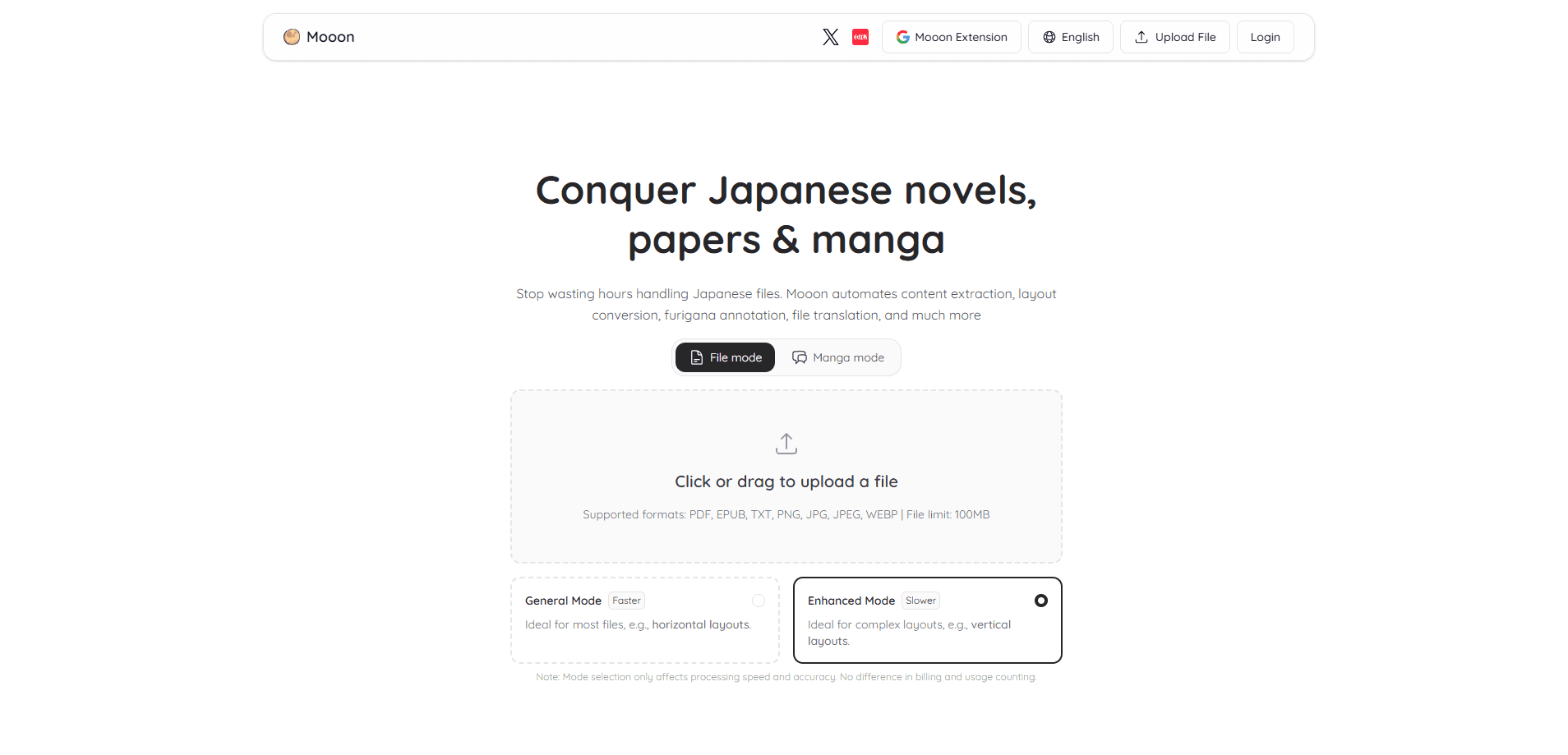
- Upload a file by clicking or dragging it, and pick General Mode for straightforward layouts or Enhanced Mode for complex ones like vertical text.
- Wait while Mooon extracts the content, then open the document to review the converted text, added furigana, and layout.
- Use the translation and read-aloud tools on the extracted text, then export to PDF or EPUB on a paid plan.
Product Information
A quick look at Mooon's pricing, supported platforms, and performance.
Best for
The users, tasks, and scenarios where this tool fits best.
Users
- Japanese learners
- JLPT candidates
- Readers of Japanese novels and papers
- Manga fans who don't read Japanese fluently
Tasks
- Converting a vertical Japanese PDF to readable horizontal text
- Adding furigana to a long document
- Translating a full Japanese file
- Turning a Japanese text into an audiobook
- Studying a web article in Japanese
Scenarios
- Reading a Japanese novel on a tablet
- Working through a manga volume
- Prepping for a JLPT reading section
- Listening practice while commuting
Key features
Vertical to Horizontal Text Conversion
Japanese novels, papers, and manga often use vertical writing, columns, or a mix of both, and that variety is exactly what makes them awkward to read on a screen without converting the layout first. Mooon converts these layouts into clean horizontal text, so you can read or edit the content in a normal document view. Enhanced Mode is built for exactly this kind of complex layout. It runs slower than General Mode.
Furigana Annotation
Mooon adds pronunciation guides to kanji and loanwords throughout a document or a manga page, which matters because beginners routinely get stuck on characters they can't read and lose the thread of a sentence while hunting for a dictionary. Paid plans make this unlimited across the whole file, while free users get a taste of it. For learners who stall on unreadable kanji, this removes the stop-and-look-up cycle. That cycle is what makes reading Japanese feel slow and tiring. It's a full Japanese OCR tool for scanned pages and manga panels, not just clean text files.
Full-File Translation
Translate an entire Japanese document at once, with the option to compare the translation against the original or replace the text outright. Think of it as Japanese PDF translation plus side-by-side checking in one pass. On a Starter plan and up, translation is unlimited, so a full novel or paper isn't out of reach. The comparison view matters when you want to check a specific phrase rather than trust the machine blindly.
Manga Processing Engine
The manga engine extracts speech-bubble dialogue, lets you copy and edit it, annotates the kanji inside, and translates the whole volume, which means you can move through a full chapter without jumping between apps for lookup and translation. In short, it's a manga translator that also keeps the original in view. You can also have bubbles read aloud in natural Japanese. It's a separate workflow from document handling, built around the way manga actually lays out text.
Read-Aloud With Natural Japanese Voices
Mooon converts extracted text into audio using natural Japanese voices, turning a document into an audiobook. That's Japanese text to speech for a whole file, not just a sentence. Paid plans add AI voices and unlimited full-text reading, and the browser extension can read web pages too. This is the part that helps with listening practice, not just reading.
Browser Extension for Web Reading
A companion browser extension adds furigana to any web page, highlights JLPT vocabulary from N5 up to N1, and offers translation and explanation tools. What if you just want to read a news article without a dictionary tab open? That's the gap this fills. The free version limits translation to 5 uses a day and restricts vocabulary extraction. Paid tiers remove those caps.
General and Enhanced Processing Modes
You choose between General Mode, which is faster and suits most horizontal files, and Enhanced Mode. The second is slower but better at complex layouts like vertical text. Both modes count the same against your quota, so the choice is purely about speed versus accuracy.
Pros and cons
Pros
- Handles vertical and mixed Japanese layouts that most PDF readers mangle.
- Combines furigana, translation, read-aloud, and manga handling in one tool.
- Browser extension extends furigana and vocabulary highlights to any web page, so your reading practice isn't limited to uploaded files.
- Exports to PDF and EPUB on paid plans, so annotated files stay portable and you can open them in whatever reader you already use.
- Pricing scales by pages, from 10 free pages a month up to 2,000.
Cons
- Free plan caps processing at 10 pages per month, too little for a novel.
- No Word or PowerPoint support, so those files must be exported to PDF first.
- 100MB file and 200-page per-run limits get in the way of very large scans.
- Pricing is listed in yen, and there's no clear English pricing page, which makes it awkward to compare the cost against other Japanese study tools you might already pay for.
Frequently asked questions
Mooon accepts PDF, EPUB, TXT, PNG, JPG, JPEG, and WEBP files. It doesn't support DOC, DOCX, PPT, or PPTX, so you need to export Word or PowerPoint files to PDF before uploading.
Related content
Explore related tools, skills, and articles for Mooon.
Mooon Alternatives

Base Code
Base44 (Wix) · Coding · ProductivityBase Code is a shared cloud development environment from Base44. Teammates describe changes to an existing GitHub codebase in chat, preview them live and send them back as pull requests.

Knocket
Knocket (Tencent RTC team) · Productivity · Business · ChatbotKnocket is a free live chat and contact page tool that lets visitors message you from your website, app, or a shareable link, with every reply handled from Telegram or one inbox.

FloorGen
Vinit Kumar (FloorGen) · Productivity · China AIFloorGen is a browser-based floor plan maker that turns a sentence or a sketch into an editable 2D plan and a 3D walkthrough. Export to PDF, DXF or video, and draw without an account.