

Morgen
Morgen · Productivity
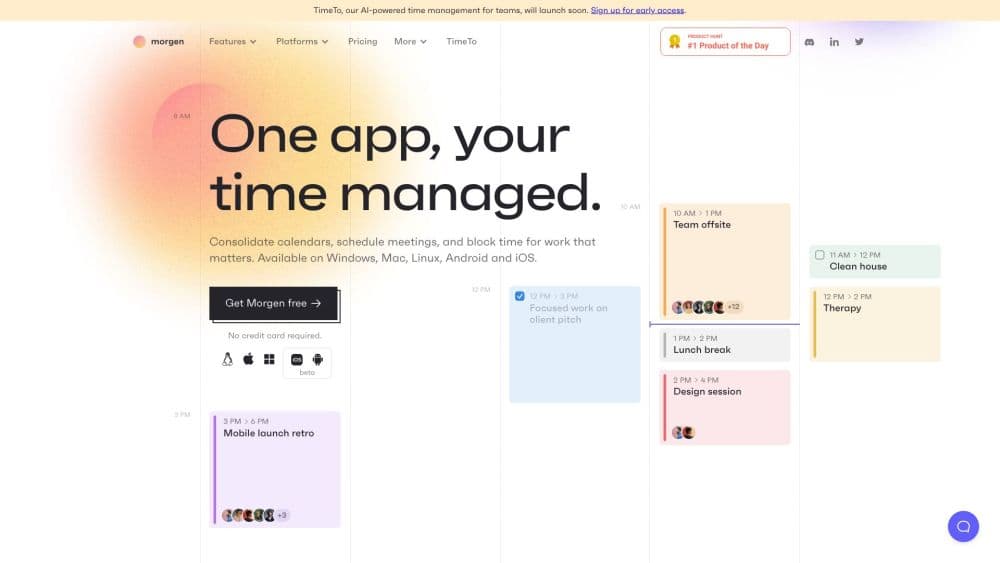
Morgen is an AI daily planner that unites your calendars and tasks in one app. This AI calendar app drafts a time-blocked day you can review, adjust, and approve before anything hits your schedule.
About Morgen
What Is Morgen
Morgen is a time management app that pulls your calendars and task lists into a single place. It connects Google, Outlook, Apple, Fastmail, and other calendars alongside tools like Notion, Todoist, ClickUp, Linear, and Obsidian, so meetings and to-dos live on the same screen instead of across five tabs.
The problem it targets is scattered time. When work lives in one app and deadlines in another, you double-book yourself or forget a due date entirely. Morgen works as both a calendar and task manager, putting the two layers together and adding an AI Planner that proposes where each task should go.
The catch is the price. Morgen has no permanent free tier, only a 14-day trial, and the mobile apps are companions that need a desktop setup first. If you want a light daily list beside one calendar, the cost is hard to justify.
Getting Started
- Download Morgen for macOS, Windows, or Linux, or open it in a browser, then create an account.
- Connect your calendars (Google, Outlook, Apple, Fastmail, and more) and any task sources such as Notion, Todoist, or ClickUp.
- Set up Frames to describe your ideal week, then let the AI Planner draft a plan that respects your focus hours.
- Review the proposal in your calendar, move tasks or adjust their length, and confirm to schedule them.
Product Information
A quick look at Morgen's pricing, supported platforms, and performance.
Best for
The users, tasks, and scenarios where this tool fits best.
Users
- Knowledge workers juggling several calendars
- People drowning in tasks across many apps
- Mixed-OS teams
Tasks
- Time-blocking a heavy task list
- Planning a week around focus time
- Sharing availability for meetings
Scenarios
- A packed Monday with client calls plus deep work
- Freelancers managing several clients
- Cross-platform remote work
Key features
AI Planner With Review Before Commit
The AI Planner reads the metadata from your task sources and proposes a time-blocked plan for the day. You see the draft inside your calendar first, then move tasks, change durations, or accept it. That preview step is the difference between an assistant and a tool that quietly rearranges your day.
Frames for Guiding the AI
Frames let you template your ideal week, telling the planner which hours are for deep work, meetings, or personal time. The AI treats those rules as guidance rather than hard walls, so you keep control over the shape of your schedule. Adjust a frame and the recommendations follow.
Unified Calendars and Tasks
Morgen consolidates Google, Outlook, Apple, Fastmail, and CalDAV calendars next to tasks from Notion, Todoist, ClickUp, Linear, Obsidian, and Microsoft To Do. Due dates show on the calendar so a deadline can't hide inside a project tool. Filtering by task source keeps a crowded week readable.
Calendar Automations
Automations handle the small chores around meetings, like adding travel time buffers before an event or blocking a slot after a call. You build them from your own workflow rather than a fixed rule set. For people who book back-to-back meetings, this closes the gaps that usually eat the day.
Scheduling Links and Booking Page
You share a scheduling link or a customized booking page so others can grab an open slot without email tag. Links copy straight into a messaging app from the desktop client. It's a lighter option than standing up a separate scheduling service.
Developer API and Zapier
Morgen publishes a developer API that gives a unified interface for calendars and tasks across providers. A Zapier integration connects tools like TickTick, Things, and Evernote without code. You connect once through OAuth, then trigger Morgen actions from other apps.
Pros and cons
Pros
- Merges calendars and task managers from many providers into one app, which cuts the tab-hopping.
- The AI Planner shows a draft plan before it touches your calendar, so you stay in control.
- Runs on Windows and Linux as well as macOS, which many rivals skip.
- Unlimited calendar and task integrations are included at every paid tier.
- Automations, scheduling links, and a booking page remove everyday scheduling chores.
Cons
- There's no free plan, only a 14-day trial, so the $15 to $30 monthly cost is the entry bar.
- The mobile apps are companions, and you must set up a desktop account before you can log in on a phone.
- It covers the calendar and task layer only, leaving email, notes, and documents to other tools.
- The API is documented but still maturing, so integrations outside Zapier can take more legwork.
Frequently asked questions
Morgen is an AI daily planner for managing calendars and tasks together. It merges your accounts into one view and uses an AI Planner to propose a time-blocked schedule you review before it's applied.
Related content
Explore related tools, skills, and articles for Morgen.
Morgen Alternatives

Base Code
Base44 (Wix) · Coding · ProductivityBase Code is a shared cloud development environment from Base44. Teammates describe changes to an existing GitHub codebase in chat, preview them live and send them back as pull requests.

Knocket
Knocket (Tencent RTC team) · Productivity · Business · ChatbotKnocket is a free live chat and contact page tool that lets visitors message you from your website, app, or a shareable link, with every reply handled from Telegram or one inbox.

FloorGen
Vinit Kumar (FloorGen) · Productivity · China AIFloorGen is a browser-based floor plan maker that turns a sentence or a sketch into an editable 2D plan and a 3D walkthrough. Export to PDF, DXF or video, and draw without an account.