
My Resume Hero
My Resume Hero · Productivity · AI Assistant
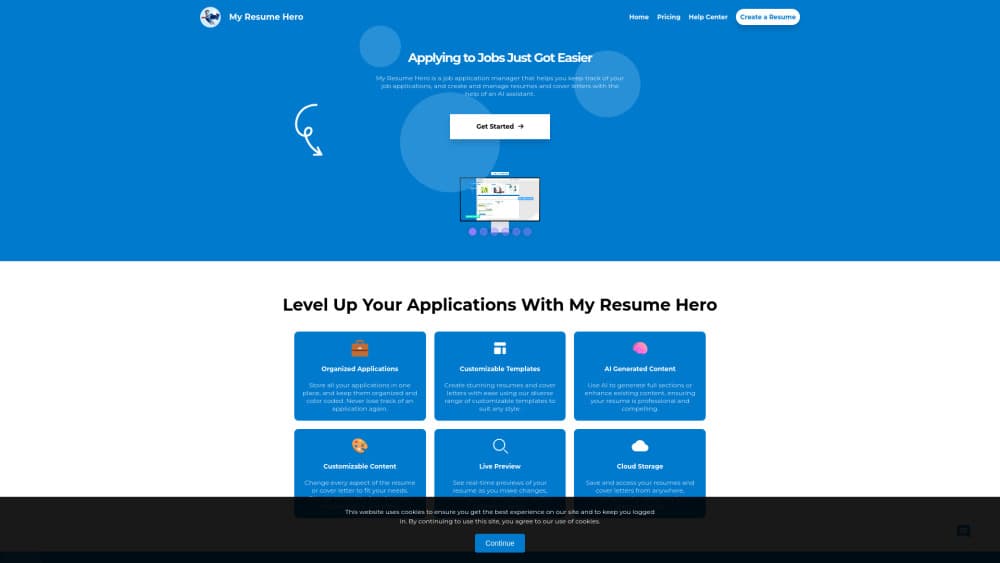
My Resume Hero is a job application manager that keeps every role you apply to next to its own resume and cover letter, with an AI assistant that drafts and edits both documents.
About My Resume Hero
What Is My Resume Hero
My Resume Hero is a web workspace for people who apply to more than one job at a time. Each application gets its own record: the company, the position, the job post, the resume, the cover letter, and where things stand. That structure solves a familiar mess. Most job seekers end up with a folder of files named final, final2, and final-real, plus a browser full of saved links.
It doubles as a resume builder with AI help, and the assistant sits inside the workspace rather than in a separate chat window. It helps write resume content and cover letters using the details you already entered, so you don't start from a blank page for every opening. You can then edit the result, swap templates, and download the document from the same screen.
The limits are worth knowing before you sign up. The free plan caps you at one job, one resume, and one cover letter, which is fine for a test drive and tight for an active search. My Resume Hero also focuses on documents and tracking. It won't submit applications for you, and it won't run an interview practice session.
Getting Started
- Create an account on the website with your email, then land on the dashboard.
- Add your first application and paste the job post so the details stay attached to that role.
- Let the AI assistant draft the resume or cover letter, then edit the wording and pick a template.
- Download the finished document, then move the application to its next status as you hear back.
Product Information
A quick look at My Resume Hero's pricing, supported platforms, and performance.
Best for
The users, tasks, and scenarios where this tool fits best.
Users
- First-time job seekers
- Career changers
- People applying to many roles at once
Tasks
- Tailoring a resume for each opening
- Writing cover letters without starting from scratch
- Tracking where each application stands
Scenarios
- An active search with ten or more open applications
- Applying while employed
- Returning to the job market after a break
Key features
Application Dashboard
Every saved role appears as a card with the company, the position, and the last time you touched it. Open a card to reach its resume, cover letter, and status. This is the job tracker that replaces the spreadsheet most people keep in a second tab, and it works best once you have more than a handful of applications in flight.
AI Resume Assistant
The AI resume assistant writes and rewrites resume sections using the experience you entered. You can ask for a tighter summary, a stronger bullet, or a version aimed at a specific role. Treat the output as a draft. The tool doesn't verify your claims, so numbers and job titles still need your review before they go out.
Cover Letter Generator
The cover letter generator builds a draft from the job details stored in the application record. That context is the useful part, since a generic letter is easy to spot. You still choose the tone and cut the sentences that don't fit, which takes a few minutes instead of an hour.
Resume and Cover Letter Templates
The resume and cover letter templates cover a small set of clean layouts, with the basic ones on the free plan and the full set behind the paid plans. They're built to stay readable when a hiring system parses the file, which is why the site describes them as ATS friendly resume templates. Design flexibility is limited on purpose, and that trade keeps the output predictable.
Job Post Storage
You can attach the original job post to each application record. When a recruiter calls two weeks later, the requirements are still there instead of buried in a closed tab. This also gives the AI assistant something concrete to work from when you ask for a rewrite.
Document Download and Versioning
Each application holds its own copy of the resume and cover letter, so you can download the exact file you sent for that role. Editing one version doesn't overwrite the others. For anyone who has sent the wrong resume to the wrong company, that separation is the feature that matters.
Pros and cons
Pros
- The workspace ties each job post to its own resume and cover letter, which removes the guesswork about which version went where.
- The AI assistant works from details you already entered, so drafts arrive with real context instead of placeholder text.
- The free plan is genuinely usable for a single application, with no card required to test the workflow.
- Templates stay simple and parse cleanly, which suits high-volume application rounds.
- Status tracking is built into the same screen as the documents, so updating it takes seconds.
Cons
- The free plan allows one job, one resume, and one cover letter, which runs out fast during an active search.
- Template choice is narrow, so anyone who wants a distinct visual style will feel boxed in.
- There's no built-in interview prep, salary research, or auto-apply, which means the job search still runs across several tools.
- The AI writes from what you type, so thin work history produces thin drafts and you carry the editing load.
Frequently asked questions
It's a job search workspace. You save each role, build a resume and cover letter for it, and track the application status in one place.
Related content
Explore related tools, skills, and articles for My Resume Hero.
My Resume Hero Alternatives

Base Code
Base44 (Wix) · Coding · ProductivityBase Code is a shared cloud development environment from Base44. Teammates describe changes to an existing GitHub codebase in chat, preview them live and send them back as pull requests.

Knocket
Knocket (Tencent RTC team) · Productivity · Business · ChatbotKnocket is a free live chat and contact page tool that lets visitors message you from your website, app, or a shareable link, with every reply handled from Telegram or one inbox.

FloorGen
Vinit Kumar (FloorGen) · Productivity · China AIFloorGen is a browser-based floor plan maker that turns a sentence or a sketch into an editable 2D plan and a 3D walkthrough. Export to PDF, DXF or video, and draw without an account.