
Neural Network
JI DASHENG · Leaning · Business
Neural Network is a browser based learning platform for deep learning, with interactive lessons, a visual lab, and companion apps for iOS and Android.
About Neural Network
What Is Neural Network
Neural Network is a teaching platform for people who want to see how a network learns instead of only reading the equations. The site at leapai.top pairs a written tutorial library with an interactive lab, short missions, and an animation heavy reference section. Content starts at a single neuron and runs through training, overfitting, initialization, convolutional networks, and recurrent networks.
The pitch is simple: change one setting, watch the result. Swap an activation function in the neural network playground and the decision boundary redraws in front of you. Add a hidden layer and the loss curve tells you whether the extra capacity helped or just slowed training down. That feedback loop is the part most courses leave out, and it's the reason the site works as a first stop before a textbook.
The platform has clear edges. The full tutorial catalogue sits behind the app, so the web version regularly asks you to download it to continue a lesson. Coverage stops at CNNs and RNNs, with nothing on transformers or large language models. Code chapters such as the PyTorch rewrite are reading material, not a runnable notebook.
Getting Started
- Open leapai.top and switch the interface to English if it loads in another language.
- Pick a starting point in the tutorial catalogue, or jump straight into the lab if you already know the basics.
- Choose a dataset in the lab, select your input features, and set the number of hidden layers and neurons.
- Press play, then adjust the learning rate, activation, and regularization while training runs.
- Install the iOS or Android app when a lesson hands you off, so the rest of the track stays available offline.
Product Information
A quick look at Neural Network's pricing, supported platforms, and performance.
Best for
The users, tasks, and scenarios where this tool fits best.
Users
- Students in a first machine learning course
- Self taught developers
- Teachers and tutors
- Career switchers
Tasks
- Understanding backpropagation
- Comparing activation functions
- Building a network by hand
- Preparing for a deep learning tutorial or course
Scenarios
- The week before a course starts
- A classroom demo on a projector
- Study sessions on a commute
- A quick refresher before reading a paper
Key features
A Lab You Can Break Without Consequence
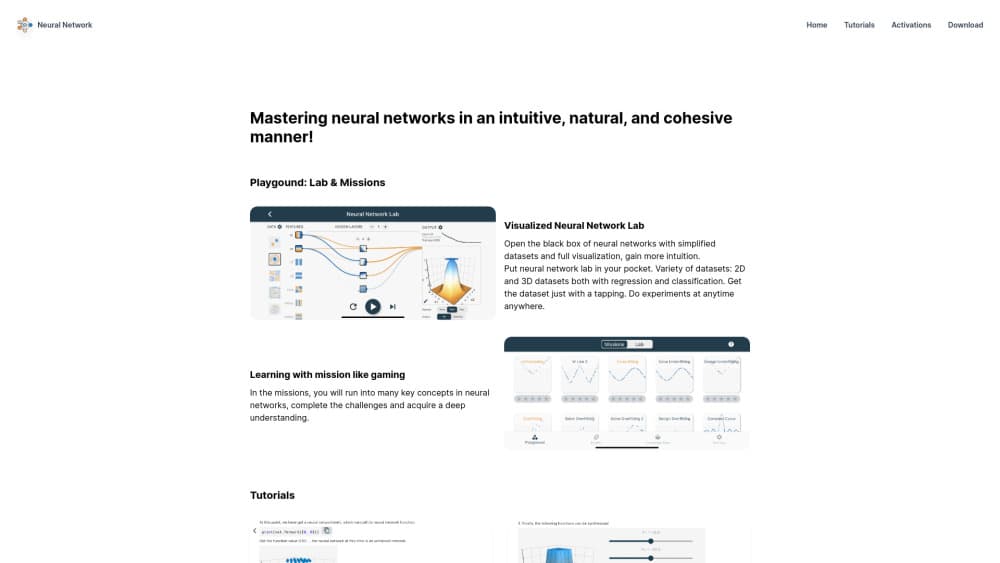
The lab is the core of the product and the closest thing to a neural network playground for beginners. You pick a 2D or 3D dataset for classification or regression, choose which features feed the network, then add or remove hidden layers while training runs. Every change redraws the neural network visualization, so a bad learning rate turns into a visibly unstable boundary rather than an abstract warning. Nothing you do here costs money or breaks an experiment.
Missions That Turn Lessons Into Challenges
Instead of a video followed by a quiz, the app sets tasks and lets you fail at them. A mission might ask you to separate two spirals with the fewest neurons possible, then grade the result against a target. The game framing keeps a session going past the point where a plain chapter would lose you, and each challenge maps to a concept that shows up later in the tutorial track.
Tutorials That Follow One Path From Neuron to Network
The neural network tutorial library is ordered, not a pile of articles. It opens with what a network is and how a single neuron works, moves into how a network approximates an arbitrary function, then covers construction, training, and the problems that show up in practice. From there it branches into a CNN tutorial on convolutions and pooling, plus a recurrent network track, with separate chapters for 1D and 2D cases, pooling, seq2seq, and autoencoders.
Activation Function Reference With Live Charts
Nine activation functions get their own pages: Linear, Sigmoid, Tanh, ReLU, ReLU6, LeakyReLU, ELU, Softplus, and Softmax. Each page pairs the formula with an interactive chart, so you can see where the gradient flattens and why a saturated Sigmoid slows learning. This section works as a standalone reference when you're debugging a model and can't remember which function fits the output layer.
A Model Editor That Flags Mistakes as You Build
The editor lets you assemble a network by dragging layers and setting input types, then computes each step as you go. Errors such as a mismatched input shape or an incompatible parameter show up immediately, which removes the usual cycle of train, crash, read traceback, guess. For someone who has never built a model, that instant feedback is the difference between an afternoon of confusion and a working first network.
Same Content in the Browser and on Your Phone
The web version opens in any modern browser with nothing to install, which makes it the easy entry point on a borrowed laptop or a lab machine. The iOS and Android apps carry the same lessons plus offline access, and the iOS build also runs on Apple silicon Macs. Progress and content stay consistent across both, so you can start on a desktop and keep going on a train.
Pros and cons
Pros
- Free to start in the browser, with no account needed for the lab.
- Missions make abstract ideas such as feature transforms and overfitting concrete within minutes.
- Coverage runs from a single neuron to CNNs and RNNs, which is more ground than most free visualization tools cover.
- The mobile apps are well received: 4.7 stars from 141 ratings on the US App Store and more than 50,000 downloads on Google Play.
- A one time $24.99 lifetime option sits next to the $12.99 semiannual and $17.99 annual subscriptions, so long term users aren't locked into renewals.
Cons
- The tutorial catalogue pushes you toward the app, so a browser session keeps interrupting with download prompts, and some chapters are only complete in the app.
- No transformer, attention, or large language model material, which leaves a gap if you're heading toward modern NLP work.
- Code chapters are static. You can read the PyTorch rewrite but can't run or edit it on the page.
- There's no export or public API, so models built in the editor stay in the editor.
Frequently asked questions
The browser version and the app download are free. In app purchases unlock the full library: $12.99 for six months, $17.99 for a year, or $24.99 once for lifetime access.
Related content
Explore related tools, skills, and articles for Neural Network.
Neural Network Alternatives

HireKey
HireKey · Voice & Language · Productivity · LeaningHireKey is an AI job search copilot built by a former tech recruiter. It checks role fit, tailors resumes, runs interview practice and tracks every application.

Lune
Retrograde Labs · Productivity · LeaningLune is a research search engine for scientific AI agents. It runs as an MCP server that lets Claude, ChatGPT and Cursor search peer-reviewed computer science papers and cite them.
Coddy
Coddy · Coding · LeaningCoddy is a gamified platform to learn to code through short interactive lessons in 20+ languages, with a browser editor, an AI tutor and free certificates.