

NEXTOOL
NEXTOOL (founded by Jafar Najafov and Agil Zeynalov) · Productivity · Marketing
NEXTOOL is a free AI tools directory for anyone comparing AI software, with 1,900+ tools across 148+ categories.
About NEXTOOL
What Is NEXTOOL
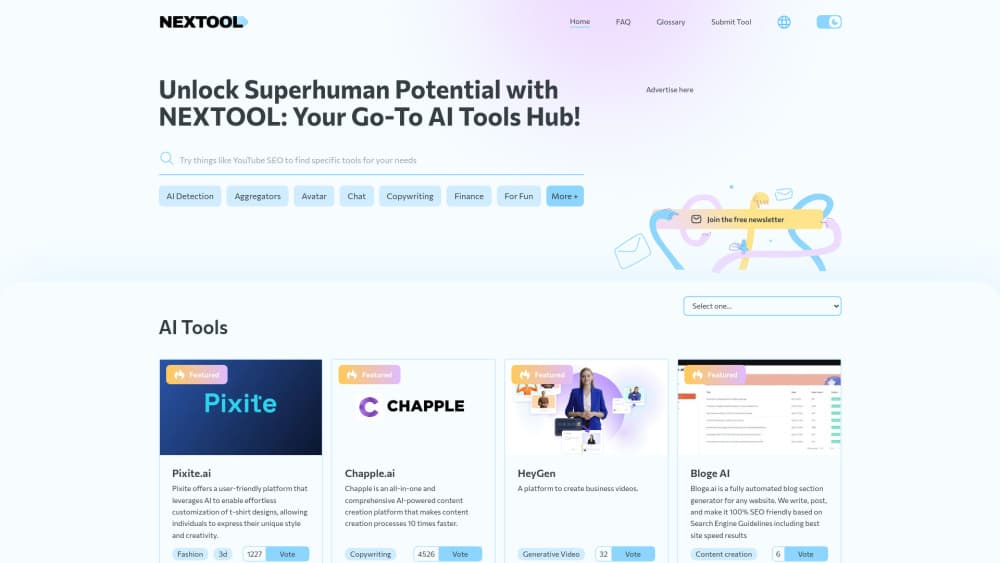
NEXTOOL, also written Nextool.ai, is an independent directory of AI tools. It works as an AI tool finder. Features, pricing plus alternatives sit side by side, so you can compare before you commit. The library covers 1,900+ tools spread across 148+ categories, and browsing it costs nothing.
The site was founded by Jafar Najafov and Agil Zeynalov to fix a real problem. The AI tools space moves fast. Tracking what a tool actually does and what it costs means opening a dozen tabs. NEXTOOL keeps a tool's pricing, key features, platforms and integrations on one profile page. From there you can jump to its category, see similar tools on an alternatives page, or open a head-to-head comparison. For quick AI software comparison, that beats a browser full of tabs.
It's a directory, not a chatbot and not an AI service itself. So if you need to generate images or write code, NEXTOOL won't do that. What it does is shorten the search: you land on a category, filter for what you need, and compare before you sign up for anything.
Getting Started
- Open nextool.ai and browse by category, or check the Trending, New tools, Top tools and Free AI tools sections.
- Use the search or a category page to narrow the list to the tools that fit your task.
- Open a tool's profile page to read its description, features, use cases and current pricing.
- Compare two or three options on their alternatives and comparison pages to see how they stack up.
- Click through to a tool's official website when you're ready to try it.
Tool makers can also submit a listing. A basic listing is reviewed for free, and paid packages add faster approval and featured placement.
Product Information
A quick look at NEXTOOL's pricing, supported platforms, and performance.
Best for
The users, tasks, and scenarios where this tool fits best.
Users
- Founders and marketers
- Developers and creators
Tasks
- Comparing AI software pricing
- Finding free AI tools
- Sizing up alternatives
- Listing your own tool
Scenarios
- Early research before committing to a subscription
- Building a shortlist for a team
- Keeping up with new releases
- Launching a new AI product
Key features
Large Curated AI Tools Library
NEXTOOL lists 1,900+ AI tools across 148+ categories, from writing and design to code, audio and video. Each tool gets a dedicated profile page with a description, features, use cases and pricing. The size matters less than the organization: categories and comparison pages turn a long list into something you can actually work through.
Verified and Independently Rated Listings
Every tool is checked to confirm it's live, functional and genuinely AI-powered before it's listed. Listings are scored on capability, value and usability, and the site says affiliate relationships don't influence those ratings. That's the pitch, and it's the thing to hold them to when you see a ranking.
Pricing and Alternatives at a Glance
Most of the work in picking an AI tool is comparing price against what you get. Profile pages carry current pricing, and alternatives pages group similar tools so you can weigh a cheaper option against a popular one without opening five tabs.
Free AI Tools Section
A dedicated Free AI tools section filters the directory down to tools with a free tier or no cost to start. If you're testing ideas or working with a small budget, this is the fastest entry point, and it skips the tools that demand a card up front.
Tool Submission and Listing
Tool owners can submit a listing. A basic listing is reviewed for free. Paid packages add faster approval and featured spots: the 1-Day Boost ($45), the 7-Day Growth Package ($145) and the 1-Month Premium Package ($600). Sponsored placements are labelled, so it's clear what's paid.
Editorial Transparency and Updates
The directory discloses affiliate links and labels sponsored placements instead of hiding them. Listings get revisited as tools change their pricing, features or availability, and readers can flag inaccuracies or request corrections. That upkeep is what keeps a directory useful months after you first bookmark it.
Pros and cons
Pros
- Free to browse, with no account required to read tool profiles or category pages.
- Coverage is broad: 1,900+ tools and 148+ categories in one place.
- Pricing, features and alternatives sit together, which cuts down on tab-hopping.
- Sponsored placements and affiliate links are labelled, so paid slots are visible.
- A dedicated Free AI tools section makes budget-friendly options easy to find.
Cons
- It's a directory only. You can't run an AI tool on the site; you click out to the official website.
- Depth varies by listing. Nicher tools may have thinner pricing or feature notes than popular ones.
- Rankings lean on the site's own scoring, so treat them as a starting point rather than a verdict.
- No public API, which means you can't pull its listings into your own app or workflow.
Frequently asked questions
NEXTOOL is an AI tools directory you use to find and compare AI software. It gathers tools across 148+ categories. Features, pricing plus alternatives sit in one place, so you can shortlist before signing up for anything.
Related content
Explore related tools, skills, and articles for NEXTOOL.
NEXTOOL Alternatives

Base Code
Base44 (Wix) · Coding · ProductivityBase Code is a shared cloud development environment from Base44. Teammates describe changes to an existing GitHub codebase in chat, preview them live and send them back as pull requests.

Knocket
Knocket (Tencent RTC team) · Productivity · Business · ChatbotKnocket is a free live chat and contact page tool that lets visitors message you from your website, app, or a shareable link, with every reply handled from Telegram or one inbox.

FloorGen
Vinit Kumar (FloorGen) · Productivity · China AIFloorGen is a browser-based floor plan maker that turns a sentence or a sketch into an editable 2D plan and a 3D walkthrough. Export to PDF, DXF or video, and draw without an account.