

Noota - Call & Voice to Text
Noota · Productivity
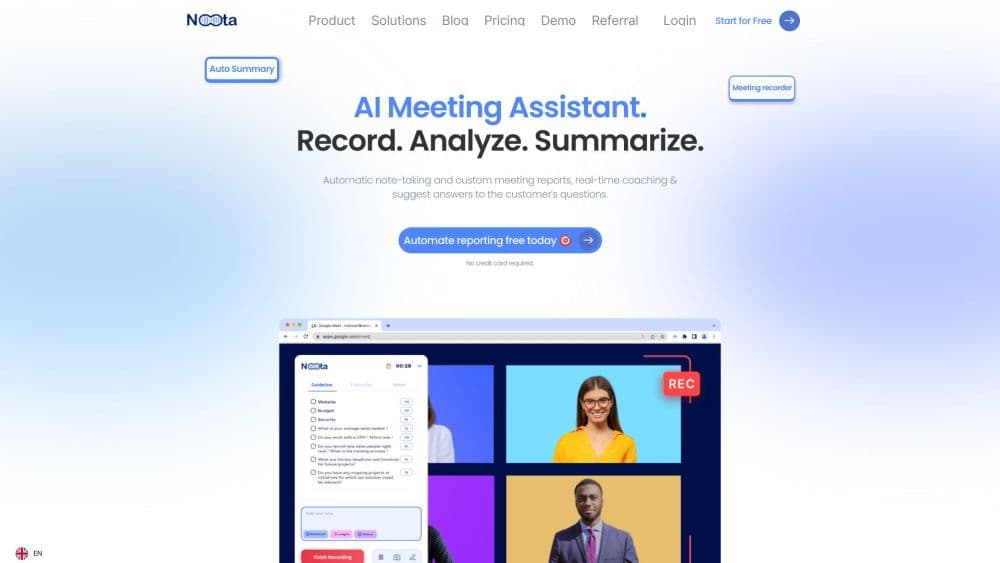
Noota is an AI notetaker that joins your calls on Zoom, Meet, Teams, or the phone, writes the transcript, and hands you the report, tasks, and follow-up email before you leave the room.
About Noota - Call & Voice to Text
What Is Noota
Noota is a meeting assistant that covers the whole cycle of a call: the brief before it, the notes during it, and the follow-up after it. It reads your calendar and inbox, joins the call as a bot or records without one, then turns the conversation into a transcript, a summary, a task list, and an email you can send as it stands. The core job is call to text, and the company behind it is French, with every recording stored on EU servers.
The product began as a meeting recorder and now leans on AI agents. Recruiting teams get an agent that sources and scores candidates, sales teams get one that scores deals, and both keep the connected CRM current without anyone typing. That range runs wider than most AI notetakers, which tend to stop at the meeting summary.
The limits matter as much as the features. Transcription quality depends on the audio, strong accents still need a manual pass, and the automation that saves real time sits on the Business plan. Free accounts also lose their recordings after a month.
Getting Started
- Sign up with a Google or Microsoft account and grant calendar access, which is how Noota knows which calls to attend.
- Choose a recording mode: send the bot to the meeting link, or record with the desktop app so no bot appears in the participant list.
- Connect the tools your team already uses, such as the CRM, Slack, or Notion, so notes and tasks land where people look for them.
- Open the meeting when the call ends, fix any name or figure the transcript got wrong, then send the follow-up email or push the tasks to your project tool.
Product Information
A quick look at Noota - Call & Voice to Text's pricing, supported platforms, and performance.
Best for
The users, tasks, and scenarios where this tool fits best.
Users
- Sales reps
- Recruiters
- Project managers
- Consultants
Tasks
- Writing follow-up emails
- Logging call notes into a CRM
- Turning a conversation into a task list
- Capturing in-person meetings
Scenarios
- Days of back-to-back discovery calls
- In-person client visits
- Hiring loops with four or five interviewers
Key features
Bot and Bot-Free Recording
Most notetakers appear as a participant, which is awkward on a client call. Noota works both ways: a bot joins the Meet, Teams, or Zoom link, or the desktop app captures system audio with nothing added to the participant list. The Business plan adds phone call recording, so a mobile conversation lands in the same library as a video call.
Transcription With Speaker Labels
The meeting transcription arrives with speakers separated, and live transcription runs while people talk. That live feed also powers Ask Noota, so you can ask what a client said about budget without waiting for the call to end. Accuracy holds on clear audio and drops on laptop microphones in a conference room, which is true of every tool in this category.
Pre-Meeting Briefs
Noota reads your calendar and inbox and writes a short brief before each meeting: who's joining, what was covered last time, what's still open. It saves the ten minutes you'd spend scrolling old notes, and it keeps the thread intact when a deal has been running for months.
Reports, Tasks, and Follow-Up Emails
The output goes past a summary. Noota builds a structured report, pulls action items with owners, and drafts the follow-up email. Templates are editable, and on the Business plan you pick which AI model writes the report. Teams with a house format can save it once as a template instead of reformatting every document.
CRM and Work Tool Sync
Notes are pushed to your CRM, Slack, and Notion, so the record lives where the team already works. You also decide who sees each note, which matters when a call touches salaries or a candidate's history. Without that connection, an AI meeting notetaker is only a nicer notebook.
Voice Typing in Any App
Pro and above include voice to text everywhere: you speak, and the words land in whatever field has focus, whether that's an email client, a support ticket, or a document. It's the same speech model as the recorder, aimed at your keyboard instead of a meeting.
Pros and cons
Pros
- The free plan allows unlimited meeting notes, which is rare among AI notetakers that usually cap minutes.
- Bot-free recording on Pro removes the notification that tells everyone a recorder joined.
- EU hosting with a stated policy against training AI models on your data suits legal and HR teams.
- Each meeting produces a report, an email draft, and a task list in one pass, so the follow-up work happens at the same time as the notes.
- API access on Business and MCP access on every plan give developers a way to pull transcripts into their own tools.
Cons
- Automation, phone recording, and unlimited storage sit on Business at $49 per user each month, or $39 billed annually, so small teams pay a real premium for the useful half.
- Free accounts keep recordings for one month only, which rules out a searchable archive built on the free tier.
- Bot-free recording needs the desktop app installed, so browser-only users are stuck with the bot.
- The recruiting and sales agents are priced separately at €139 per user each month, so a team that wants both meeting notes and hiring runs two bills.
Frequently asked questions
Yes, there's a free plan with unlimited meeting notes, chat across all your meetings, automatic to-do lists, and access from web, mobile, and desktop. It keeps recordings for one month and uses bot-based recording only.
Related content
Explore related tools, skills, and articles for Noota - Call & Voice to Text.
Noota - Call & Voice to Text Alternatives

Udon
Udon · Coding · ProductivityUdon turns an Apple Silicon Mac into a home server you run from a browser, with container controls, file shares, and an optional AI sysadmin.

offstage
offstage cloud · Coding · Productivityoffstage gives AI coding agents and CI jobs a real Mac: a fresh macOS account on Apple silicon, driven over an API and billed by the second.

BotBus
Chengdu Tuyang Tusen Technology Co., Ltd. · Coding · ProductivityBotBus lets you control AI coding agents from your phone and watch: approve commands, start tasks and read results while the code stays on your desktop.