
NoteThisDown
NoteThisDown · Image · Productivity
NoteThisDown is an AI app that turns photos of handwritten notes into clean, formatted pages inside your Notion workspace.
About NoteThisDown
What Is NoteThisDown
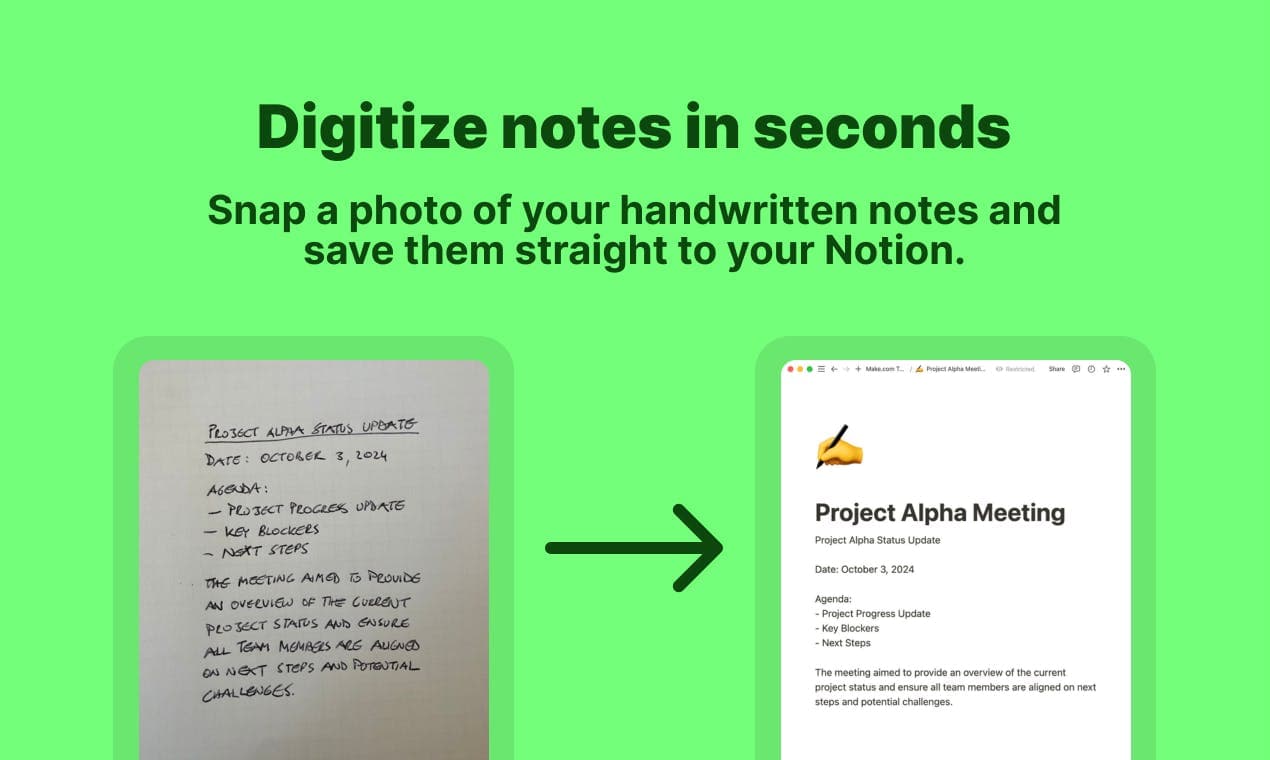
NoteThisDown is a note transcription app that reads your handwriting from a photo and writes the result into Notion. You snap a picture of a notebook page, the app converts the handwriting to text, and it saves the copy as a new page in a database you choose. It targets a specific gap. Most people who still write by hand lose the notes the moment they close the notebook, because retyping them is slow and easy to postpone.
In practice it is AI handwriting recognition aimed at handwritten notes to Notion, and it does that one task end to end. The workflow leans on the phone you already carry. NoteThisDown is a progressive web app, so it runs in a browser on your phone, tablet, or desktop without an app store download. You can add it to your home screen and treat it like a native app. Once you take a photo, the transcription and the Notion sync finish in seconds, and the company puts the full trip from photo to Notion at under 30 seconds.
The story the developer tells is honest about scope. NoteThisDown does one job: moving handwritten notes into Notion. It isn't a general note app, it doesn't replace Notion, and it doesn't try to organize your life. You bring a Notion workspace and a handwritten page, and it moves the content across. It supports messy cursive, faded ink, and notes that are hard to read, and it handles a batch of pages in one pass.
Getting Started
- Open NoteThisDown in your browser at app.note-this-down.com and start the 7-day unlimited free trial.
- Connect your Notion workspace so the app can create pages in the database you pick.
- Snap a photo of your handwritten notes with your phone, or upload several pages at once.
- Let the AI convert the handwriting to clean text and wait for the formatted page to land in Notion.
- Review the new page in Notion, then edit the text, adjust tags, or move it wherever it belongs.
Product Information
A quick look at NoteThisDown's pricing, supported platforms, and performance.
Best for
The users, tasks, and scenarios where this tool fits best.
Users
- Students
- Analog thinkers
- Professionals in meetings
- Consultants and note-heavy workers
Tasks
- Converting handwriting to digital text
- Syncing notes into Notion
- Processing several pages at once
- Keeping the original
Scenarios
- The end of a lecture
- After a meeting
- Clearing a backlog of notebooks
Key features
Handwriting recognition for messy notes
The recognition model sits at the center of NoteThisDown, and the company says it was trained on millions of samples to handle handwriting that people struggle to read. That covers messy cursive, faded ink, and the loose scrawl that fills a rush of notes. It is a photo to text step that does not ask you to slow down or write neatly. Accuracy still depends on the photo, so clear lighting and a flat page give the best results.
Direct Notion integration
NoteThisDown doesn't hand you a block of text to paste somewhere else. It creates a formatted page in the Notion database you select, and the page arrives with date properties, tags, and the original image attached. That is the difference between a transcript and a finished note. You still own the organization, since the app fills the page but Notion holds the structure, so anything you set up in your workspace carries over.
Multi-page scanning
A single photo is the basic unit, but NoteThisDown also accepts a batch. You can upload up to 10 photos at once, and the app compiles them into one document instead of scattering them across separate pages. This matters for anyone clearing a backlog, where a long meeting or a full notebook produces more pages than a single snap can cover. The result reads as one document with a continuous flow.
Works on any device
NoteThisDown is a progressive web app, so it opens in a browser on a phone, tablet, or desktop without an app store install. You can add it to your home screen and it behaves like a regular app. That removes the platform question that hangs over many note tools, since the same login works across devices and you're not locked to one operating system. Snap on the phone, review on the laptop.
Original image attached to the page
Every transcribed page keeps the photo it came from. In Notion you get the clean text and the source image on the same page, which helps when the recognition gets a word or a symbol wrong. You can glance at the handwriting and fix the text on the spot rather than hunting for the paper later. For notes you need to trust, the fallback is built in, and it sets NoteThisDown apart from plain OCR notes tools that only return raw text.
Simple flat-price plan
NoteThisDown keeps pricing to one plan with no feature gates and no per-page limits. The monthly plan costs 8 EUR, and the yearly plan costs 64 EUR, which works out at about 5.33 EUR a month and saves 33 percent. Both plans include unlimited transcriptions, multi-page support, the Notion integration, and priority support. There's a 7-day unlimited free trial, and you can cancel at any time.
Pros and cons
Pros
- Direct Notion integration creates a formatted page with date and tags instead of a plain block of text.
- Handwriting recognition is trained to read messy cursive and faded ink, which covers real notebook notes.
- Multi-page scanning handles up to 10 photos at once and merges them into a single document.
- The progressive web app runs on phone, tablet, and desktop, so you're not tied to one platform.
- One flat price with unlimited transcriptions and no per-page limits keeps the cost predictable.
- A 7-day unlimited free trial lets you test the whole workflow before paying.
Cons
- It only connects to Notion, so people on other note apps have no use for it.
- There's no free plan beyond the trial, so heavy users pay from day eight.
- There's no published API, so teams that want to wire transcription into their own tools can't.
- Recognition quality depends on the photo, and a blurry or poorly lit shot still needs manual fixes.
Frequently asked questions
NoteThisDown is an AI note transcription app that turns photos of handwritten notes into clean, formatted pages in your Notion workspace. It reads your handwriting, converts it to text, and saves the result as a new Notion page.
Related content
Explore related tools, skills, and articles for NoteThisDown.
NoteThisDown Alternatives

Google EmbeddingGemma 2
Google DeepMind · Writing · Image · CodingGoogle EmbeddingGemma 2 is a 740M-parameter open model that turns text, code, images, audio, and video frames into vectors in one 768-dimension space, running on phones and laptops.

Tractionwave
TractionWave · Image · MarketingTractionWave is an AI attention heatmap tool for static ads. Upload a PNG or JPG and it returns predicted attention, ranked hotspots, and fixes before you spend budget.

Imejis.io
Imejis.io · Image · MarketingImejis.io is an AI design studio for agents and marketing teams. Describe an image in plain words, and it writes the copy, builds the layout, reflows it to every size, then exports a finished file.