
Notion Second Brain 6.0
Easlo · Productivity · Leaning
Notion Second Brain 6.0 is an all-in-one Notion template from Easlo that keeps your tasks, projects, goals, notes and references in one dashboard with a one-time purchase.
About Notion Second Brain 6.0
What Is Notion Second Brain 6.0
Notion Second Brain 6.0 is a ready-made all-in-one Notion system that organizes your tasks, projects, goals, notes and references in one place. As a Notion productivity template, you duplicate it into your own Notion account and start using it in minutes, instead of building a personal system from a blank page.
The template follows the PARA method from Tiago Forte, which sorts everything into Projects, Areas, Resources and Archives. That structure is what keeps a growing pile of notes, references and to-do lists from turning into a mess. An all-in-one dashboard sits on top and gives you a bird's-eye view of what matters today.
Two limits are worth knowing up front. It's a Notion template, not a separate app, so it runs entirely inside your own Notion workspace and needs a Notion account. And it's a one-time purchase, so there's no subscription, but there's also no live product support tier beyond the tutorials and examples that come with it.
Getting Started
- Open the template link and duplicate it into your own Notion account.
- Follow the full video walkthrough to run the initial setup and connect your databases.
- Start capturing tasks, notes and references into the inbox areas as they come up.
- Link projects to your goals and break bigger work into sub-tasks.
- Learn from your own daily use and customize the pages and properties to fit how you actually work.
Product Information
A quick look at Notion Second Brain 6.0's pricing, supported platforms, and performance.
Best for
The users, tasks, and scenarios where this tool fits best.
Users
- People drowning in scattered tools
- Students and knowledge workers
- Freelancers and solo operators
Tasks
- Managing daily tasks and sub-tasks
- Tracking goals across life areas
- Collecting notes, quotes and references
Scenarios
- Replacing a pile of disconnected apps
- Starting a personal knowledge system
- Keeping a project and its context together
Key features
All-in-One Dashboard
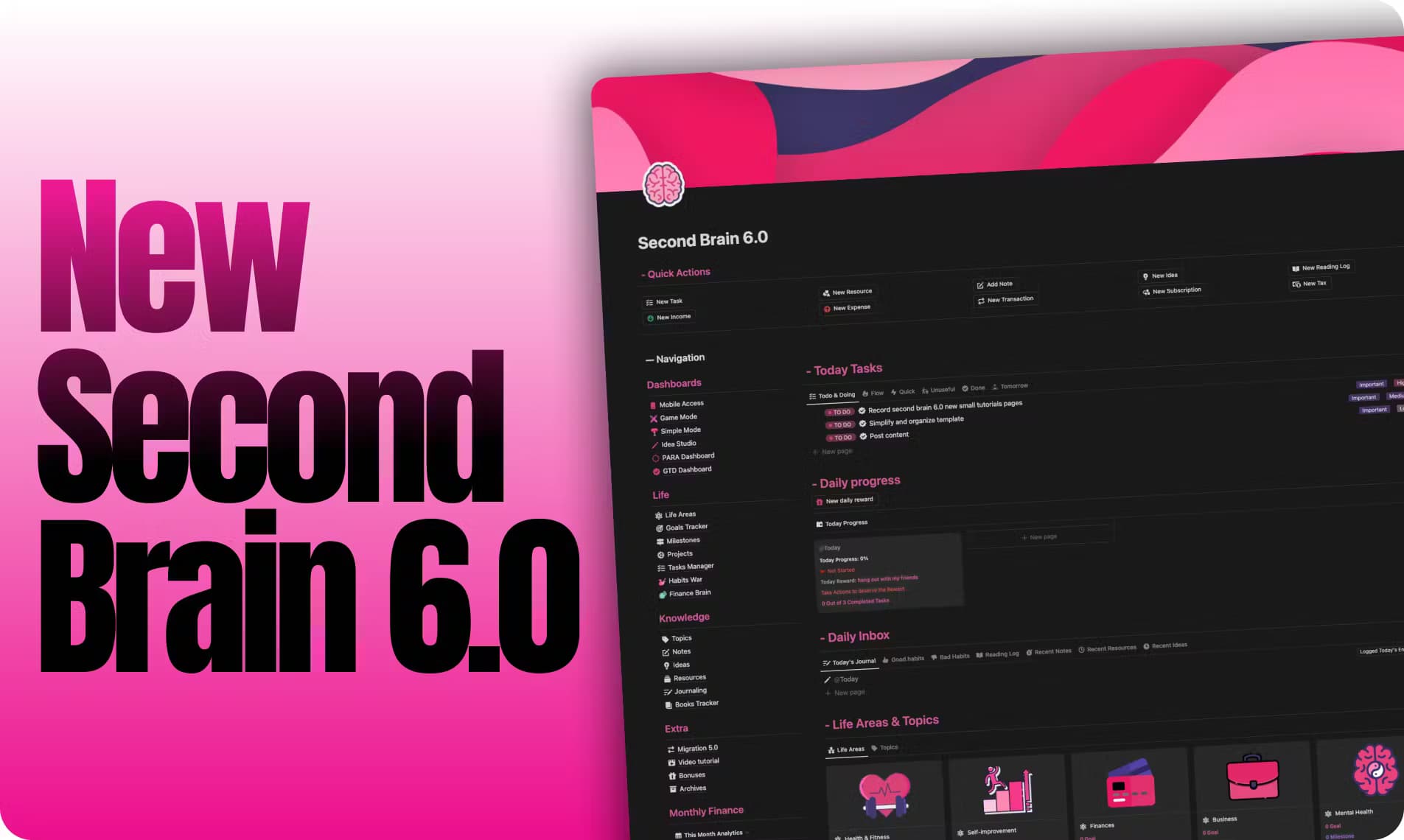
A single dashboard gives you a bird's-eye view of your tasks, projects and goals. Instead of opening several pages to see where things stand, you get one screen that shows what's active and what needs attention. It's the layer that ties the separate databases together.
PARA-Based Organization
Everything is sorted using the PARA method, which splits your world into Projects, Areas, Resources and Archives. That structure is why the template stays usable as your notes pile up. You always know which bucket something belongs in.
Tasks and Sub-tasks
You prioritize tasks and break larger ones into manageable sub-tasks. This keeps a big piece of work from sitting as one scary line item, and it fits daily planning as well as longer projects. It works as the day-to-day to-do layer of the system.
Goal Tracking
You set goals across different areas of your life and align them with concrete, actionable steps. The point is to connect the work you're doing now to something you actually care about. It suits both personal goals and work milestones.
Notes, References and Highlights
Notes, quotes and highlights each get their own organized space. You can save reflections as you read or think, and keep references from articles, videos, podcasts and movies in one place. Linking a reference to a project keeps the source next to the work it supports.
Integrated Project Management
Projects are tied to your goals and broken into tasks. That link is what keeps day-to-day work aimed at something bigger instead of drifting. You can see how a specific project ladders up to an area you're trying to move forward.
Pros and cons
Pros
- One-time payment, so there's no monthly subscription to keep paying.
- Built on the well-known PARA method, which gives you a tested structure on day one.
- The all-in-one dashboard puts tasks, goals, notes and references on a single screen.
- A full video walkthrough and bundled examples shorten the setup time.
- Comes with a 14-day money-back guarantee.
Cons
- It runs entirely inside Notion, so you need a Notion account and some comfort with the app.
- There's no free tier, so trying it means paying the one-time price first.
- Setup rewards people who invest time in customizing it, which won't suit anyone wanting a zero-config tool.
- There's no standalone mobile app or API, since it's a template rather than a product of its own.
Frequently asked questions
It's an all-in-one Notion template from Easlo that organizes your tasks, projects, goals, notes and references in one dashboard. You duplicate it into your own Notion account and use it as a ready-made personal system built around the PARA method.
Related content
Explore related tools, skills, and articles for Notion Second Brain 6.0.
Notion Second Brain 6.0 Alternatives

Base Code
Base44 (Wix) · Coding · ProductivityBase Code is a shared cloud development environment from Base44. Teammates describe changes to an existing GitHub codebase in chat, preview them live and send them back as pull requests.

Knocket
Knocket (Tencent RTC team) · Productivity · Business · ChatbotKnocket is a free live chat and contact page tool that lets visitors message you from your website, app, or a shareable link, with every reply handled from Telegram or one inbox.

FloorGen
Vinit Kumar (FloorGen) · Productivity · China AIFloorGen is a browser-based floor plan maker that turns a sentence or a sketch into an editable 2D plan and a 3D walkthrough. Export to PDF, DXF or video, and draw without an account.