

OceanMind
OceanMind Wellness Inc · AI Assistant
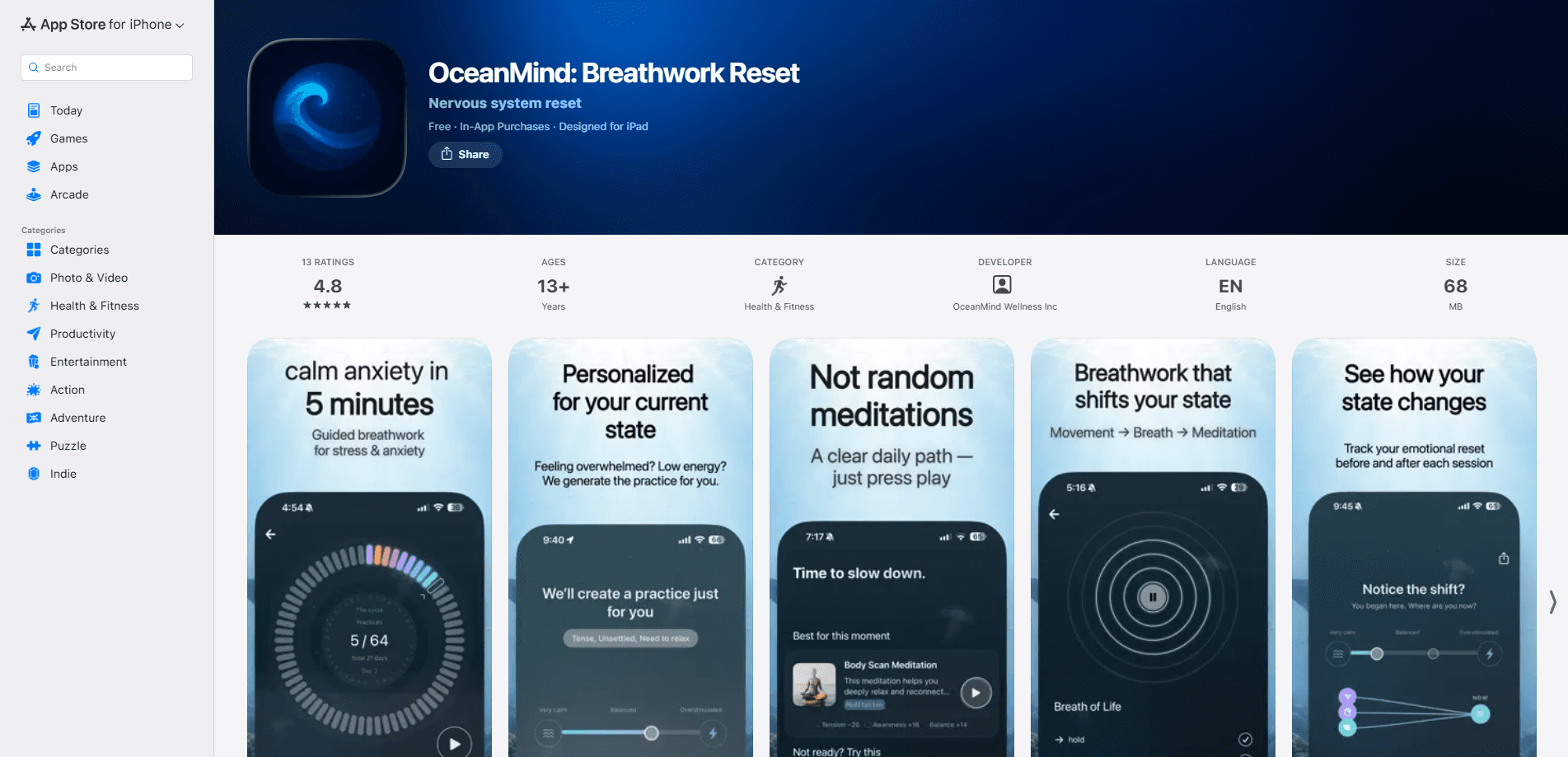
OceanMind is a breathwork and meditation app for iOS that turns guided breathing into a short, structured routine. You pick what you need in the moment, calm down, focus up, or wind down for sleep, and the app builds a personalized session around that goal and your practice history. Most sessions run about 5 minutes, and a check-in before and after each one shows whether your state actually shifted. It's built for people who want a practical tool they can open under pressure, not a long course they'll abandon in a week. No incense. No jargon.
About OceanMind
What Is OceanMind
OceanMind is a mobile app from OceanMind Wellness Inc that pairs guided breathwork with guided breath pacing. The pitch is simple: stress lives in the body, and slow, structured breathing gives the body something concrete to do about it. Instead of offering a huge library you have to sift through, the app asks what you need right now and generates a session to match.
The core idea is personalization. Tell it you want to calm down, focus up, or wind down for sleep, and it factors in your goal, your current state, and how much you've practiced. That means the session you get this week won't look like the one you got on day one. Sessions tend to run about 5 minutes, which is short enough to fit between meetings or before bed.
It's worth being clear about what this isn't. OceanMind is a wellness tool, not a medical treatment. It won't diagnose or fix a clinical anxiety disorder. The App Store listing even flags "Infrequent/Mild Medical/Treatment Information." Treat it as training for your stress response, the same way you'd train a muscle. The app also leans hard into privacy: no social feed, no sharing, no audience.
Getting Started
- Download OceanMind from the App Store and open it on an iPhone or iPad running iOS 17 or later.
- Tell the app what you need right now by choosing a goal such as calm down, focus up, or wind down for sleep.
- Let it generate a personalized breathwork session based on your goal, your current state, and your practice history.
- Follow the guided pacing through the session, which usually takes about 5 minutes.
- Check in before and after to measure the shift and track how your state changes over time.
Product Information
A quick look at OceanMind's pricing, supported platforms, and performance.
Best for
The users, tasks, and scenarios where this tool fits best.
Users
- People dealing with everyday stress who want a 5-minute reset instead of a 30-minute commitment, as long as they're on iOS.
- Anyone who's bounced off bigger meditation apps because the library felt overwhelming and wants the app to just pick a session for them.
- Practitioners who like tracking progress and want a check-in before and after each session to see whether their state actually changed.
Tasks
- Calming down fast before a meeting, a call, or a hard conversation where you need steady nerves.
- Sharpening focus during a slow afternoon when your attention keeps drifting away from the task in front of you.
- Winding down after a long day, including the 2am "mind won't slow down" problem that keeps you staring at the ceiling.
Scenarios
- A stressful workday where you need a short guided breathing exercise between back-to-back meetings.
- Pre-sleep routines where a brief breathwork session helps you transition out of screen time and into rest.
- High-pressure moments like presentations or interviews, where a few minutes of paced breathing is easier to fit in than a full meditation.
Key features
Goal-Based Session Generation
The app starts from a question, not a menu. You tell OceanMind what you need right now, calm down, focus up, or wind down, and it assembles a breathwork session around that goal. It also factors in your current state and your practice history, so the recommendation shifts as you use it. No endless browsing. No guessing which track to pick. That's the whole point of guided breathing exercises that meet you where you're at.
Personalized Breathwork
Rather than serving the same recorded track to everyone, OceanMind builds a session that adapts to you. Your goal, your check-in state, and how often you practice all feed into what you get. Over time that means the app can nudge you toward the breathing pattern that seems to work best for your nervous system. It learns. You adapt.
Guided Breath Pacing
Sessions rely on guided breath pacing, which tells you when to inhale and exhale so you don't have to count in your head. Slow, structured breathing is what engages the vagus nerve and helps rebalance the autonomic nervous system, according to the developer. That's the nervous system reset the app is going for. The pacing keeps you in rhythm, which is the part most people get wrong when they try to breathe "deeply" on their own.
Before and After Check-Ins
Each session comes with a check-in before and after so you can measure the shift rather than assume it happened. That turns practice into something closer to training: you see what moved your state and what didn't. Over weeks, the pattern starts to tell you which techniques suit your body. Did it work? Now you know.
Short 5-Minute Sessions
Most sessions take about 5 minutes, which is the detail that makes the whole thing usable. You can run one between meetings, in a hallway, or while lying awake at 2am without committing half an hour. Short sessions are also easier to repeat, and repetition is what builds the habit. Five minutes beats thirty you'll never do.
Progress Tracking
OceanMind tracks your practice over time so you can see consistency and how your responses change. This isn't a leaderboard or a streak you'll feel guilty about, it's a log of what works for you. That feedback loop is the difference between a one-off relaxation trick and an actual skill. Small difference. Big payoff.
Privacy by Design
There's no social feed, no sharing, and no audience. The app is built around the idea that you're doing this alone, which matters for a tool people open when they're anxious or lying awake at night. If privacy around health-adjacent data is a concern, this design choice is a real point in its favor. Nothing leaves your phone. Good.
Pros and cons
Pros
- Personalized breathwork sessions cut out the decision fatigue of browsing a huge library.
- 5-minute sessions fit into real gaps in the day, which makes a daily habit more realistic.
- Before-and-after check-ins give you feedback instead of leaving you to guess whether it worked.
- Goal-based entry points (calm, focus, sleep) map directly onto the moments you'd actually reach for the app.
- Privacy-first design with no feed or social sharing keeps a personal practice personal.
Cons
- It's iOS only, so Android users can't get it at all.
- There's no API, which means you can't pull session data into your own tools or dashboards.
- As a wellness app rather than a clinical tool, it won't replace treatment for a diagnosed anxiety or sleep disorder.
Frequently asked questions
It builds short, personalized guided breathwork sessions based on what you need in the moment, such as calming down, focusing, or winding down for sleep. Most sessions take about 5 minutes, and you check in before and after to see whether your state shifted.
Related content
Explore related tools, skills, and articles for OceanMind.
OceanMind Alternatives

Iplan AI
Iplan AI · Productivity · AI AssistantIplan AI is an AI travel planner that turns a few trip details into a full day-by-day itinerary in seconds. You answer questions about your destination, interests, budget, and travel companions, and the tool builds a plan you can edit, share, and carry with you on any device. It targets travelers who want a solid draft without spending hours in spreadsheets and browser tabs. Think of it as an itinerary generator that does the tedious part for you.

Screenhelp
Screenhelp · Productivity · AI AssistantScreenhelp is an AI screen assistant that turns a single keyboard shortcut into real-time help. You press Ctrl+Shift+Space, it captures what's on your screen, and it streams an answer into a private panel in about two seconds. Think of it as an AI screenshot helper you trigger on demand. It runs on Mac, Windows, and the web, starts free with 30 answers a month, and stays invisible during screen sharing on Zoom, Teams, and Google Meet.

Rainbow
Rainbow · AI AssistantRainbow is an AI weather forecast app built around short-term precipitation nowcasting. Its engine pushes min-by-min rain and snow predictions up to four hours ahead, blending live satellite and radar feeds into hyperlocal forecasts. The app adds live rain radar, a seven-day outlook, precipitation alerts, home-screen widgets, and a hurricane tracker, and it runs on both Android and iOS with a free tier plus paid upgrades.