

OpenGPT
TantanFu · Business · Other
OpenGPT is a web platform for running ready-made ChatGPT apps or building your own in plain English. It suits quick writing, coding, and lifestyle tasks without setup.
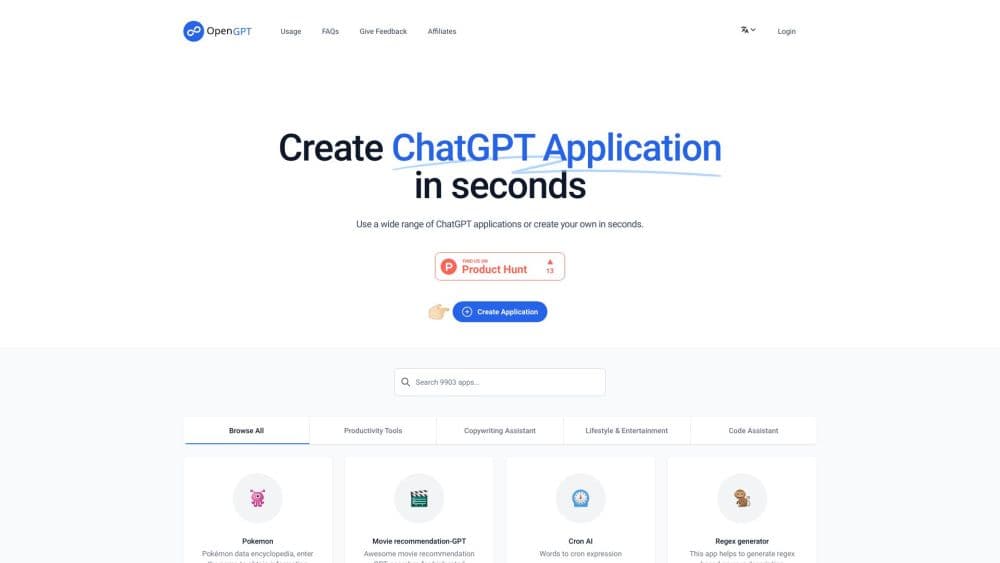
About OpenGPT
What Is OpenGPT
OpenGPT is a browser-based workspace where ChatGPT-powered mini apps live in one catalog. Each app handles a narrow job. Some fix grammar, some draft a blog post, some generate a regex pattern, some turn a plain description into a Midjourney prompt. You open it, type, and get an answer. No prompt engineering, no model picker, no API key.
The GPT app library is the appeal: speed. A general chatbot makes you explain the task every time, and the result shifts with your wording. A single-purpose app locks the instructions in place, so the same input gives a similar shape of output on Monday and Friday. OpenGPT also lets you publish your own app and share a link, which turns a private prompt into something a classmate or teammate can use.
The limits are worth knowing before you pay. Free attempts run out, output has a character cap per run, and long documents need to be split. The catalog is built by individual creators, so quality varies between apps. OpenGPT is a shortcut for small, repeatable jobs, not a replacement for a full document editor or a coding environment.
Getting Started
- Create an account on open-gpt.app with email or a social login.
- Browse the library by category, or pick a card from the home page and read its description.
- Press Run, type your input, and check the output against the character limit shown for your plan.
- To publish your own tool, choose Create, describe the task and the tone you want, then test it with a few inputs.
- Share the app link, or buy a credit pack or subscription from the Usage page when the free attempts run out.
Product Information
A quick look at OpenGPT's pricing, supported platforms, and performance.
Best for
The users, tasks, and scenarios where this tool fits best.
Users
- Writers and marketers who need a first draft fast and don't want to rewrite the same prompt every morning
- Students who want summaries, essay outlines, or grammar fixes without paying for a full AI subscription
- Indie developers and analysts who need small utilities like a cron builder or a regex generator on demand
Tasks
- Turning a rough idea into a structured blog post, product description, or email, and let an app built for that format do the shaping
- Generating and testing regular expressions when you can describe the pattern in words but can't recall the syntax
- Cleaning up grammar and tone in a paragraph before sending it to a client, editor, or manager
Scenarios
- A five-minute gap before a meeting when you need a polite reply drafted and ready to paste
- Running a weekly report or social post through the same app so the format stays consistent across weeks
- Testing whether a custom ChatGPT app is worth building before you invest in a development stack
Key features
A Library Organized by Job
The home page groups apps into Productivity Tools, Copywriting Assistant, Lifestyle & Entertainment, and Code Assistant. That structure beats a search box when you don't know what to ask for. You can scan a category, read a one-line description, and run the app without leaving the page. The catalog leans toward small, specific jobs rather than broad assistants.
Run Apps Without Configuration
Every card has a Run button and a Share button. Run opens an input field, and the app's hidden instructions do the rest. You never see the system prompt, which keeps the experience simple and keeps the creator's work private. Share produces a link you can drop into a group chat or a course page.
Build a Custom ChatGPT App in Plain English
The Create flow asks for a name, a description of the task, and the behavior you expect. OpenGPT turns that into a working app with its own page. This is the no-code AI app builder part of the product, and it works as a ChatGPT application builder for people with a repeatable task and no interest in wiring up a backend. Testing takes a few runs, and you can delete an app you no longer want.
Credit Packs and License Keys
Paid access runs on credits. The Usage page lists $4 for 50 credits, $8 for 150, and $16 for 350, each valid for one year. A subscription at $12 per month raises the per-run character limit and adds a dedicated API service for steadier response times. After purchase you get a license key, and a separate page checks how much of it you've used.
Character Limits That Push You to Split Work
Free and entry-level runs cap the input and output length, with higher caps on paid plans. For a short email or a product blurb, the cap rarely matters. For a long article, you'll be chunking by section. You can avoid pasting 3,000 words only to watch the app truncate them.
Multilingual App Catalog
The library mixes English apps with Chinese-language tools for Xiaohongshu captions, weekly reports, naming, and even tarot readings. That mix is unusual for a Western-built AI app builder, and it makes OpenGPT useful for bilingual creators who need local formats rather than generic English output.
Pros and cons
Pros
- Ready-made apps cover common writing, coding, and admin tasks, so you can get output in under a minute
- Building a custom app takes a short form instead of code, which suits non-technical teams
- Credit packs start at $4, a low entry point compared with a monthly AI subscription
- Share links make it easy to hand the same tool to a classmate, client, or teammate
Cons
- Free attempts expire quickly, and the per-run character cap forces long documents to be split into chunks
- App quality depends on the creator, so two apps for the same job can differ a lot in output
- No public developer API is documented, which rules it out for teams that need to call the service from their own software
- The interface and much of the catalog assume familiarity with ChatGPT-style prompting, which can confuse a first-time user
Frequently asked questions
OpenGPT is used to run small ChatGPT-powered apps for writing, coding help, and everyday tasks, and to publish your own app from a plain-English description. It works in a browser and needs an account.
Related content
Explore related tools, skills, and articles for OpenGPT.
OpenGPT Alternatives
Liveplan
Palo Alto Software · BusinessLivePlan is business plan software that helps founders and small business owners turn an idea into a funder-ready plan. It combines AI-assisted writing, market research with cited sources, and connected financial forecasting so your income statement, cash flow, and balance sheet move together when you change one number. Over 1.5 million businesses have used it to plan, forecast, and track performance against real accounting data. That's a lot of founders. It's also a signal the tooling survived contact with real lenders.

Swms
Swms AI · Writing · Productivity · BusinessSwms is an AI safety compliance tool that turns a plain description of a job into ready-to-use safety documents. Describe your project, trade, and known hazards, and it writes a safe work method statement, job hazard analysis, safe work procedure, RAMS, or safety data sheet in seconds. It also ships with Oscar, a chat assistant that answers workplace safety questions in any language. Teams in construction, mining, transport, and warehousing use it to cut the paperwork that usually eats into a workday.

Rows
Rows (Superhuman) · Productivity · BusinessRows is an AI spreadsheet and data analysis tool that imports live data from more than 50 sources, then lets you work with it using plain language instead of SQL queries or nested formulas. You can pull numbers out of PDFs, connect ad platforms, databases, and bank accounts, and ask the AI to build reports, merge datasets, or set up models that recalculate themselves. It runs in the browser, works like a spreadsheet, and now sits under the Superhuman umbrella.