

AI Chat with Photo Capture;
Coffee & Chapters - Press · Leaning
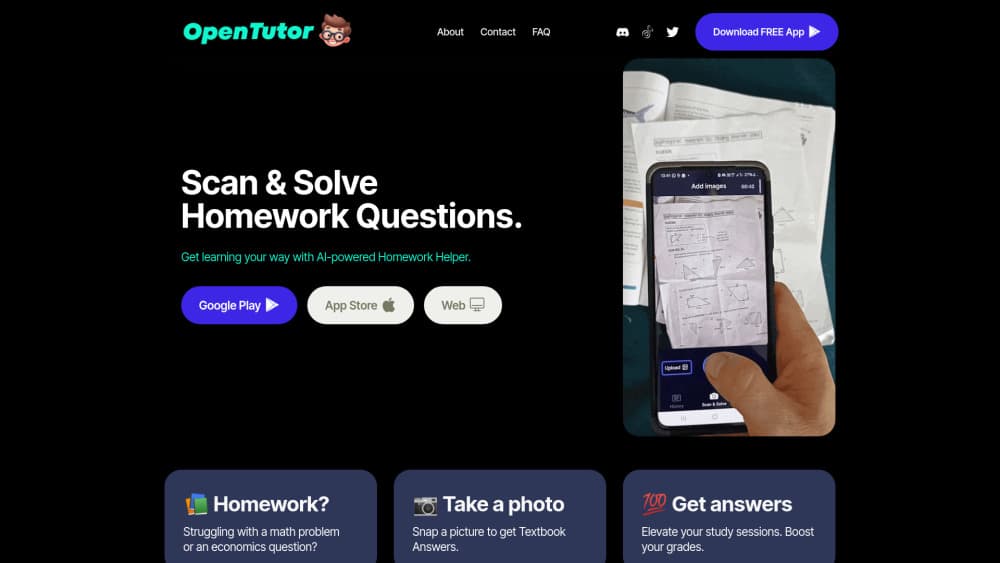
Open Tutor is an AI homework helper and homework scanner app that reads a photo of any question. It acts as a photo math solver for equations and a study helper app for other subjects, with a free plan on Android and iOS.
About AI Chat with Photo Capture;
What Is Open Tutor
Open Tutor is a mobile study app built around one action: point your camera at a homework question and get an answer back. The photo can come from a textbook, a worksheet, a test paper or your own handwriting. The app reads it, works out what is being asked, and replies with steps you can follow rather than a bare final number. As a homework scanner app it replaces retyping a question into a search box, and as a study helper app it aims to go a step further than a plain answer key.
It aims at a common problem. Traditional tutoring costs money and needs scheduling, while staring at a hard problem alone rarely helps. Photomath solved part of this for equations. Open Tutor stretches the same idea across subjects, covering chemistry, economics and history alongside math. According to the developer, the app works in every language and every subject, because the answering is handled by a general AI model rather than a fixed bank of textbook answers.
The limits matter just as much as the features. Open Tutor is a helper, not a replacement for a teacher. It explains what it can see, so a blurry photo or a diagram-heavy question can throw it off. The free tier carries ads, and this is a small project from an independent developer, not a school-endorsed platform.
Getting Started
- Download Open Tutor free from the Google Play Store or the App Store.
- Open the app and grant camera permission when prompted.
- Snap a clear photo of the homework question, keeping the whole problem in frame.
- Read the step-by-step answer, then ask a follow-up in the chat if something is unclear.
- Save the question to your study list if you want to review it later.
Product Information
A quick look at AI Chat with Photo Capture;'s pricing, supported platforms, and performance.
Best for
The users, tasks, and scenarios where this tool fits best.
Users
- Middle and high school students
- Parents helping with homework
- Self-learners
Tasks
- Solving a photo math problem
- Checking a finished answer
- Understanding a concept behind a question
Scenarios
- Evening homework sessions
- Exam prep
- Homework in a second language
Key features
Scan and Solve
The core feature. You photograph a homework question and the app returns a solution broken into steps. It handles printed and handwritten problems, which matters because most homework is not typed. The developer notes it now covers math problems in addition to the original textbook subjects.
Step-by-Step Explanations
Answers come with the working shown, not just a result. For a student trying to learn, the reasoning is the useful part, since copying a number teaches nothing. This is where Open Tutor separates itself from a plain answer key.
Multi-Subject Coverage
The app is built to answer across subjects, from geometry and chemistry to economics and history. That range comes from using a general AI model rather than a narrow solver, so the same photo tool works whether the question is numeric or written.
Chat Follow-Ups
After the first answer, you can ask more in a chat thread. If a step does not make sense, you can push on it without taking a fresh photo. The back-and-forth is closer to how a tutor answers a follow-up question than to a one-shot search.
Study Materials and Reminders
The app lets you save questions and notes, and it sends reminders tied to what you are studying. Over a term, that turns a pile of one-off questions into something you can revise from, provided you do the saving.
Works in Any Language
Because the answering runs through an AI model, the app reads questions and replies in the language you are using rather than a fixed set of supported markets. For students studying in a language they are still learning, that is a real advantage.
Pros and cons
Pros
- Free to download and use, with the only paid option removing ads.
- Camera-first design, so a question does not have to be retyped into a search box.
- Step-by-step output supports learning rather than answer copying.
- Subject coverage is wide, not limited to math.
- Available on both Android and iOS.
Cons
- Ads on the free plan interrupt study sessions.
- Accuracy depends on photo quality, and a blurry or crowded shot can produce a wrong reading.
- Diagrams and figures are harder for it than plain text questions.
- The app store listing is small, so it is not a well-known, reviewed product.
Frequently asked questions
Yes. Downloading and using Open Tutor costs nothing, and the developer says there are no hidden charges. The one paid option is an ad-free version.
Related content
Explore related tools, skills, and articles for AI Chat with Photo Capture;.
AI Chat with Photo Capture; Alternatives

HireKey
HireKey · Voice & Language · Productivity · LeaningHireKey is an AI job search copilot built by a former tech recruiter. It checks role fit, tailors resumes, runs interview practice and tracks every application.

Lune
Retrograde Labs · Productivity · LeaningLune is a research search engine for scientific AI agents. It runs as an MCP server that lets Claude, ChatGPT and Cursor search peer-reviewed computer science papers and cite them.
Coddy
Coddy · Coding · LeaningCoddy is a gamified platform to learn to code through short interactive lessons in 20+ languages, with a browser editor, an AI tutor and free certificates.