

Open Knowledge Maps
Open Knowledge Maps, charitable non-profit based in Vienna, Austria · Coding · Business
Open Knowledge Maps is a free nonprofit AI research discovery tool that turns a query into a visual knowledge map of a field, built from 400 million papers, preprints, and datasets.
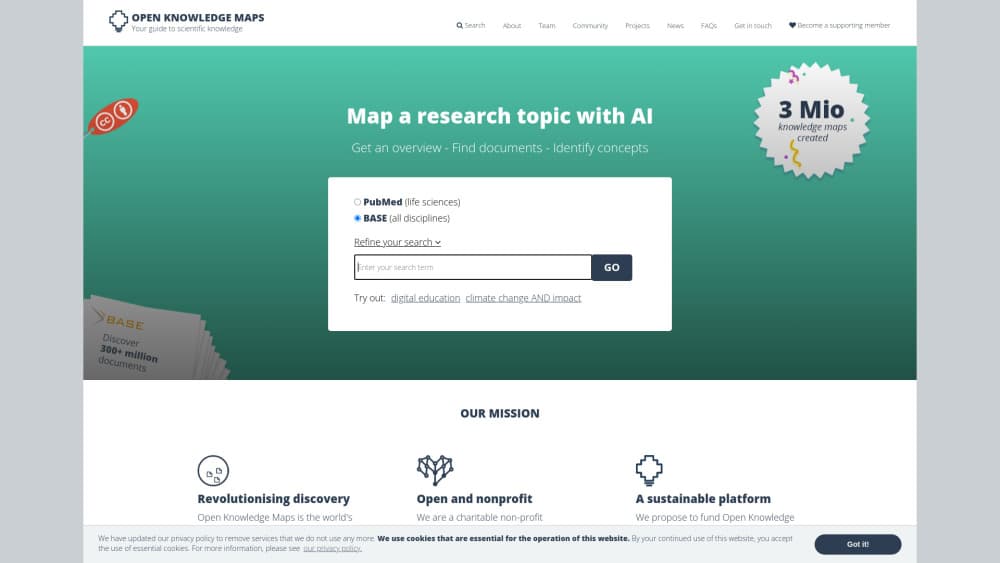
About Open Knowledge Maps
What Is Open Knowledge Maps
The first search in an unfamiliar field is the hard part. A database hands back thousands of rows in no clear order, and nothing on the page says which clump of papers actually matters. Open Knowledge Maps, often shortened to OKMaps, treats scientific literature search as a mapping problem. One query becomes a knowledge map: the 100 most relevant records, sorted into labelled circles, so the shape of a topic shows up before you open a single PDF.
The project runs as a charitable non-profit in Vienna, founded by Peter Kraker and a small core team. At heart it's a literature search engine with a visual layer on top. Records come from BASE, PubMed, and OpenAIRE. An AI pipeline clusters them using titles, abstracts, authors, journals, and subject keywords, then scores candidate terms with TF-IDF to name each area. That's why a bubble reads "climate change adaptation" instead of "Cluster 4".
Two limits shape daily use. Every map is built from the top 100 results, so a narrow query beats a broad one, and each build takes up to 30 seconds because the search runs live against the provider. You don't need an account, and maps come with a shareable link.
Getting Started
- Open openknowledgemaps.org and type a topic into the search box. A short phrase works better than a full sentence.
- Choose a data source. BASE covers repositories and publishers across disciplines; PubMed covers medicine and life sciences.
- Start the search and wait for the map. A BASE query can take up to 30 seconds end to end.
- Read the bubbles before the papers. Click one to see the resources inside that area.
- Share the map link with a colleague, or open a record and follow the open access badge to the full text.
Product Information
A quick look at Open Knowledge Maps's pricing, supported platforms, and performance.
Best for
The users, tasks, and scenarios where this tool fits best.
Users
- Students starting a thesis
- Librarians and research support staff
- Interdisciplinary researchers
Tasks
- Scoping an unknown topic
- Separating disciplines on an ambiguous query
- Finding readable full texts
- Building a background section
Scenarios
- The first week of a dissertation
- Preparing a grant application
- Running a literature search workshop
Key features
Knowledge Maps Instead of Result Lists
The core output is a diagram where circles stand for sub-areas and their size tracks how many records land in each one. You see the main areas at a glance, then zoom into the ones that match your question. Compared with scrolling a ranked list, the map hands you a research topic overview instead of a queue: what is in this field, not just what matches my words.
Clustering That Splits Disciplines
An AI pipeline groups records by similarity in their metadata, so a multi-purpose keyword no longer returns one blended pile. Searching a contested term produces separate clusters for each research community that uses it. Picking the right bubble is faster than adding field names to your query by hand.
Area Labels Pulled From the Literature
Each bubble gets up to three labels, chosen from the terms that appear often inside that cluster and rarely outside it. The method is extractive, which keeps the wording close to what authors actually wrote. When subject keywords are missing from a record, the pipeline infers them from titles and abstracts, so labels sometimes come out in the paper's original language.
Open Access Highlighting and Inline Reading
Maps mix paywalled and open records, and open ones are marked. Many open access items open inside the map view, which saves a detour through a publisher site. For anyone checking whether a claim is worth pursuing, that shortcut matters more than a full text download.
Coverage of 400 Million Outputs and 25 Output Types
The underlying index reaches beyond journal articles to preprints, software, research data, and other output types, across all disciplines. That breadth helps in fields where the important work never becomes a journal paper, such as computer science or social science data collection. Coverage depends on the chosen provider, so results differ between BASE and PubMed.
Embedded Maps for Institutions
Organizations can license Custom Services that place a map inside their own catalogue or repository, with the option to limit results to their holdings. Library networks in Austria and Switzerland offer it as a module, and the service runs as a cloud component. Pricing is handled per institution, not through a public plan.
Pros and cons
Pros
- Free to use with no account, no ads, and no per-search limit, since a nonprofit funds the platform through institutional memberships.
- The visual overview replaces the slow work of skimming 100 titles to guess which ones cluster together.
- Open access badges and in-map reading cut the time between a promising title and the actual text.
- Clustering handles ambiguous search terms better than a flat ranked list, which matters in cross-disciplinary work.
- Shareable links make it easy to hand a map to a student, a co-author, or a workshop group.
Cons
- Each map draws on 100 records at most, so a key paper can fall outside the cut and never appear.
- Builds can take up to 30 seconds, and nothing is saved between sessions, so repeat queries cost the same wait again.
- There's no public API. Automation and catalogue integration exist only through paid Custom Services for organizations.
- Clustering reads metadata, not full texts, so thinly indexed or non-English work can end up underrepresented.
Frequently asked questions
It runs a search and draws the results as a map of research areas instead of a ranked list. Each area is labelled with terms taken from the papers inside it, and you click through to the records.
Related content
Explore related tools, skills, and articles for Open Knowledge Maps.
Open Knowledge Maps Alternatives

Udon
Udon · Coding · ProductivityUdon turns an Apple Silicon Mac into a home server you run from a browser, with container controls, file shares, and an optional AI sysadmin.

offstage
offstage cloud · Coding · Productivityoffstage gives AI coding agents and CI jobs a real Mac: a fresh macOS account on Apple silicon, driven over an API and billed by the second.

BotBus
Chengdu Tuyang Tusen Technology Co., Ltd. · Coding · ProductivityBotBus lets you control AI coding agents from your phone and watch: approve commands, start tasks and read results while the code stays on your desktop.