

OrgaNice
Upsilon LLC · Productivity
OrgaNice is an employee engagement platform that lives inside Slack, bundling an AI org chart, a time off tracker, kudos, surveys, and coin-based rewards in one bot.
About OrgaNice
What Is OrgaNice
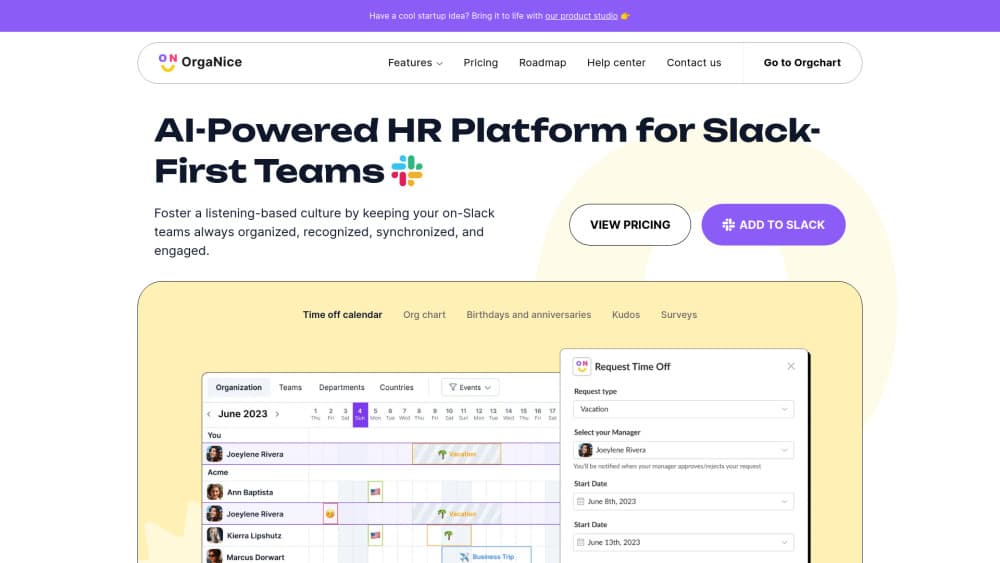
OrgaNice is a Slack app suite for the people side of a small company. Six modules share one bot: org chart, time off tracker, birthdays and anniversaries, kudos, surveys, and rewards. Setup happens in a web dashboard. Daily use never leaves Slack. Someone requests a day off with a button in a direct message, a manager approves it in the same thread, and the absence shows up on a shared calendar.
The product targets HR work that never justified a full platform. At 30 or 80 people, nobody wants to buy a suite with payroll, recruiting, and performance reviews to get a birthday reminder and a vacation calendar. OrgaNice sells those pieces separately, at $1.00 per app per employee per month, or all six for $1.80. If you're shopping for a Slack HR app, the pitch is simple: one install, one bill, no new tab for employees to ignore.
Two limits shape the fit. It's Slack only, so a Microsoft Teams shop gets nothing from it. And it stops at engagement and light HR admin: no payroll, no applicant tracking, no benefits enrollment. Teams that need those still keep a separate system of record, and OrgaNice either syncs with Slack profiles or runs alongside it.
Getting Started
- Install the app from the Slack App Directory or through organice.app, then approve the workspace permissions it asks for.
- Open dashboard.organice.app and map your Slack profile fields to org chart fields such as manager, department, and job title. Existing employee data gets pulled in from Slack.
- Pick the modules you want on the pricing page. Each one can be switched off later, and the 14-day trial opens all six.
- Configure the parts your team will actually notice: who approves time off, which channel gets celebration posts, the coin value of a kudos, and how often surveys go out.
- Run one cycle end to end, usually a PTO request plus a round of kudos, before you announce it in a company channel.
Product Information
A quick look at OrgaNice's pricing, supported platforms, and performance.
Best for
The users, tasks, and scenarios where this tool fits best.
Users
- HR generalists at 20 to 200 person companies
- Founders and office managers who handle people ops part time
- People ops leads at remote teams spread across time zones
Tasks
- Replacing the org chart spreadsheet
- Approving vacation and sick days without email chains
- Starting employee recognition on a small budget
Scenarios
- A new hire's first week
- Planning coverage around holidays and summer leave
- A quarterly pulse check
Key features
An AI org chart built from Slack data
OrgaNice reads the profile fields already in your workspace and generates a first draft of the reporting structure in one click. From there you drag people between managers, add departments, and push corrections back to Slack so both stay in sync. The value shows up during onboarding and reorgs, when the chart is the fastest answer to "who do I talk to about this."
Time off tracker for Slack with real approval flows
Requests, approvals, and rejections happen in Slack messages, with buttons instead of forms. Admins can set a separate approval channel for companies that route leave through several managers, and approved absences post straight into a channel of your choice. A shared absence calendar shows who is out and when, which is the part managers use most.
Slack status updates tied to leave
When a vacation or sick day starts, the employee's Slack status switches to the matching emoji and text, then returns to normal when they're back. It's a small automation that removes the "are you around today?" messages. Admins choose the status text for each leave type.
Kudos tied to company values
Recognition takes a few clicks, with emoji and GIF support, and each kudos can be tagged to one of your values. Weekly reminder posts nudge people to send thanks, and admins get usage data that shows who receives recognition and who has gone quiet. That last part is useful before a performance conversation.
A coin economy for real rewards
Every kudos, completed profile, or survey response can pay out coins. Employees spend them in a marketplace you build yourself, with rewards like a coffee, a book, or an extra day off, each with its own price and icon. Templates get a program running on day one, and the bot announces redemptions so the rest of the team sees the loop working.
Employee surveys in Slack
Pick a template, choose questions, and launch. Surveys appear as Slack messages, which is why OrgaNice reports completion rates several times higher than email surveys. Reminders, scheduling, a live dashboard, and one-click exports cover the rest of the loop.
Birthdays and anniversaries on autopilot
The bot posts celebrations on the right day in the channel you pick, with a message you can customize. Nobody has to maintain a birthday list in a spreadsheet, and new hires get added as soon as they join the workspace.
Pros and cons
Pros
- Six modules on one install and one invoice, which removes the usual tool sprawl around a Slack workspace.
- Pricing is public and granular: $1.00 per app per employee per month, or $1.80 for all six, with yearly billing taking 20% off.
- Employees never learn a new interface. Requests, kudos, and surveys all run as Slack messages.
- The 14-day trial includes every module, so you can test the PTO flow and the rewards marketplace before paying.
- An API with public docs exists for teams that need to pull or push data, which is rare at this price.
Cons
- Slack only. If part of the company works in Microsoft Teams, they're locked out of every feature.
- No payroll, applicant tracking, or performance review module, so it adds a tool rather than replacing a full HR platform.
- Per-employee pricing scales with headcount: 100 people on all six modules runs about $180 a month, and the bill climbs as you hire.
- Deeper settings such as approval routing and reward catalogs live in the web dashboard, not in Slack, which splits the admin experience in two.
Frequently asked questions
It handles the recurring people tasks a small company runs on Slack: org chart, time off requests, birthday and anniversary posts, kudos, rewards, and surveys. All of it runs through one bot, with a web dashboard for setup and reporting.
Related content
Explore related tools, skills, and articles for OrgaNice.
OrgaNice Alternatives

Base Code
Base44 (Wix) · Coding · ProductivityBase Code is a shared cloud development environment from Base44. Teammates describe changes to an existing GitHub codebase in chat, preview them live and send them back as pull requests.

Knocket
Knocket (Tencent RTC team) · Productivity · Business · ChatbotKnocket is a free live chat and contact page tool that lets visitors message you from your website, app, or a shareable link, with every reply handled from Telegram or one inbox.

FloorGen
Vinit Kumar (FloorGen) · Productivity · China AIFloorGen is a browser-based floor plan maker that turns a sentence or a sketch into an editable 2D plan and a 3D walkthrough. Export to PDF, DXF or video, and draw without an account.