

Packify.ai
Packify.ai · Image
Packify.ai is an AI packaging design tool. Describe a product in a chat and it returns 3D packaging concepts, dielines you can send to a printer, and product photos.
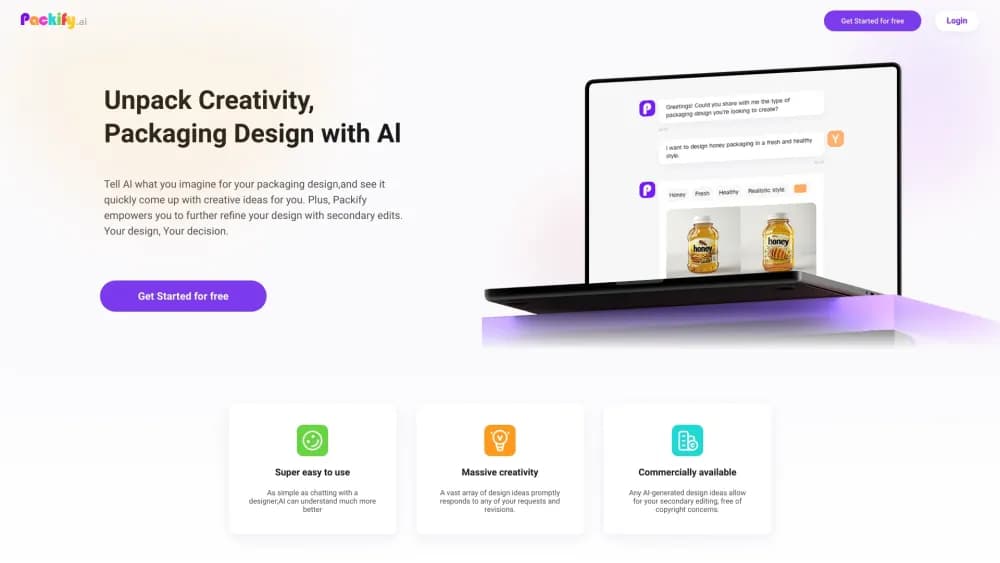
About Packify.ai
What Is Packify.ai
Packify.ai is a web app for designing packaging by conversation. You describe a product, a brand mood, or a shelf context in a chat window, and the system generates 3D packaging visuals in return. From there you keep refining with plain words instead of dragging layers in design software. The output is meant for real production, not just a pretty render: the same project can export a dieline, which is the flat cutting and folding template a printer needs before anything goes on a press.
The problem it targets is the gap between a packaging idea and a packaging file. Normally those are two different jobs handled by two different people, with weeks of back and forth in between. Packify.ai puts both in one place, so a small brand can move from a rough concept to something a supplier can quote on without hiring a studio.
There are limits worth knowing up front. The design work is credit based, and credits are consumed per generated image, so heavy iteration costs money. The platform is web only, with no desktop install. Custom structural engineering, unusual materials, and regulated claims all still need a human with production experience. The company also sells a full design service through its own team for projects that outgrow the self-serve tool.
Getting Started
- Open packify.ai and create an account. The Free plan arrives with 100 one-time credits, enough for roughly ten AI design runs at 10 credits each.
- Start a design chat and describe what you're making. Product type, target audience, colors, and the feel you want on shelf all help the first pass land closer.
- Review the generated concepts. Pick the direction you like, then ask for changes in the chat: swap a background, adjust the logo placement, or try a different label layout.
- Export the files you need. Download the 3D mockup for presentations and the dieline for your printer, then check the dieline against your supplier's specs before sending it out.
- Move to a paid plan if the project continues. Subscription credits refill each month, and Top-up credits cover spikes without changing your plan.
Product Information
A quick look at Packify.ai's pricing, supported platforms, and performance.
Best for
The users, tasks, and scenarios where this tool fits best.
Users
- Small brand owners
- Freelance designers
- Startup founders preparing a pitch
- Ecommerce sellers
Tasks
- Testing packaging concepts
- Building a dieline for a quote
- Making product images for listings
- Designing a label
- Keeping a product line consistent
Scenarios
- A bakery launching a seasonal line
- A DTC brand testing shelf appeal
- A packaging supplier's client review
- A small team without a designer
Key features
Chat Based Packaging Design
This is the core of the product. You type a description of the product and the look you want, and the agent returns 3D packaging concepts. No layers, no artboards, no software to learn. Iterate by describing the change you want, and the system regenerates. The pricing model reflects this: each AI design or edit run costs 10 credits.
Print Ready Dielines
A packaging mockup alone doesn't get you to a factory. Packify.ai exports the dieline, the flat vector template that defines cutting lines, fold lines, and bleed. Your printer works from that file, which is why the product claims to cover the gap between a nice image and a producible package. Always verify dimensions and material assumptions with your supplier before a print run.
AI Photoshoot and Background Swaps
The AI photoshoot tool places a finished package into a scene and swaps backgrounds for you. That covers the product photography you'd otherwise book a studio and a retoucher for. Each photoshoot run costs 5 credits, which makes it cheaper than a design run and practical to try several scenes.
Label and Nutrition Panel Generator
Beyond the outer box, the platform generates product labels, including back panels with nutrition facts. That matters for food and beverage brands, where the label carries compliance information and can't be treated as decoration.
Logo Integration and Brand Kits
You upload a logo and the system places it into the design, then keeps that treatment consistent across formats. Business plans add shared Brand Kits, so a team can pull the same colors, type, and logo rules into every new project instead of rebuilding the look each time.
Expert Design Service and Manufacturing Network
When the self-serve tool isn't enough, Packify's own team steps in. The company says it has more than 20 packaging designers and has supported over 2,000 custom projects. The print network connects you to verified packaging manufacturers, which shortens the search for someone who can actually produce what you designed.
Pros and cons
Pros
- The output goes past the mockup stage into dielines, which is where most AI design tools stop and where real money gets spent.
- The chat interface removes the training time that comes with professional design software, so a marketing lead can produce a first draft.
- Credit packs and a 100-credit free tier let you test the output before committing to a subscription.
- The combination of design, label generation, and a manufacturer directory covers more of the launch checklist than a single purpose tool.
- Team features on higher plans share brand assets across projects, which keeps a product line from drifting.
Cons
- Credits are spent per generated image, and heavy iteration on a complex pack can burn a month's allowance quickly. Top-up credits cost extra.
- The self-serve tier leaves structural engineering and material choice to you, so an unusual pack shape may still need a packaging engineer.
- There's no desktop app or offline mode, which is a problem on a slow connection or in a print shop with locked down networks.
- Dielines still need checking against your printer's specifications. Treat the export as a starting file, not a certified production asset.
Frequently asked questions
Packify.ai designs product packaging from text prompts. You describe a product and a brand direction, and it generates 3D packaging visuals, product labels, and printable dielines. It's a packaging mockup generator and labeling tool in one place, aimed at brands and sellers who need packaging design without hiring a studio for every SKU.
Related content
Explore related tools, skills, and articles for Packify.ai.
Packify.ai Alternatives

Google EmbeddingGemma 2
Google DeepMind · Writing · Image · CodingGoogle EmbeddingGemma 2 is a 740M-parameter open model that turns text, code, images, audio, and video frames into vectors in one 768-dimension space, running on phones and laptops.

Tractionwave
TractionWave · Image · MarketingTractionWave is an AI attention heatmap tool for static ads. Upload a PNG or JPG and it returns predicted attention, ranked hotspots, and fixes before you spend budget.

Imejis.io
Imejis.io · Image · MarketingImejis.io is an AI design studio for agents and marketing teams. Describe an image in plain words, and it writes the copy, builds the layout, reflows it to every size, then exports a finished file.