

Pactto
Pactto · Productivity · Business
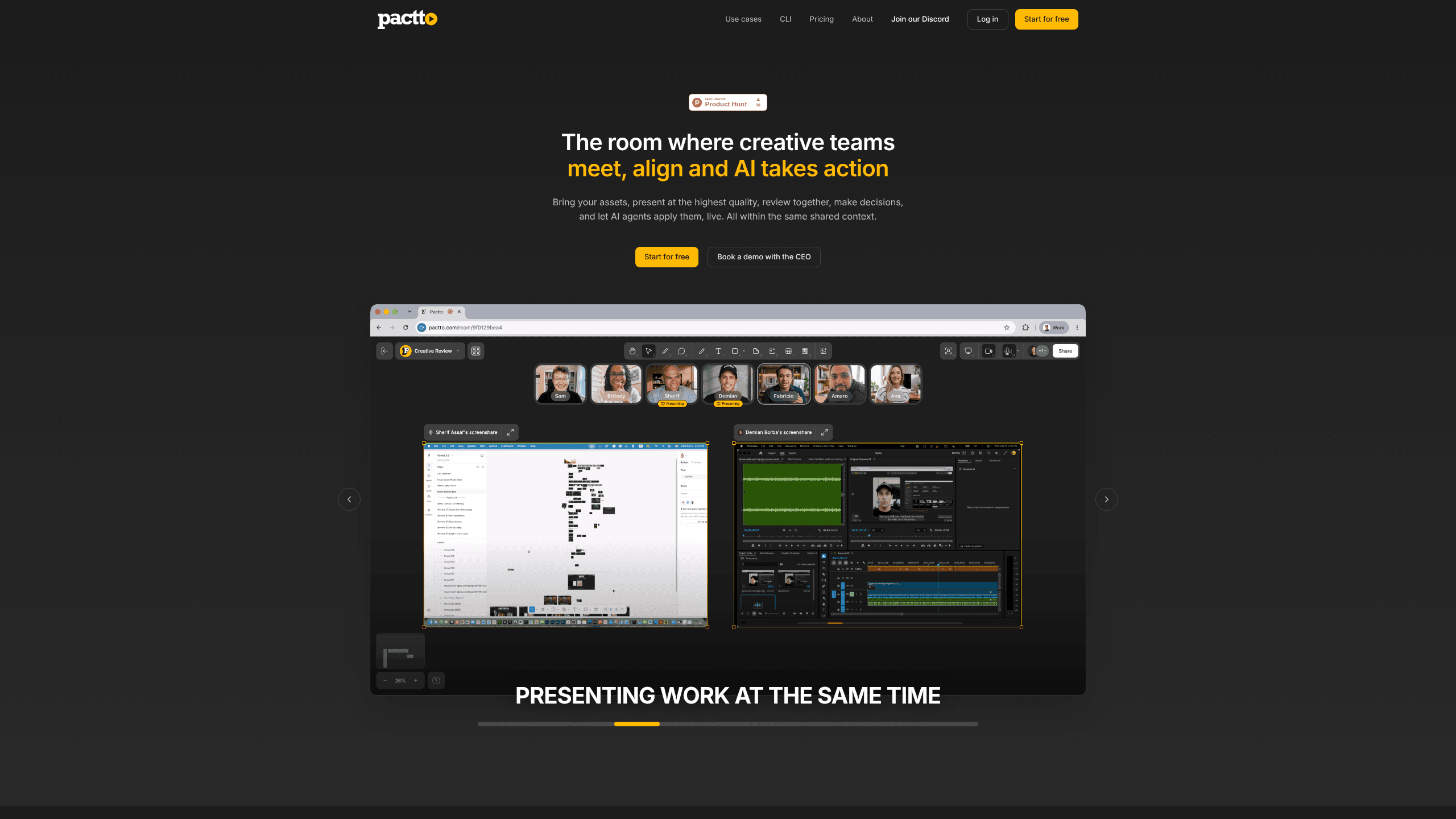
Pactto is a web-based AI creative review platform where teams present work at studio quality, discuss it in a persistent room, and let an AI agent turn feedback into edits and approvals.
About Pactto
What Is Pactto
Pactto is a workspace for the part of creative work that happens after the file is exported, and it treats creative review and approval as one continuous conversation. Teams upload video, images, PDFs, audio, or live screens into a room, watch the work together at full quality, and decide what changes before anyone reopens an editor.
The problem it targets is familiar to anyone who has shipped a campaign. Generation got faster, so review became the slow step. Notes arrive in three channels, decisions vanish when a call ends, and version numbers climb while stakeholders wait.
Pactto presents itself as an AI agent for creative teams, and the room is the place where that agent does its work. Rooms carry the context forward. A room remembers the conversation, the annotations, and the decisions, so a follow-up session starts with the AI already knowing what was settled. On the free plan that memory covers only the latest session. Pro keeps the full history.
Getting Started
- Create an account at pactto.com with email or Google Sign In. The free plan needs no card and gives you two rooms.
- Drag assets into a room from your computer, or connect Adobe Frame.io and Google Drive on Pro to pull in files you already organized.
- Invite the people who need to weigh in. On Pro, guests join a room through a link without an account or a paid seat.
- Share the canvas inside one of the live review rooms and go through the work together. Draw on a frame, speak a comment, or type it, and pin each note to the exact frame or frame range.
- Ask the agent to act. It can apply a grade, generate alternative shots, or write a doc with every action item from the session.
Product Information
A quick look at Pactto's pricing, supported platforms, and performance.
Best for
The users, tasks, and scenarios where this tool fits best.
Users
- Creative agencies
- In-house brand and video teams
- Producers and account managers
Tasks
- Reviewing a cut frame by frame
- Approving a campaign before everyone logs off
- Bringing a distributed team onto one conversation
Scenarios
- A weekly client review with four stakeholders in three time zones
- A podcast team mapping an episode into social cuts
- An architecture studio walking a client through renders and plans
Key features
Persistent Rooms With Room Memory
Every project gets a room, and the room keeps its history. Come back a week later and the agent still knows what was approved, what was flagged, and which asset is current. This is the feature that separates Pactto from a video call: a meeting ends and leaves nothing behind, while a room accumulates. The free plan keeps one session of memory, which is enough to test the idea but not enough to run a long project on.
Live Editing Through an AI Agent
You can say "the pacing in the middle feels slow" or "warm up the grade on the hero shot," and the assistant turns that into an action on the canvas. It can also generate alternative hero images, create a doc listing every task from the session, or reorganize a board by moving images and notes. Rooms support custom instructions, so an agency can match the assistant to its own review language.
Studio-Quality Playback and Multi-Screen Sharing
Studio-quality video review means video plays at full quality and stays in sync for everyone, so a color decision isn't made through a compressed screen share. Frame accuracy matters here: if the team is arguing about a two-second transition, everyone needs to see the same two seconds. Several people can share screens at once, which lets an editor in Premiere and a designer in Figma work in front of the same audience.
Voice Comments Pinned to Frames
Speaking a note is faster than typing it, and Pactto keeps the nuance that a written summary loses. Comments attach to a specific frame or frame range, and you can draw lines, shapes, text, or freehand marks directly on the work. The agent reads those annotations as part of the context when it proposes a change.
Real-Time Translation for Distributed Teams
The assistant transcribes the conversation by speaker and timestamp, then translates it live into each participant's language. Eleven languages are supported, including English, Spanish, Portuguese, French, German, Japanese, Korean, and Arabic. A producer can follow a review in their own language without an interpreter on the call.
Approvals, Status Tracking, and Asset Integrations
Decisions happen inside the room instead of a separate tracker. Statuses move as the conversation moves, and documents update while the session runs. Assets arrive from local folders, and the Frame.io integration comes through a partnership with Adobe. Google Drive and Air connect the same way, with Dropbox listed as coming. Pro also adds CLI access, so you can point Claude Code or Codex at a room and read or write its contents from a terminal.
Pros and cons
Pros
- Presenting, reviewing, and approving happen in one place, which shortens the loop between a note and a new version.
- Room memory keeps context across sessions, so a follow-up review doesn't restart from a blank page.
- Voice comments and frame-pinned annotations preserve detail that typed feedback usually loses.
- Live translation in eleven languages makes a single session workable for teams spread across regions.
- Guests join free on Pro, so clients and outside collaborators don't need a paid seat.
Cons
- The free plan is a trial in practice: two rooms, a 60-minute meeting limit, 5GB of storage, and only the latest session remembered.
- AI credits are capped at 100 per month on Pro, and meeting summaries draw from that pool, so heavy rooms can run dry.
- It's a browser tool. There's no desktop app, and a weak connection turns a full-resolution review into a frustrating one.
- Dropbox and Air imports are listed as coming soon, and SOC 2 is still in progress, which matters for procurement teams that need certified vendors.
Frequently asked questions
Pactto gives a creative team one room to present assets, review them together, leave feedback, and approve the result. An AI agent listens to the session, captures the feedback as structured comments, and can apply changes to the work on the canvas.
Related content
Explore related tools, skills, and articles for Pactto.
Pactto Alternatives

Base Code
Base44 (Wix) · Coding · ProductivityBase Code is a shared cloud development environment from Base44. Teammates describe changes to an existing GitHub codebase in chat, preview them live and send them back as pull requests.

Knocket
Knocket (Tencent RTC team) · Productivity · Business · ChatbotKnocket is a free live chat and contact page tool that lets visitors message you from your website, app, or a shareable link, with every reply handled from Telegram or one inbox.

FloorGen
Vinit Kumar (FloorGen) · Productivity · China AIFloorGen is a browser-based floor plan maker that turns a sentence or a sketch into an editable 2D plan and a 3D walkthrough. Export to PDF, DXF or video, and draw without an account.