

Palette Hunt
Palette Hunt · Image
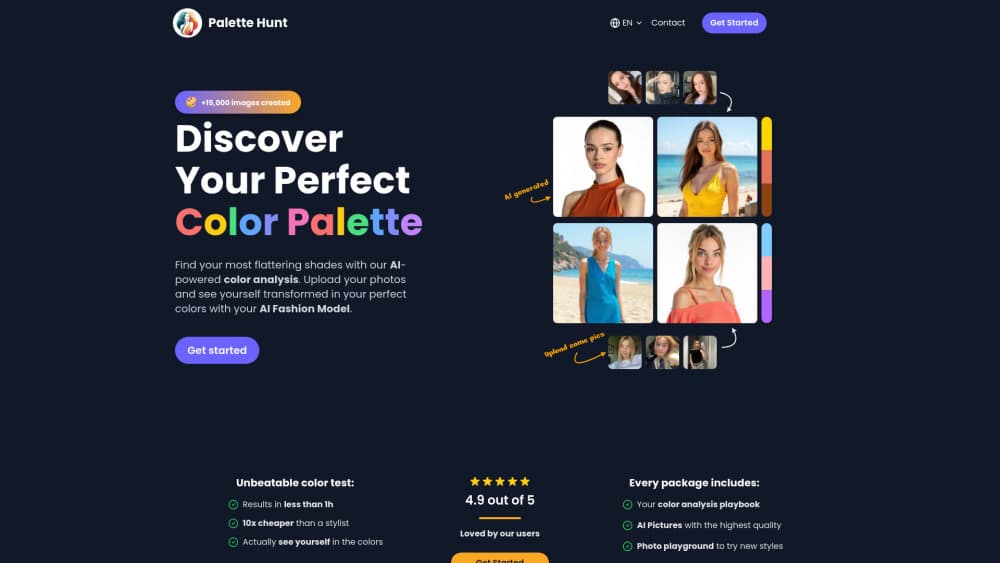
Palette Hunt is an AI personal color analysis tool. A selfie returns your season, undertone, and 30-color palette, then previews hair, makeup, and outfits on your own face.
About Palette Hunt
What Is Palette Hunt
Palette Hunt is a browser-based color analysis tool built by a small independent team led by founder Ricardo Fernández. You upload one selfie in natural light, and its computer vision models read your skin undertone, contrast, and natural coloring against a seasonal framework, then place you in one of 16 sub-seasons. The output is your season, a 30-color palette, makeup recommendations, and a list of your best and worst shades.
The pitch is speed and price. A traditional in-person draping session costs hundreds of dollars and needs to be booked weeks ahead; a free internet quiz guesses from a handful of multiple-choice answers. Palette Hunt tries to land in between: the accuracy of a professional consultation, returned in minutes from a photo you already have. You get the analysis first, then decide whether to pay.
The platform follows the 16-season Sci\ART system, an expansion of Carole Jackson's four-season model from "Color Me Beautiful" that adds value, chroma, and hue to the original scheme. The central limitation is that a photo-driven analysis depends on photo quality. Poor lighting, heavy makeup, or filters distort undertone readings, and the tool asks for a clean, well-lit selfie so the models have honest input.
Getting Started
- Sign in with Google or email. Your account holds your analysis, palette, and previews.
- Upload a head-and-shoulders selfie in natural daylight, without heavy makeup or filters.
- Let the AI return your season, undertone, and 30-color palette.
- Use the studio to preview hair colors, makeup, and outfits on your face, or generate a full AI photoshoot in your colors.
Product Information
A quick look at Palette Hunt's pricing, supported platforms, and performance.
Best for
The users, tasks, and scenarios where this tool fits best.
Users
- People who want their seasonal colors without a pricey consultation
- Shoppers who keep buying the wrong shades
- Anyone considering a hair color change
- Men building a small wardrobe
Tasks
- Taking a skin undertone test
- Matching makeup to your coloring
- Planning an outfit around your colors
- Previewing a full look before an event
Scenarios
- Deciding on a hair color before a salon appointment
- Shopping for clothes you'll actually wear
- Preparing for a professional headshot or event
- Building a capsule wardrobe over time
Key features
Photo-Based Color Analysis
A single selfie drives the whole result. The AI reads skin undertone, contrast level, and natural features, then maps them to the 16-season Sci\ART framework and returns your season, palette, and makeup guidance. The tradeoff is that the read is only as good as the photo you upload.
AI Photoshoot
Generates magazine-style images of you styled in your best colors, so you see a full look rather than a swatch card. It runs on the credits included with the paid plans, and higher-quality renders cost more credits per image.
Virtual Hair Color Try-On
Renders 36 or more shades, including golden and ash blondes, caramel and mushroom browns, copper, auburn, burgundy, espresso, blue-black, and gray, on your real face from your photos. You can try a single shade or line up a shortlist side by side and save the images to show a colorist.
Makeup Color Matcher
Reads your undertone and returns matched foundation, blush, lipstick, and eyeshadow families. It keeps every product on the same temperature side as your skin, which is the fix for the mismatched base-and-blush look.
Outfit Color Matcher
Helps you build combinations from an anchor color, a grounding neutral, and one accent, with a quick reference table for base colors like navy, black, beige, and olive. It separates color harmony (why clothes go together) from personal color analysis (why they suit you).
AI Stylist
A conversational stylist that takes a vibe, occasion, or mood and renders the look on your face, then lets you adjust it in follow-up messages. It turns styling advice into something you can see before you buy.
Body Shape and Kibbe Tools
Additional styling quizzes, including a body shape calculator and a Kibbe body type quiz, sit alongside the color tools. They cover fit and silhouette rather than color, so they complement the palette work instead of replacing it.
Pros and cons
Pros
- The color analysis itself is free. You upload a selfie and get your season, 30-color palette, undertone analysis, and makeup recommendations before paying anything.
- Paid plans are one-time purchases, not subscriptions. Essential is $19, Complete is $29, and Studio Pro is $59, with credit packs of 15, 400, and 1500 that never expire.
- Previews render on your own photo rather than a stock model, so the shade reacts to your real skin and lighting.
- The hair try-on covers a wide range in one place, from natural blondes and browns to bold reds and gray coverage.
- Palette Hunt states that photos are encrypted, used only to render your results, and never sold, which matters for a tool that asks for your face.
Cons
- Results depend on photo quality. A dim, filtered, or heavily made-up selfie can distort the undertone reading, so you may need to reshoot for an accurate analysis.
- The most useful studio previews sit behind the paid plans. The free tier gives you the analysis, but photoshoots, hair, makeup, and outfit previews burn credits, and a photoshoot can run several credits per image.
- Palette Hunt is web-only. There is no offline mode and no dedicated color analysis app, so every session needs a browser and a connection.
- There is no public API or developer documentation, which rules it out for anyone who wanted to fold the analysis into another product or workflow.
- Color analysis narrows your range, but a photo can still miss subtle shifts. The tool frames its result as a fast starting point rather than a replacement for every professional draping session.
Frequently asked questions
The color analysis is free. You upload a selfie and get your season, undertone, 30-color palette, and makeup recommendations without paying. The studio previews, which render photoshoots, hair, makeup, and outfits on your face, use credits tied to the paid plans.
Related content
Explore related tools, skills, and articles for Palette Hunt.
Palette Hunt Alternatives

Google EmbeddingGemma 2
Google DeepMind · Writing · Image · CodingGoogle EmbeddingGemma 2 is a 740M-parameter open model that turns text, code, images, audio, and video frames into vectors in one 768-dimension space, running on phones and laptops.

Tractionwave
TractionWave · Image · MarketingTractionWave is an AI attention heatmap tool for static ads. Upload a PNG or JPG and it returns predicted attention, ranked hotspots, and fixes before you spend budget.

Imejis.io
Imejis.io · Image · MarketingImejis.io is an AI design studio for agents and marketing teams. Describe an image in plain words, and it writes the copy, builds the layout, reflows it to every size, then exports a finished file.