

AiPassportPhotos
AiPassportPhotos · Image
AiPassportPhotos is a free online passport photo maker. Upload a selfie and it crops to size, fixes the background, and checks your shot against official rules for your country.
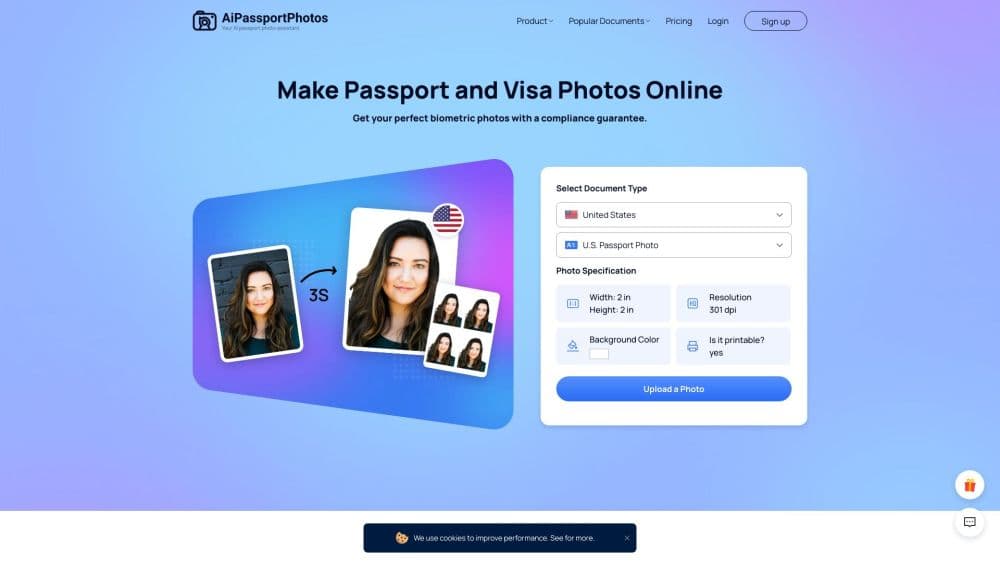
About AiPassportPhotos
What Is AiPassportPhotos
AiPassportPhotos is a browser-based tool for making passport, visa, and ID photos without a photo studio. It works as a passport photo maker and a visa photo maker in one place: you upload a picture you already took, pick your document type, and the AI crops it to the right size, swaps in a plain white or off-white background, and runs a compliance check against that country's published rules. What comes out is a digital photo plus a printable sheet you can take to any print shop.
The draw is the cost and the waiting. A studio visit means an appointment, a queue, and a fee for two prints. Here you shoot a photo at home, upload it, and download the result in minutes. The site keeps the whole workflow free, from the compliance preview to the final digital file.
Two things set the limits. You still have to take a usable source photo, so lighting and pose are on you. And the tool corrects framing and background, not your face. The U.S. Department of State now rejects photos altered with AI face-editing or skin smoothing, so the tool keeps your features intact on purpose.
Getting Started
- Open aipassportphotos.com in any browser. There's nothing to install and no account needed to try it.
- Take a source photo against a plain wall, with even light and your face straight to the camera. A rear phone camera works fine.
- Upload the photo and select your document type, such as U.S. passport or visa. The tool detects your face and applies that country's size and background rules.
- Review the result and the compliance check. If the framing is off, crop again or upload a new shot. Attempts stay free.
- Download the digital photo, plus the printable template, and print it at a local shop if you need a physical copy.
Product Information
A quick look at AiPassportPhotos's pricing, supported platforms, and performance.
Best for
The users, tasks, and scenarios where this tool fits best.
Users
- Applicants who need a passport or visa photo fast
- Parents making photos for babies and kids
- Budget-conscious travelers
Tasks
- Making passport photos at home with an online passport photo tool
- Preparing a visa or ID photo for another country
- Fixing a photo that got rejected
- Printing a sheet of photos
Scenarios
- A passport renewal is due and you're out of time
- Applying for a visa from a country you're not in
- Getting a child's first passport ready
Key features
AI Background Replacement
If you don't have a plain white wall, the tool removes whatever is behind you and drops in a compliant white or off-white background. That matters because a busy room or a shadow is one of the most common reasons a photo gets rejected. It handles the fix automatically, so you don't need to find a blank wall or a backdrop.
Automatic Sizing and Cropping
The tool detects your face and crops to the exact dimensions the selected document calls for, from the 2x2 inch U.S. passport format to other national sizes. Head position and proportion get set to the published range instead of leaving you to measure by hand. You upload once and get a correctly framed photo back.
Compliance Check and Feedback
Before you download, the tool reviews the photo against the chosen country's requirements and flags problems it can catch, such as an off-center head or a missing plain background. You get that check for free, and you can re-upload as many times as you like until the framing looks right.
Country-Specific Rules
The platform is trained on passport and visa photo requirements for many countries, not just one. You pick your document type and the correct dimensions, background color, and layout apply. That saves you from cross-referencing a foreign embassy page to figure out sizing.
Printable and Digital Output
You get two things from one upload: a digital file ready to attach to an online application, and a printable template. The print layout places several copies on a sheet so a single cheap print at any shop gives you the spares you might want. Both come at no charge.
No Account, No Install
Everything runs in the browser, so there's no app to download and no signup to start. You can make a photo on a laptop at home or on a phone while traveling, and the same free workflow applies either way.
Pros and cons
Pros
- Free for the core workflow, including the digital photo and the printable template, so cost isn't a barrier.
- Automatic background replacement solves the single most common cause of rejection without a studio or backdrop.
- Country-specific sizing means you don't have to look up dimensions for a foreign passport or visa yourself.
- No account or install required, so you can make a photo on any device with a browser.
- Unlimited free retakes help with hard subjects like babies and young children.
Cons
- You still need a decent source photo. Poor lighting, a tilted head, or a wrong pose won't be fixed for you, and those are the errors that actually get a photo rejected.
- There's no mobile app or offline mode, so you're tied to a browser and an internet connection.
- The tool corrects framing, not your face. If a photo is rejected for expression or accessories, you'll have to retake it.
- No public API, so you can't fold the process into an automated document workflow.
Frequently asked questions
Yes. The core workflow, from the compliance preview to the digital photo and printable template, doesn't cost anything. You only pay if you choose to have a local shop print the file for you.
Related content
Explore related tools, skills, and articles for AiPassportPhotos.
AiPassportPhotos Alternatives

Google EmbeddingGemma 2
Google DeepMind · Writing · Image · CodingGoogle EmbeddingGemma 2 is a 740M-parameter open model that turns text, code, images, audio, and video frames into vectors in one 768-dimension space, running on phones and laptops.

Tractionwave
TractionWave · Image · MarketingTractionWave is an AI attention heatmap tool for static ads. Upload a PNG or JPG and it returns predicted attention, ranked hotspots, and fixes before you spend budget.

Imejis.io
Imejis.io · Image · MarketingImejis.io is an AI design studio for agents and marketing teams. Describe an image in plain words, and it writes the copy, builds the layout, reflows it to every size, then exports a finished file.