
PDF.ai
Damon Chen · Productivity
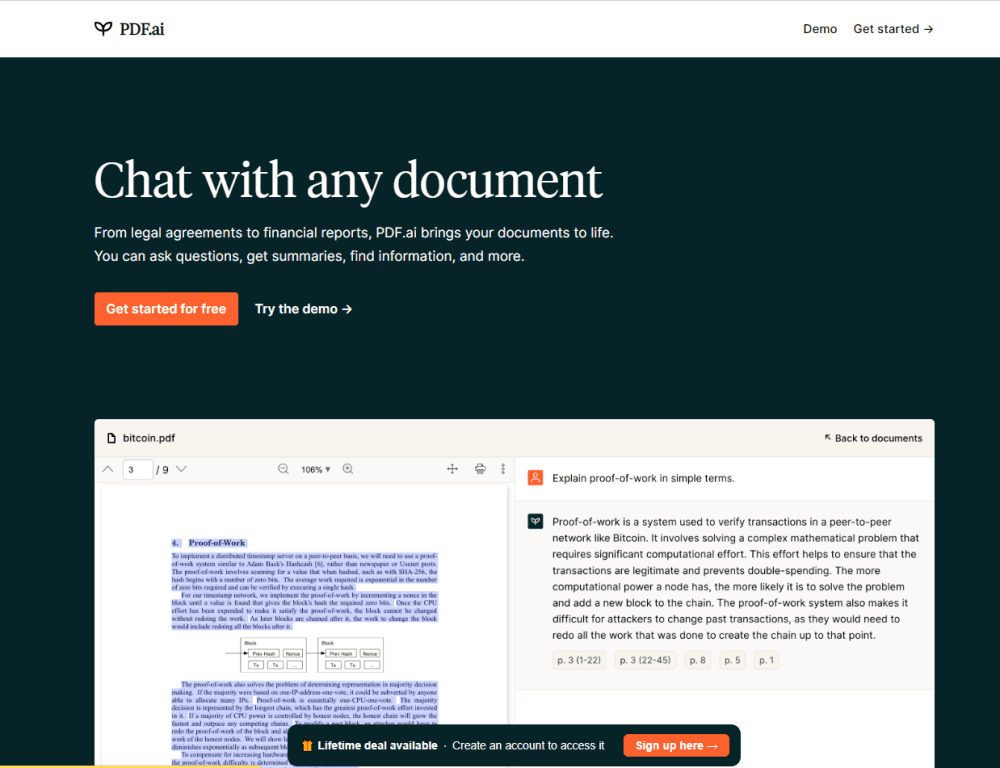
PDF.ai is an AI PDF chat tool that answers questions, pulls out summaries, and finds details inside any document. It reads scanned files, works across several PDFs at once, and adds a Chrome extension for PDFs you open in the browser.
About PDF.ai
What Is PDF.ai
PDF.ai is a web app for talking to your documents instead of scrolling through them. Upload a contract, a research paper, a tax filing, or a 200-page report, then ask questions about a PDF in plain language. The AI answers from the file and points you to the pages it used, so you can check the source yourself.
The product started as a build on top of GPT-4 and grew into a full document workspace. As a PDF summarizer and PDF OCR tool in one, it reads image-based PDFs with OCR, handles several documents in a single chat, and lets teammates share access to the same files. Language is not a barrier either: upload a PDF written in one language and ask your questions in another.
The limits sit mostly on the free plan. The Hobby tier is free forever but caps usage, so anyone reading large files every day or needing team seats has to pay. The API for developers is a separate paid add-on.
Getting Started
- Go to pdf.ai and create an account with your email or Google login.
- Upload a PDF from your computer, or paste a public link to one.
- Ask a question in the chat panel and read the answer alongside the pages it cites.
- Add more files to the same chat, invite teammates, or install the Chrome extension to chat with PDFs you open on the web.
Product Information
A quick look at PDF.ai's pricing, supported platforms, and performance.
Best for
The users, tasks, and scenarios where this tool fits best.
Users
- Students
- Researchers
- Lawyers and analysts
- Small teams
Tasks
- Summarizing a long report
- Reading a scanned file
- Searching across documents
- Working in translation
Scenarios
- Deadline research
- Due diligence on a deal
- Everyday reference
Key features
Chat With Any PDF
Ask a question about a document in everyday language and get an answer drawn from the file itself. PDF.ai handles contracts, papers, manuals, and reports, so you can find a clause or a figure without reading the whole thing.
Chat With Multiple PDFs at Once
Open several documents in one chat and let the AI pull from all of them. This helps when an answer is spread across a set of files, like a batch of invoices or a series of related papers, and you would rather not search each one separately.
OCR for Scanned Documents
Upload image-based PDFs, scans, or photographed pages and let OCR turn them into text you can search. This covers older documents and receipts that carry no text layer and would otherwise sit unreadable to a chat tool.
Chrome Extension
Install the extension and a chat panel appears on any PDF you open in the browser, whether it lives online or on your machine. It also links up with Google Drive and Dropbox, so you can chat with cloud files without downloading them first.
Multi-Language Support
Upload a PDF written in one language and ask your questions in another. The answers come back in the language you choose, which is useful for reading foreign contracts, papers, or product manuals.
Team Workspaces
Invite people to your account and give them access to the same documents. Everyone chats with the same files, which keeps a small team on one shared set of source material instead of passing copies around.
Tags and Prompt Library
Sort documents with tags so related files stay together. The prompt library saves the questions you ask often, so you do not retype the same request every time you open a new document.
Pros and cons
Pros
- Reads image-based and scanned PDFs through OCR, so files without a text layer still work.
- Handles several documents in one chat, which suits research and comparison work.
- Answers point back to the pages they came from, so you can check the source.
- The Chrome extension covers PDFs you open in the browser, including Google Drive and Dropbox files.
- A free Hobby plan lets you test the tool before paying.
Cons
- The free plan caps usage, so regular readers hit the limit and need a paid seat.
- Team access and higher limits sit on the pricier tiers, which adds up for a small group.
- There is no dedicated mobile app, so phone users rely on the browser.
- The developer API is a separate paid add-on rather than part of the standard plans.
Frequently asked questions
PDF.ai lets you chat with a PDF instead of reading it cover to cover. You ask questions, get summaries, and pull out specific details, with answers linked to the pages they came from.
Related content
Explore related tools, skills, and articles for PDF.ai.
PDF.ai Alternatives

Base Code
Base44 (Wix) · Coding · ProductivityBase Code is a shared cloud development environment from Base44. Teammates describe changes to an existing GitHub codebase in chat, preview them live and send them back as pull requests.

Knocket
Knocket (Tencent RTC team) · Productivity · Business · ChatbotKnocket is a free live chat and contact page tool that lets visitors message you from your website, app, or a shareable link, with every reply handled from Telegram or one inbox.

FloorGen
Vinit Kumar (FloorGen) · Productivity · China AIFloorGen is a browser-based floor plan maker that turns a sentence or a sketch into an editable 2D plan and a 3D walkthrough. Export to PDF, DXF or video, and draw without an account.