

PDF Generator in ChatGPT
Strive Math · Productivity · Business
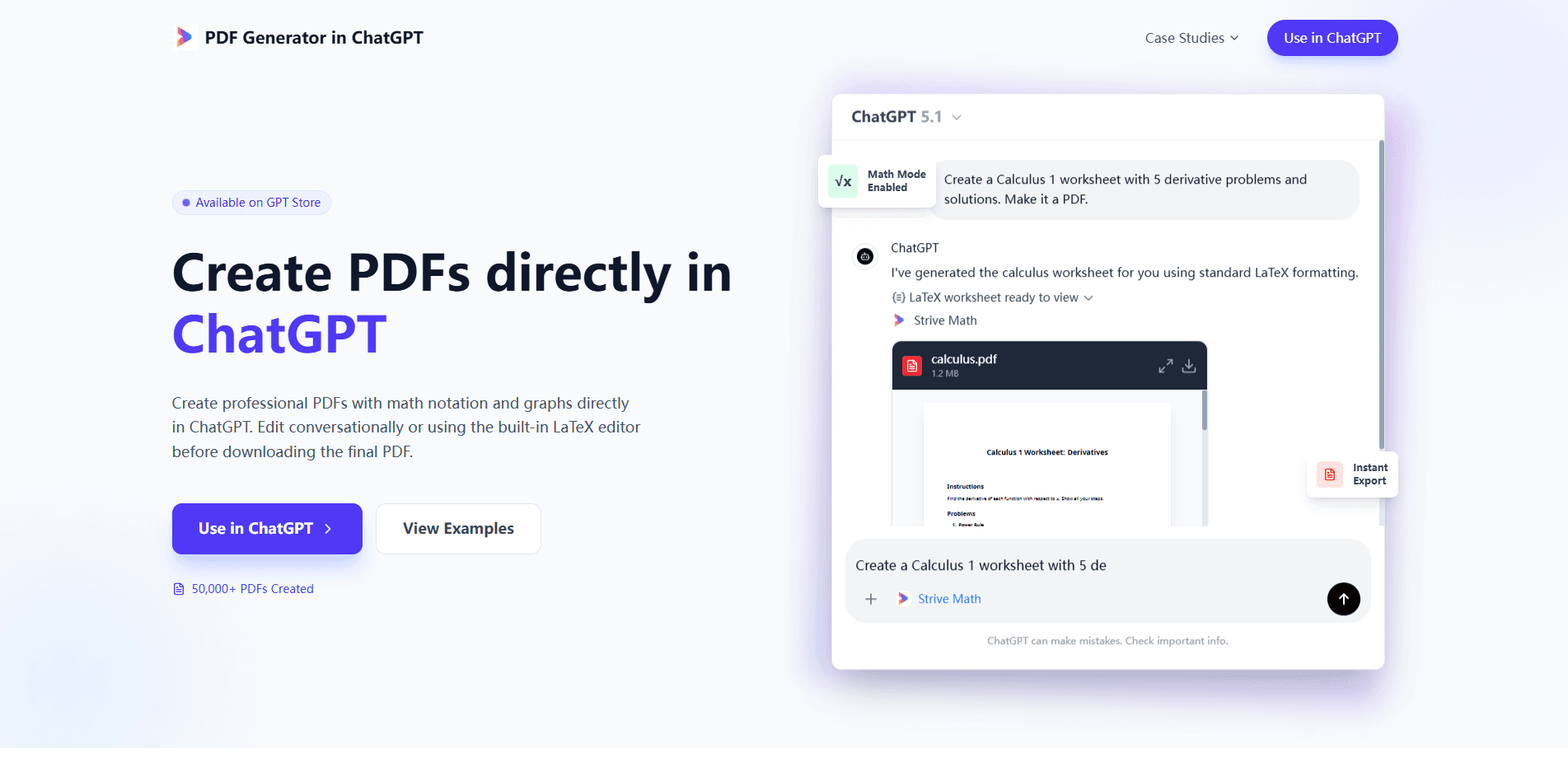
PDF Generator in ChatGPT is a ChatGPT app that turns a normal chat prompt into a finished PDF. It handles the tricky parts that built-in exports usually break, like calculus notation, matrices, and scientific layouts, and it runs on Strive Math's LaTeX typesetting engine. Think of it as a ChatGPT PDF tool with a real typesetting engine underneath. You don't need a separate account, a paid plan, or dedicated PDF software. Ask for a worksheet, a report, or a handout, review it in the chat, and download it when it looks right. That's it.
About PDF Generator in ChatGPT
What Is PDF Generator in ChatGPT
It's an app inside ChatGPT that builds PDFs from plain conversation. You type what you want, the tool typesets it, and you get a downloadable file. The pitch is simple: stop fighting formatting tools and let the chat handle layout. No drag-and-drop. No template hunting. According to Strive Math, the tool has already produced more than 50,000 PDFs.
The thing that separates it from a generic "print to PDF" shortcut is math and science formatting. Standard exports tend to mangle equations, subscripts, and multi-line derivations, so a formula that looked fine in the chat can arrive as broken symbols once it lands in a file. This app renders them properly through LaTeX, so a calculus worksheet or a physics report looks the way a textbook would. That's the whole point. It matters if your document has to be handed to a class, a supervisor, or a journal.
The catch is that everything lives inside ChatGPT. There's no standalone web editor and no way to use it outside the ChatGPT Apps environment, so you'll need a ChatGPT account to reach it at all, which is a real limit if you wanted a tool that lives in your browser bookmarks or your own document pipeline. Pricing for the app itself is free, but access still depends on the ChatGPT platform you're running.
Getting Started
- Open ChatGPT and go to the Apps or GPT store section, then search for Strive PDF Generator.
- Launch the app inside your ChatGPT session. No separate sign-up is needed.
- Describe the document you want: worksheets, reports, handouts, or papers, with the structure and style you need.
- Review the draft in the chat. Ask for edits in plain language if something's off.
- Open the built-in LaTeX editor for finer control, then download the finished PDF.
Product Information
A quick look at PDF Generator in ChatGPT's pricing, supported platforms, and performance.
Best for
The users, tasks, and scenarios where this tool fits best.
Users
- Students and tutors
- Teachers and lecturers
- Researchers and engineers
- Anyone frustrated by "print to PDF"
Tasks
- Generating math worksheets
- Writing technical reports
- Building class handouts
- Revising a finished PDF
Scenarios
- Preparing a lesson the night before class
- Drafting a lab report
- Turning chat notes into a deliverable
- Quick job-application documents
Key features
Real LaTeX Typesetting
The app supports full LaTeX, so complex calculus, matrices, integrals, and scientific layouts come out looking right. It works as a LaTeX PDF generator without the usual setup. If you've watched a "print to PDF" shortcut turn a clean equation into a jumble of symbols, this is the fix. You get typeset math that's actually readable when printed, which is the difference between a document you can hand in and one you have to retype from scratch.
Conversational Editing
You edit by talking. Spot a typo or want a section rewritten, and you ask ChatGPT to change it. Simple as that. The revised PDF comes back in seconds, so you don't need PDF editing software or a round trip through another app.
Built-in LaTeX Editor
When chat instructions aren't precise enough, the built-in LaTeX editor lets you adjust the document directly. It's the escape hatch for fine control, whether that's spacing, alignment, or a specific notation style, and it means you can fix a rendering problem without abandoning the document you've already drafted in the conversation.
No Login Required
There are no sign-up screens and no subscription for the app itself. You generate documents within your existing ChatGPT session, which cuts the usual onboarding friction for a one-off task. Just open the app and go.
Instant Export
Once the draft looks right, you download the PDF right away. There's no queue and no separate rendering step to wait on, so iterating to a final version stays quick. Speed matters when you're fixing a typo five minutes before class.
Graphs and Scientific Layouts
Beyond text and equations, the tool handles graphs and scientific formatting. That makes it usable to create PDFs with math notation and plots sitting side by side, not in separate files. For a report or a paper, that keeps everything in one place, and it means the reader never has to cross-reference an image against an equation printed several pages away.
Pros and cons
Pros
- Handles math notation and graphs that standard PDF exports break, so technical documents stay readable.
- Free to use with no separate account, which removes the setup barrier for quick jobs.
- Editing happens in plain conversation, so fixing a mistake doesn't require PDF software.
- Works inside ChatGPT, so there's nothing new to install or learn.
- Fast turnaround from prompt to downloadable file. No waiting around.
Cons
- Only works inside ChatGPT Apps, so you can't use it as a standalone PDF generator.
- No public API means you can't automate PDF creation from your own tools or scripts.
- Because it's free and chat-based, there's no formal support tier or SLA if something goes wrong.
Frequently asked questions
Launch the Strive PDF Generator app inside ChatGPT, describe the document you want, and the app typesets it for download. You can then revise it in the chat or in the built-in LaTeX editor before saving the final file.
Related content
Explore related tools, skills, and articles for PDF Generator in ChatGPT.
PDF Generator in ChatGPT Alternatives

Base Code
Base44 (Wix) · Coding · ProductivityBase Code is a shared cloud development environment from Base44. Teammates describe changes to an existing GitHub codebase in chat, preview them live and send them back as pull requests.

Knocket
Knocket (Tencent RTC team) · Productivity · Business · ChatbotKnocket is a free live chat and contact page tool that lets visitors message you from your website, app, or a shareable link, with every reply handled from Telegram or one inbox.

FloorGen
Vinit Kumar (FloorGen) · Productivity · China AIFloorGen is a browser-based floor plan maker that turns a sentence or a sketch into an editable 2D plan and a 3D walkthrough. Export to PDF, DXF or video, and draw without an account.