

PDF2Anki
XonLabs · Productivity · Leaning
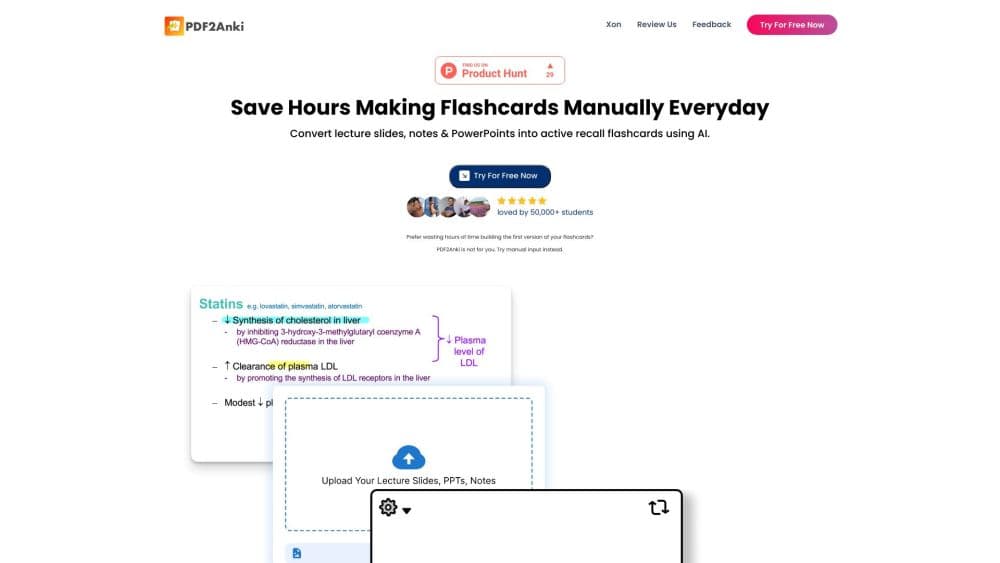
PDF2Anki, now rebranded as Memo, is an AI flashcard maker that turns PDFs, videos, and notes into flashcards, quizzes, and mind maps, with Anki export for spaced repetition.
About PDF2Anki
What Is PDF2Anki
PDF2Anki started as a simple idea: take a lecture PDF and turn it into Anki flashcards without retyping a single card. It grew into Memo, an AI knowledge workspace built by two medical students who got tired of losing hours to manual card making. The old pdf2-anki.com address now points to the Memo site, and the two names describe the same product.
What Memo does today is wider than the original PDF to flashcards pitch. You drop in a PDF, a YouTube lecture, a website, or plain text, and the tool reads the material, pulls out the ideas that matter, and builds study outputs from them. Flashcards are still the center of it, but you also get notes, practice tests, mind maps, and a guided audio walkthrough that narrates your documents.
A few limits are worth knowing up front. The AI actions run on a shared credit pool that resets monthly, so heavy use on the free plan hits a ceiling fast. Paid tiers lift that. Export to Anki and RemNote exists, but it works from supported card sets, so some output types stay inside Memo. And because the cards are generated, you should read them against the source before you trust them for an exam.
Getting Started
- Create a free account at the Memo site or launch the web app. No credit card is needed to start.
- Open a notebook and add your sources: upload PDFs and pick the exact page ranges, paste a YouTube link, or drop in text from a webpage.
- Ask the AI agent a question or run a Studio action to generate flashcards, notes, a mind map, or a practice test from the sources you selected.
- Review the generated set in the flashcard viewer, using column, toggle, typing, or Learn mode to study the cards.
- Export the set to Anki or RemNote, or keep it in Memo for the built-in spaced repetition schedule.
Product Information
A quick look at PDF2Anki's pricing, supported platforms, and performance.
Best for
The users, tasks, and scenarios where this tool fits best.
Users
- Medical and health science students
- University students in any subject
- Researchers and professionals
Tasks
- Turning a lecture PDF into Anki-ready cards
- Generating a practice test from course material
- Summarizing a dense document into notes
- Studying away from your desk
Scenarios
- Cramming the week before finals
- Reading a stack of research papers
- Learning from video lectures
- Sharing study material with a class group
Key features
PDF and Video to Flashcards
The core job is turning a source into cards. Upload a PDF, pick the pages you want, or paste a YouTube lecture link, and the agent reads the material and generates basic, quiz, or cloze cards. For diagrams and labeled figures, image occlusion cuts a page into masked cards. Every card links back to the page or timestamp it came from, so you can check the claim rather than take it on faith. That source link is the difference between a generator you trust and one you don't.
Multiple Card and Review Styles
Memo doesn't stop at generating cards. It gives you several ways to review them in the same window: a column view for scanning, toggle and list views for quick passes, a typing view that forces active recall, and a Learn mode that paces cards and tracks what's due. You can move between them without leaving the notebook, which matters when you want to switch from a fast pass to a hard drill on the same set.
AI Copilot With Cited Answers
You can chat with your sources instead of hunting through pages. The copilot answers questions grounded in the material you uploaded and cites the page or timestamp behind each answer. For research work, that turns a notebook into something closer to an assistant that has read everything you have. It's a retrieval tool, not an oracle, so a confusing answer still means going back to the source.
Notes, Mind Maps, and Practice Tests
Beyond flashcards, the Studio generates other study formats from the same sources. The notes generator offers bullet, table, Cornell, summary, or custom layouts. Mind maps lay out how concepts connect. Practice tests come in short-answer, multiple-choice, or mixed form. Having these in one place means you don't export to three separate apps to build a full study pack.
Track Mode and AI Professors
Track mode turns a document into a guided walkthrough. An AI voice narrates the material, the pages flip as it goes, and it stops for comprehension checks along the way. It also explains diagrams and charts, and it works across dozens of languages for both input and spoken output. For long readings, this turns passive skimming into something closer to a lecture you can follow.
Anki and RemNote Export
For people already invested in Anki, Memo exports supported flashcard sets to Anki and RemNote, so you can keep the spaced repetition routine you trust. You can also send notes out as text, PDF, or Markdown. Export works from the sets Memo supports, so it isn't available for every generated output, and re-exporting is the way to apply a changed display setting.
Pros and cons
Pros
- Turns lecture PDFs, YouTube videos, and web pages into flashcards without manual typing, which is the whole point for busy students.
- Cards and notes carry citations back to the source page or timestamp, so you can verify what the AI produced.
- Anki and RemNote export keeps your existing spaced repetition workflow instead of locking you into a new app.
- Runs on web, desktop, iOS, and Android, so a notebook follows you across devices without manual syncing.
- Free plan with no credit card covers light use, which makes it easy to try before paying.
Cons
- AI actions draw on a shared monthly credit pool, so heavy free use runs out and paid tiers become necessary.
- Export only works for supported flashcard sets, so some generated outputs stay inside Memo.
- Generated cards can misread dense or diagram-heavy material, which means spot-checking against the source is not optional.
- There's no documented public API, so you can't wire the generator into your own tools or scripts.
Frequently asked questions
PDF2Anki, now Memo, converts study material into learning outputs. You feed it a PDF, video, website, or text, and it generates flashcards, notes, practice tests, and mind maps from the content. The original draw was turning lecture slides into Anki cards, and that path still works through export.
Related content
Explore related tools, skills, and articles for PDF2Anki.
PDF2Anki Alternatives

Base Code
Base44 (Wix) · Coding · ProductivityBase Code is a shared cloud development environment from Base44. Teammates describe changes to an existing GitHub codebase in chat, preview them live and send them back as pull requests.

Knocket
Knocket (Tencent RTC team) · Productivity · Business · ChatbotKnocket is a free live chat and contact page tool that lets visitors message you from your website, app, or a shareable link, with every reply handled from Telegram or one inbox.

FloorGen
Vinit Kumar (FloorGen) · Productivity · China AIFloorGen is a browser-based floor plan maker that turns a sentence or a sketch into an editable 2D plan and a 3D walkthrough. Export to PDF, DXF or video, and draw without an account.