

Peak Strength
Garage Strength Sports Performance LLC · Leaning · AI Assistant
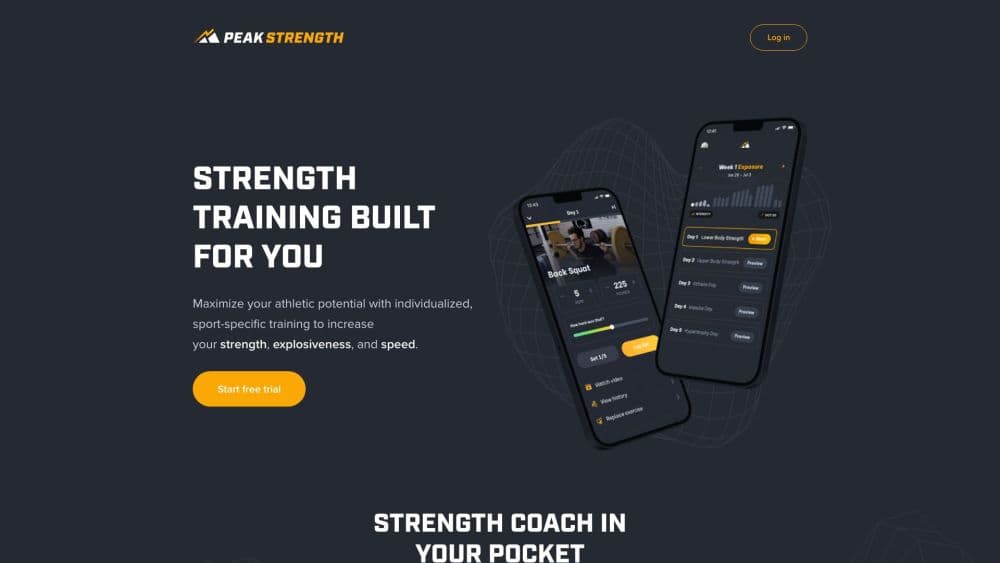
Peak Strength is a strength training app from Garage Strength that builds sport specific lifting plans for athletes, with auto adjusted weights and HD technique videos.
About Peak Strength
What Is Peak Strength
Peak Strength is the mobile training app from Garage Strength, the weight room Dane Miller runs with Olympians, college athletes, and pros in the program. The pitch is simple. You tell the app what sport you play and what gear your gym has, and it hands back a week of lifting with the exercises, sets, reps, and weights already filled in. No spreadsheet, no guessing how heavy to go on a Tuesday in October.
The company says it covers 20 training goals, 32 sports, 40 positions and events, and 3 tactical focuses for tactical athletes. Athletes can build the plan around one of four pillars: strength, explosiveness, speed, or endurance. Someone chasing a faster 40 yard dash and someone trying to add 20 kilos to a clean get different blocks, which is the point. Coaching teams get a separate dashboard for assigning and monitoring workouts.
There's a good chunk of real strength programming in there. What it isn't is a general fitness app. There are no calorie trackers, no food logs, no step counts. If you want a lifting program that respects barbells and plyo boxes, that's fine. If you want a lifestyle fitness hub, it'll feel narrow.
Getting Started
- Download the app from the App Store or the Google Play listing, then sign up with Apple, Google, or an email address. Sign up starts a 7 day free trial.
- Pick your main goal from the training goals list, then your sport or general athleticism, and your position or event if that applies.
- Answer the setup questions about experience level, days you can train, and the equipment in your gym. The answers shape every workout you'll see.
- Run your first session. You log the weight you actually lifted and rate how hard each set felt.
- Repeat the next day it's scheduled. The app reads your last session and nudges the suggested loads up or down.
Product Information
A quick look at Peak Strength's pricing, supported platforms, and performance.
Best for
The users, tasks, and scenarios where this tool fits best.
Users
- Team sport athletes
- Olympic weightlifting hobbyists
- Tactical athletes
- Teens and young lifters learning the basics
Tasks
- Planning a lifting week
- Swapping an exercise when the rack is taken
- Tracking whether the program is working
- Building team workouts
Scenarios
- Off season prep with a season start date in mind
- Training in a small home gym
- Coming back after a break
- Running a high school weight room
Key features
Sport Specific Programming
An AI workout app usually starts with your goal and stops there. This one starts from the sport you play and the role you play in it. Football linemen and wide receivers get different emphasis, and the same logic applies across basketball, soccer, baseball, and combat sports. The app ships with 32 sports, 40 positions and events, and 20 training goals, and it builds the week from those answers rather than from a generic template that ends at a squat and a bench press.
Auto Adjusted Weight Suggestions
The weight suggestions are what change how the app feels day to day. Each set comes with a suggested load, and you rate how hard it felt when you finish. Rate a set as easy and the next one loads heavier; rate it as a grind and the app backs off. Over a few weeks the suggestions drift toward what you can actually handle on a given day, which matters when sleep and school schedules are inconsistent.
Exercise Demos and Technique Cues
Each movement comes with an HD video and short cues on setup, path, and common mistakes. For someone who's never done a hang clean, that's the difference between following a program and hurting a wrist. The library also covers the Olympic lifts, plyometrics, and mobility work, so the teaching isn't limited to basic barbell movements.
Swap Any Exercise
Gyms get crowded, equipment breaks, and sometimes an exercise just doesn't work for your body. The replace option suggests a similar movement for the same slot in the session, so you can keep training without skipping the block. Frequent travelers get the most out of it, since hotel gyms rarely have everything the plan calls for.
Equipment Aware Workouts
You list what your gym has when you set up, and the app trims or substitutes exercises the plan would otherwise include. That makes a rack, a bench, and a few plates enough to run a real program. Home gym owners and school weight rooms both benefit, and the same plan can be reused when you switch locations.
Coaching Dashboard for Teams
Coaches get a separate view for assigning training across a roster, grouping athletes by sport and position, and tracking who finished their sessions. A performance dashboard shows how strong athletes are, how much the team is progressing, and estimated one rep maxes. Group rates scale down sharply with roster size, and the September 2026 update added group pricing for teams and organizations.
Pros and cons
Pros
- Programming comes from a working weight room, not a generic AI template, so the exercise selection holds up under a barbell.
- Weight suggestions adjust to your logged performance, which removes the daily guesswork of picking loads.
- The exercise swap keeps a session usable when a rack is taken or a hotel gym has two dumbbells and a treadmill.
- Technique videos and cues make the Olympic lifts approachable for lifters who train without a coach.
- The coaching dashboard gives teams one place to assign work and check completion.
Cons
- There's no calorie or nutrition tracking, so anyone who wants one app for food and lifting will need a second tool.
- Subscriptions are billed through the app stores, and Apple and Google set regional prices, so the monthly cost varies by country.
- The free trial lasts 7 days, which is short for judging a program that's built around multi week progress.
- Speed and plyometric sessions assume you have floor space and equipment beyond a basic home setup.
Frequently asked questions
It builds a sport specific training program around your position, experience level, and equipment, then guides you through each session with suggested weights, videos, and rest timers. You log what you actually lifted, and the app uses that to adjust future loads.
Related content
Explore related tools, skills, and articles for Peak Strength.
Peak Strength Alternatives

HireKey
HireKey · Voice & Language · Productivity · LeaningHireKey is an AI job search copilot built by a former tech recruiter. It checks role fit, tailors resumes, runs interview practice and tracks every application.

Lune
Retrograde Labs · Productivity · LeaningLune is a research search engine for scientific AI agents. It runs as an MCP server that lets Claude, ChatGPT and Cursor search peer-reviewed computer science papers and cite them.
Coddy
Coddy · Coding · LeaningCoddy is a gamified platform to learn to code through short interactive lessons in 20+ languages, with a browser editor, an AI tutor and free certificates.