

Peas and Pans
Peas and Pans · Productivity · Business
Peas and Pans is meal planning software for nutrition coaches and dietitians. It imports recipes, matches every ingredient to official food data, and sends branded plans as a link or PDF.
About Peas and Pans
What Is Peas and Pans
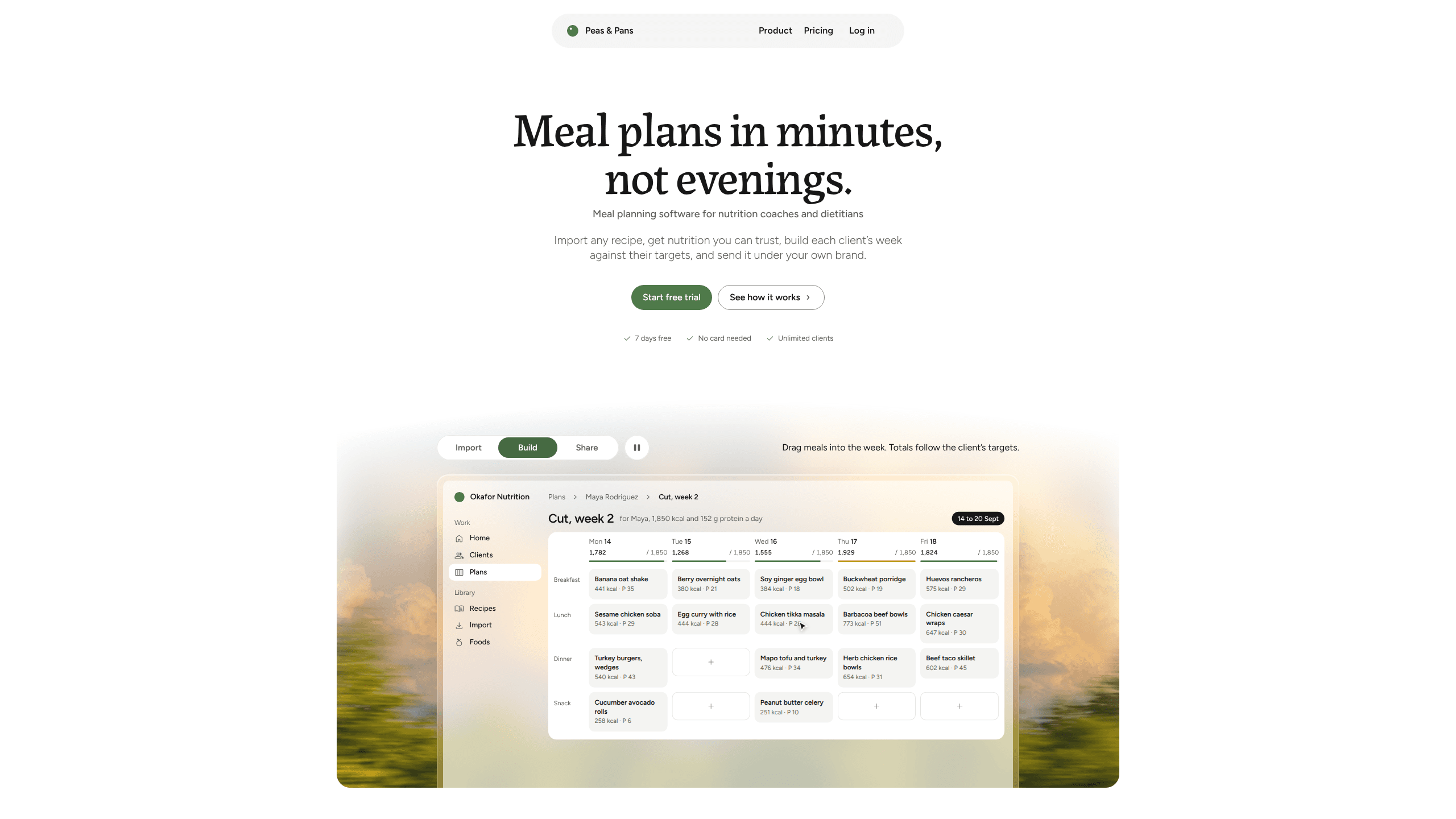
Peas and Pans is meal plan software for nutrition coaches, dietitians and personal trainers, and it runs in a browser. You set a client's calorie and protein targets, fill the week from your own recipes or the built-in library, and publish the result as a private page and a PDF under your business name.
It launched on 24 September 2026 and is run by its founder from Dehradun, India. That origin shows in the pricing: one plan, USD 29 a month, unlimited clients, no per-client fee. Most coaching software charges by seat or by active client, which gets expensive for someone with twelve clients and a part-time practice.
The job it takes over is the retyping. A recipe arrives as a link, a photo of a cookbook page, a PDF or pasted text, and the importer reads the file, pulls out the ingredients, and matches each one to a food in an official table. You check the matches rather than building the numbers from scratch. What it does not do is practice management: no clinical notes, no scheduling, no telehealth, no insurance billing. Keep those in Practice Better, Healthie or whatever you already use, and let this handle the plans.
Getting Started
- Create an account at peasandpans.com. The 14-day Pro trial needs no card, and every feature is open during it.
- Add a client and send the invite link. They answer a short intake form, and the app suggests energy, protein, carb and fat targets from the Mifflin-St Jeor equation. You change any number you disagree with.
- Build the week. Drag recipes into each day, or press Fill to populate the empty slots, then swap meals that don't fit the client's diet, allergies or dislikes.
- Pick a template, upload your logo and set your colour. Publish to the client, who gets a private link and a print-ready PDF, plus a grocery list grouped by aisle.
Product Information
A quick look at Peas and Pans's pricing, supported platforms, and performance.
Best for
The users, tasks, and scenarios where this tool fits best.
Users
- Nutrition coaches with their first paying clients
- Dietitians who have to justify every number
- Personal trainers who already get asked what to eat
Tasks
- Writing a weekly plan against calorie and protein targets
- Importing a client's own recipes
- Producing handouts you can charge for
- Running two to four week plans
Scenarios
- Sunday evening batch planning
- Onboarding a new client
- Adding nutrition to an existing coaching business
Key features
Recipe Import From a Link, Photo, PDF or Text
Paste a recipe URL, photograph a cookbook page, drop in a PDF or type the ingredients yourself. AI models read the file and pull out the ingredient list, then each line is matched to a food in your chosen table. Anything the importer is unsure about is flagged, so you confirm it instead of shipping a wrong number.
A Checked Library of 500+ Recipes
The starter library covers breakfasts, lunches, dinners and snacks, with calories, protein, carbs and fat per serving. You can browse by meal, diet and ingredients to leave out, use a recipe as it stands, or copy it and edit it into your own version. For a coach starting from nothing, it means the first plan can go out on day one.
A Week Builder With Live Targets
Drag recipes into each day and the totals add up against that client's targets as you go. Fill empties the whole week in one click. Swapping a meal keeps the calories and protein in the same range, which matters when a client says they hate salmon two hours before you publish.
White-Label Client Pages and PDFs
Each client gets a private page that opens in any browser, with no app to install and no password to remember. On Pro, the page and the PDF carry your logo, your colour and your font, and the Peas and Pans name stays off them. Six client meal plan templates run from clean to editorial, so a handout can look like the rest of your material.
Food Data You Can Trace
Ingredients are matched against USDA FoodData Central, the UK's CoFID, Canada's CNF or Australia's AFCD, and you pick the table in Settings. Each food page names its source and shows fibre, sodium and the main minerals and vitamins. When a food isn't in a national table, the app falls back to USDA rather than guessing.
Agent Access and Webhooks
A meal planning API sits behind the app, and an MCP server at api.peasandpans.com/mcp lets Claude, ChatGPT or another agent work inside your account: import recipes, add a client, draft a plan. The agent never sees intake answers or health details, and you approve the connection. Webhooks push a message to Zapier or Make when a client is added or a plan is published.
Pros and cons
Pros
- Client pages and PDFs go out under your brand on the paid plan, and clients open a link instead of creating an account.
- Every ingredient line names its food and data source, and uncertain matches are flagged for you to confirm, which is the difference between a number you can defend and one you can't.
- Recipe import accepts links, photos, PDFs and text, so a coach with a folder of family recipes doesn't start by retyping them all.
- USD 29 a month with unlimited clients and a 14-day trial without a card is simple to price into a coaching package.
- The free calculators, including a recipe nutrition calculator and macro calculator, let you check the numbers before you sign up.
Cons
- No practice management: no clinical notes, scheduling, telehealth or insurance billing, so it has to sit beside the software that holds client records.
- The company states it is not HIPAA certified, has no SOC 2 report and does not sign Business Associate Agreements, which rules it out for some clinical settings.
- Food tables cover the US, UK, Canada and Australia only. Coaches elsewhere work from USDA matches that may not reflect local products.
- There is no native iOS or Android app. The browser app can be added to a phone's home screen, but push notifications and offline use are limited.
- It is a young product from a one-person company, so support hours and the roadmap depend on one founder.
Frequently asked questions
Peas and Pans is meal planning software for nutrition coaches, dietitians and personal trainers. You set a client's calorie and protein targets, fill the week from your recipes or the library, and send the plan as a private page and a PDF in your own brand.
Related content
Explore related tools, skills, and articles for Peas and Pans.
Peas and Pans Alternatives

Base Code
Base44 (Wix) · Coding · ProductivityBase Code is a shared cloud development environment from Base44. Teammates describe changes to an existing GitHub codebase in chat, preview them live and send them back as pull requests.

Knocket
Knocket (Tencent RTC team) · Productivity · Business · ChatbotKnocket is a free live chat and contact page tool that lets visitors message you from your website, app, or a shareable link, with every reply handled from Telegram or one inbox.

FloorGen
Vinit Kumar (FloorGen) · Productivity · China AIFloorGen is a browser-based floor plan maker that turns a sentence or a sketch into an editable 2D plan and a 3D walkthrough. Export to PDF, DXF or video, and draw without an account.