

Pebblely AI Product Photography
Pebblely Pte Ltd · Image
Pebblely is an AI product photography tool that drops your product into studio-style scenes in seconds. Upload a shot, remove the background, and download marketing images.
About Pebblely AI Product Photography
What Is Pebblely
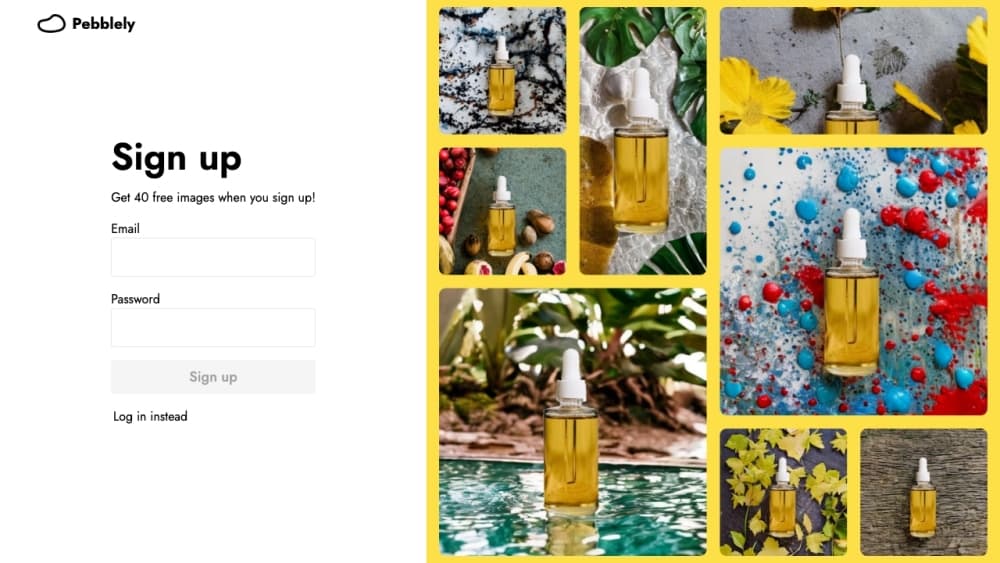
Pebblely takes the photo you already shot on a phone and rebuilds the scene around it. You upload a product image, the tool cuts it from its background, and then it paints a new setting: a marble counter, soft silk, a sunlit room, or water rippling under the item. It adds shadows and reflections so the product sits in the scene instead of floating over it.
The pitch is the shoot you skip. A studio day costs a few thousand dollars, needs a photographer and a stylist, and takes time you often don't have when a listing goes live tomorrow. As a product photo editor, Pebblely moves that work into a browser tab. Store owners on Etsy, Shopify, and Amazon use it to turn plain white-background shots into product images for ads, product pages, and social posts.
Two limits matter. The product itself doesn't change, so the tool is strong on backgrounds and weak on fixing a bad product angle. And output quality depends on how clean your cutout is, which means a busy or low-light original can need a retake. If you sell physical goods and shoot them yourself, this fits well.
Getting Started
- Sign up at pebblely.com with an email or a Google account. New accounts get a small batch of free generations to try the tool.
- Upload a product photo. Pebblely removes the background automatically, so a plain shot against any surface works.
- Pick a scene from the template library or type a custom prompt. You can describe a setting in your own words when no template matches.
- Generate and review. Pebblely returns several variations, and you keep the ones that fit your brand.
- Download the image, or use batch mode on paid plans to process many products at once.
Product Information
A quick look at Pebblely AI Product Photography's pricing, supported platforms, and performance.
Best for
The users, tasks, and scenarios where this tool fits best.
Users
- Etsy and Shopify sellers
- Brands running paid social
- Small marketing teams
- Jewelry and candle makers
- Online sellers and ecommerce sellers
Tasks
- Turning white-background photos into lifestyle shots
- Building a product page for a marketplace
- Refreshing ad creative
- Making social content
Scenarios
- A new product ships tomorrow and you have no time to book a studio
- Seasonal campaigns need themed visuals
- A client hands you raw product photos
Key features
AI Background Generation
Pebblely reads your product's shape, material, and lighting, then builds a background that fits. It adds the shadow and reflection the scene calls for, so the item looks photographed in place rather than pasted on top. This is the core of the tool: the scene is generated, not stock imagery you have to blend by hand.
Automatic Background Removal
Every upload gets its background cut before generation, which is why a plain shot works as a starting point. Clean edges matter, since a sloppy cutout shows up as a halo in the final image. Products with fine detail, like jewelry clasps or glass, need a sharp original for the best result.
Template Library and Custom Prompts
The library holds more than 100 scene templates, from marble surfaces and wooden tables to bedrooms and outdoor settings. When none match, you describe the scene yourself in plain language, covering background, surface, and mood. Custom prompts keep brand visuals consistent without hiring a designer.
Reference Images
On paid plans you can attach a reference image to guide a generation. That means you can hold a campaign look steady across many products by pointing the tool at one approved scene. It's the difference between a batch of random backgrounds and a set that reads as one brand.
Bulk Generation
Basic and Pro plans let you process many products in one run instead of one at a time. For a store with dozens of SKUs, batch mode is the feature that makes the tool practical, since a catalog refresh stops being a week-long task.
Multi-Size Output for Social
Pebblely exports images in different sizes suited to social platforms, so one product shot becomes a feed post, a story, and an ad without manual resizing. This saves the extra step of re-cropping in another editor.
Pros and cons
Pros
- Turns a plain product shot into a finished scene in seconds, which removes the cost and delay of a studio shoot.
- The template library plus custom prompts cover a wide range of looks, so most products find a fitting scene.
- Bulk generation on higher plans makes catalog-wide refreshes realistic for stores with many products.
- Automatic shadow and reflection placement gives images a photographed feel rather than a flat cutout look.
- Monthly image allowances are straightforward, with plans from 30 to 500 images per month.
Cons
- You can't change the product itself, so a bad angle or poor original stays a weak point; the tool only rebuilds the surroundings.
- Result quality leaning on a clean cutout means low-light or busy originals may need a reshoot first.
- There's no native mobile app, so everything runs in a browser and phone-only sellers have to work through the web.
- The free allowance is small and meant for testing, so regular use needs a paid plan.
Frequently asked questions
Pebblely is an AI product photography tool. You upload a product image, it removes the background, and it generates a new scene around the item with matching shadows and reflections. It's built for turning plain product shots into marketing-ready images without a photoshoot.
Related content
Explore related tools, skills, and articles for Pebblely AI Product Photography.
Pebblely AI Product Photography Alternatives

Google EmbeddingGemma 2
Google DeepMind · Writing · Image · CodingGoogle EmbeddingGemma 2 is a 740M-parameter open model that turns text, code, images, audio, and video frames into vectors in one 768-dimension space, running on phones and laptops.

Tractionwave
TractionWave · Image · MarketingTractionWave is an AI attention heatmap tool for static ads. Upload a PNG or JPG and it returns predicted attention, ranked hotspots, and fixes before you spend budget.

Imejis.io
Imejis.io · Image · MarketingImejis.io is an AI design studio for agents and marketing teams. Describe an image in plain words, and it writes the copy, builds the layout, reflows it to every size, then exports a finished file.