
Photo AI
Pieter Levels (independent) · Image
Photo AI is an AI photo generator and AI video generator that builds a version of you from your own selfies, then shoots headshots, dating pics, and short clips on demand.
About Photo AI
What Is Photo AI
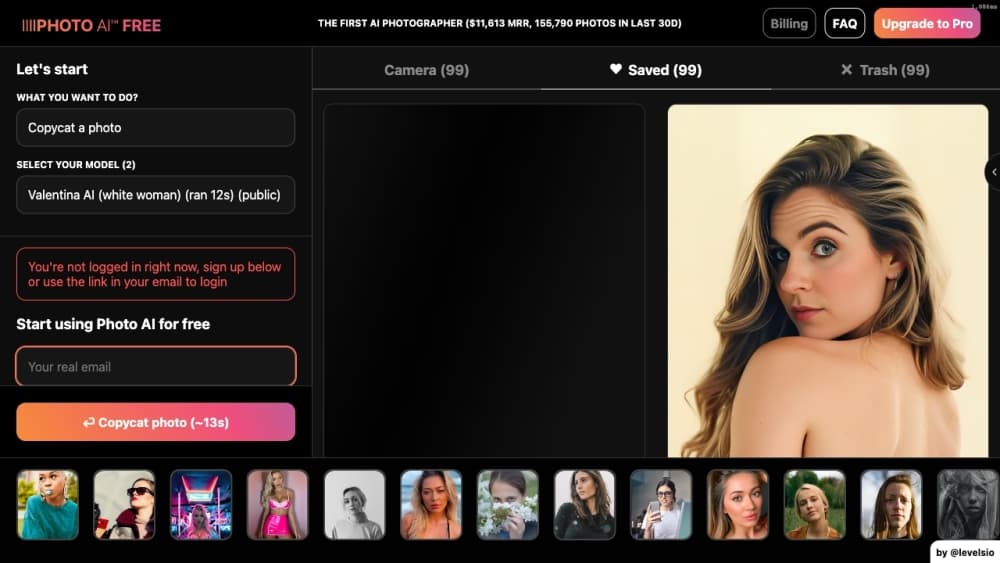
Photo AI is a browser-based AI photo studio that learns your face from a small batch of selfies, then generates new photographs of you without a camera. Solo developer Pieter Levels launched it in 2023, and it has grown into one of the better known AI photoshoot tools. Instead of editing an existing image, it trains a private model on your uploaded photos, so every shot keeps the same face across different outfits, locations, and lighting.
The pitch is convenience. You pick a photo pack, upload around a dozen clear selfies, and wait for the studio to render a set of images. You can then push any result into an AI video, zoom out for a wider frame, upscale for detail, or swap the background. AI headshot generators, dating profile photo makers, and product-shot tools all live in the same place.
The catch is that you still need decent source photos, and the cheapest plan caps quality and likeness. Video runs short, and heavy generation burns credits fast. There is no free plan, but subscribers still get a batch of free photos with every model they create.
Getting Started
- Sign in at photoai.com with an email or Google account and open the pricing page.
- Pick a plan, then choose a photo pack for the look you want, such as professional or dating.
- Upload a set of clear selfies so the studio can learn your face.
- Wait for generation, then review the free photos or spend credits for more.
- Edit the result with zoom out, upscale, or background tools, or turn any photo into a short video.
Product Information
A quick look at Photo AI's pricing, supported platforms, and performance.
Best for
The users, tasks, and scenarios where this tool fits best.
Users
- Professionals building a personal brand
- Daters refreshing their profile
- Solo creators and small shops
Tasks
- Generating professional headshots
- Making AI photos of yourself that never happened
- Turning a still photo into video
Scenarios
- Updating a dating profile
- Building an AI influencer
- Shooting product content alone
Key features
Hyper Realism Model
Photo AI trains its own model on your face rather than pasting it onto a stock image, and its Hyper Realism build aims at skin, hair, and lighting that hold up close. The result is portraits that look photographed instead of rendered. It is the difference between a face that reads as a filter and one that reads as you.
AI Photoshoot Packs
Packs bundle a look, so you pick a style and get a full set of images without writing prompts. Categories cover fashion, dating, professional, holidays, travel, fitness, and retro. This is the fastest path for anyone who does not want to wrestle with prompt wording.
AI Video Generation
With one press, a generated photo becomes a short high-resolution video of you. The studio also builds on ByteDance's Seedance model for motion clips. It is a quick way to turn a still into something social feeds reward. Video costs more credits than a single image, so it is best saved for the shots worth animating.
Editing and Upscaling Tools
Zoom out widens a tight frame, upscaling adds detail, relighting resets the light on a subject, and background tools swap the scene. Combining photos merges people into a single shot. These edits fix rough output in place instead of sending you to another editor.
Product Video Studio
You upload a product photo, write a script, pick an AI voice, and your model presents the item on camera. It runs with captions for TikTok, Instagram, and e-commerce use. For a small seller, it replaces a full production crew with a single upload.
Batch and Consistency Controls
Batch image-to-image edits several photos at once, and consistent characters keep one face stable across a set. Try-on clothes and batch try-on push the same idea into fashion, letting a shop show outfits on the same model. Consistency is the hard part of AI images, and this is where the app leans hardest.
Pros and cons
Pros
- Learns your face from selfies so outputs stay recognizable across shots
- Bundles headshots, dating pics, product shots, and video in one studio
- Photo packs remove the need to write prompts for common looks
- Editing tools like zoom out, upscale, and relighting fix output in place
- Consistent characters and batch try-on suit recurring series and shops
Cons
- No free plan, so you pay before you see what the model produces
- The cheapest plan caps quality and likeness, which pushes serious users up a tier
- Video and higher quality rendering drain credits quickly, raising real cost
- Weak or low-light source selfies lead to poor results, so source photos still matter
Frequently asked questions
No. Photo AI is a paid service with plans from about $9 to $199 per month, and its founder argues that charging keeps the studio independent instead of selling user data. You still get free photos with a subscription, since every model you create comes with a batch of auto-generated shots.
Related content
Explore related tools, skills, and articles for Photo AI.
Photo AI Alternatives

Google EmbeddingGemma 2
Google DeepMind · Writing · Image · CodingGoogle EmbeddingGemma 2 is a 740M-parameter open model that turns text, code, images, audio, and video frames into vectors in one 768-dimension space, running on phones and laptops.

Tractionwave
TractionWave · Image · MarketingTractionWave is an AI attention heatmap tool for static ads. Upload a PNG or JPG and it returns predicted attention, ranked hotspots, and fixes before you spend budget.

Imejis.io
Imejis.io · Image · MarketingImejis.io is an AI design studio for agents and marketing teams. Describe an image in plain words, and it writes the copy, builds the layout, reflows it to every size, then exports a finished file.