

Photofeeler
Photofeeler Inc. · Image
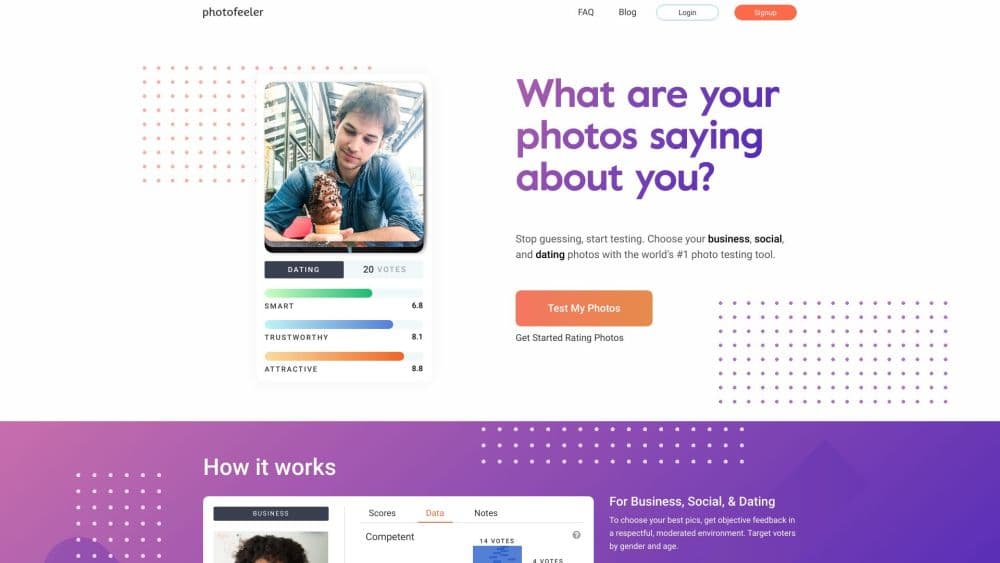
Photofeeler is a web-based photo testing tool that scores your dating, social, and business pictures on key traits using feedback from real human voters.
About Photofeeler
What Is Photofeeler
Photofeeler is a browser-based service for checking how your profile photos land with strangers. You upload a picture, pick a category, and wait for real people to rate it on the traits that matter for that context. The whole point is to remove your friends from the equation.
Friends know your backstory, so they rate the memory, not the photo. Photofeeler voters see only the picture. That gap is where a bad dating profile photo survives for years without anyone telling you the truth.
The service is built around three categories, each with its own trait set. Business photos, including the LinkedIn photo you keep second-guessing, get scored on competence, likability, and influence. Social shots are rated on confidence, authenticity, and fun. Dating photos come back scored on attractiveness, trustworthiness, and intelligence. The scores are averages of real votes, not an algorithm guessing.
Photofeeler tests photos, not people. A weak score means the picture is working against you, not that you're unlikable. The company leans on this hard in its own messaging, and it matters for how you read the results. What you walk away with is a profile picture rating stripped of the bias that friends and family bring.
Getting Started
- Create a free account with an email address and password.
- Upload a photo and pick its category, then set who you want voting and how many votes you need.
- Earn votes by rating other people's photos, or buy credits if you want results faster and don't feel like voting.
- Wait for the test to finish, then read your trait scores alongside any written notes from voters.
- Apply the suggestions, swap the photo, and run a new test to compare the two versions.
Product Information
A quick look at Photofeeler's pricing, supported platforms, and performance.
Best for
The users, tasks, and scenarios where this tool fits best.
Users
- Online daters
- Job seekers and freelancers
- Social media regulars
Tasks
- Picking a primary profile photo
- Fixing a photo that isn't landing
- Comparing a retouched version against the original
Scenarios
- Fresh off a breakup and back on the apps
- Prepping for a job hunt
- Building a content creator persona
Key features
Three-Category Trait Scoring
Photofeeler splits tests into Business, Social, and Dating, each measuring different qualities. Business covers competence, likability, and influence. Social tracks confidence, authenticity, and fun. Dating scores attractiveness, trustworthiness, and intelligence. Picking the right category is the single biggest factor in getting a useful score, since a photo that wins in Dating can flop in Business.
Real Human Voters
Every score comes from people, not a model guessing at aesthetics. You earn votes by rating other users' photos, which keeps the pool self-sustaining and free. The trade-off is speed: unpaid tests move at whatever pace the voter queue allows, and popular categories can take a while to fill.
Privacy Controls
Photos stay hidden except while a test is running. Once it finishes, the image goes private again, and it never shows up in Google search. You can also pause or delete a test at any point. Photofeeler states plainly that it doesn't sell user data, and its revenue comes from credit sales rather than ads.
Written Feedback Notes
Beyond the numeric scores, voters can leave short notes or pick from prewritten prompts. The company moderates these to block hostile comments and bans users who behave badly. It's the most human part of the product, and often more useful than the score itself.
Fraud and Vote Filtering
Photofeeler runs real-time checks to filter out low-quality or fake votes, and it blocks anyone from voting on the same test twice. Tests from one account are spaced apart to avoid stacking. You don't see any of this machinery, but it's the reason repeated tests on the same photo stay roughly consistent.
Voter Style Adjustment
The service accounts for the fact that people vote differently, some harshly, some generously, through what it calls a VoterStyles algorithm. That adjustment is meant to keep one grumpy voter from dragging down an otherwise solid photo.
Pros and cons
Pros
- Feedback comes from strangers who judge the photo alone, which is exactly what dating and hiring gatekeepers do.
- The free path works: rate photos to earn votes and you never pay a cent.
- Three separate trait sets mean you get more than a vague "good" or "bad" verdict.
- Written notes explain the why behind a score, so you know what to change.
- Privacy is handled clearly, with photos hidden outside active tests and no data selling.
Cons
- It's web only. There's no mobile app, so everything runs through a browser.
- Paid credits get expensive fast at $1+ per vote if you're testing many photos.
- You get impressions of a photo, not judgments about you, so a low score can sting without meaning what people think it means.
- Tests aren't instant. Free voting takes time, and you can't force results faster without paying.
Frequently asked questions
Yes. You earn votes by rating other people's photos, and those votes pay for feedback on your own. Buying credits is optional and only there to speed things up.
Related content
Explore related tools, skills, and articles for Photofeeler.
Photofeeler Alternatives

Google EmbeddingGemma 2
Google DeepMind · Writing · Image · CodingGoogle EmbeddingGemma 2 is a 740M-parameter open model that turns text, code, images, audio, and video frames into vectors in one 768-dimension space, running on phones and laptops.

Tractionwave
TractionWave · Image · MarketingTractionWave is an AI attention heatmap tool for static ads. Upload a PNG or JPG and it returns predicted attention, ranked hotspots, and fixes before you spend budget.

Imejis.io
Imejis.io · Image · MarketingImejis.io is an AI design studio for agents and marketing teams. Describe an image in plain words, and it writes the copy, builds the layout, reflows it to every size, then exports a finished file.