
PicPicAI
PicPicAI, Inc. · Image
PicPicAI is a browser-based AI photo editor that removes backgrounds, sharpens photos, extends images, and builds headshots, with most tools paid by credits.
About PicPicAI
What Is PicPicAI
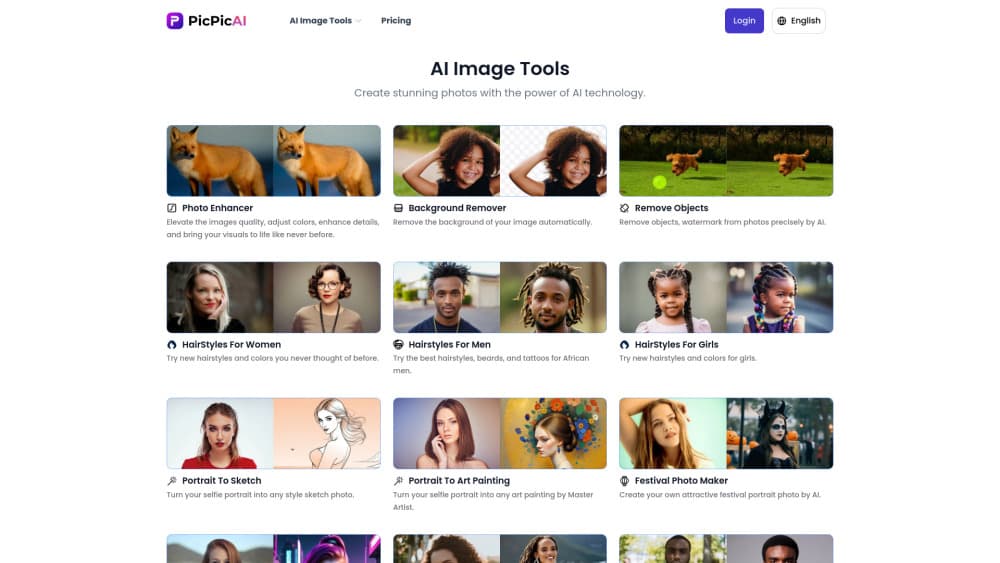
PicPicAI is a web app from PicPicAI, Inc. that packs a long list of single-purpose image tools into one account. You upload a photo, pick a tool, and download the result. There's no timeline, no layers, and no brush tool, so it sits closer to a utility drawer than to Photoshop.
The catalog covers the jobs people usually outsource to a designer: a product cut out of its background, a photobomb cleaned up, a scanned family photo restored, a LinkedIn-ready portrait, or a square shot stretched into a banner. Each tool runs on its own AI model, and several of them finish in under a minute on a normal connection.
The tradeoff is control. Automatic masks sometimes clip hair, thin straps, or glass edges, and the tools give you limited ways to fix that by hand. Output resolution also varies by tool. Anyone who needs precise retouching will still open a full editor afterward.
Getting Started
- Open picpicai.com and sign in with an email address or a Google account.
- Pick a tool from the catalog, such as the background remover or the photo enhancer.
- Upload a photo in JPG, PNG, or WebP format and let the model process it.
- Review the preview, adjust the few available options, then download the file.
- Buy a credit pack when a paid tool runs out, since credits load into your account after payment.
Product Information
A quick look at PicPicAI's pricing, supported platforms, and performance.
Best for
The users, tasks, and scenarios where this tool fits best.
Users
- Online sellers
- Social media creators
- Family archivists
Tasks
- Cutting a product out of a messy table
- Making a profile picture for work
- Turning a square photo into a wide banner
- Removing a stranger or a logo from a photo
Scenarios
- Listing twenty items on a marketplace in one evening
- Preparing a passport or visa photo
- Printing an old family portrait
Key features
Background Remover and Object Cleanup
The background remover cuts the subject out and returns a transparent PNG, and a separate tool drops in a solid color when a store requires one. Object cleanup paints over unwanted elements and rebuilds the surrounding texture. Both cost two to four credits per image, which is the middle of the price list.
Photo Enhancer and Upscaler
The photo enhancer targets soft focus, noise, and dull color, and the upscaler raises resolution rather than just enlarging the canvas. Results look best on faces and product surfaces, where the model has plenty of training data. Text and fine patterns can pick up a slight painted look.
AI Image Extender and Relight
The AI image extender generates new background beyond the original frame, which rescues photos that were cropped too tight for a banner or a print ratio. Relight adds a light source that wasn't there, useful for flat product shots. Both sit at four credits per image, the most expensive tier.
Headshot and Passport Photo Tools
The headshot generator turns a casual selfie into a business portrait with a neutral background, and the passport photo maker crops to common document sizes. Neither tool verifies that a photo meets a specific government standard, so check the rules for your country before you submit one.
Style, Avatar, and Hairstyle Generators
A cluster of lighter tools converts a portrait into a sketch, a cartoon, an anime frame, or a different hairstyle. Most run at one credit and finish quickly. They're the fun end of the catalog, and they work best on clear, front-facing portraits with even light.
FLUX.1 and SDXL Image Generation
The FLUX.1 image generator turns a text prompt into a picture at one to two credits, and an SDXL art generator runs free. These are the tools to use when you need a background or a concept image rather than an edit of an existing photo. Prompt quality matters more here than anywhere else in the app.
Pros and cons
Pros
- One account covers background removal, upscaling, restoration, headshots, and image generation, so you don't juggle five subscriptions.
- The credit model means you pay for what you use instead of a monthly fee that runs whether you edit or not.
- Several tools are free outright: the SDXL art generator, photo compression, colorize, and remove objects.
- The workflow is the same on every tool: upload, preview, download. There's nothing to install and no learning curve.
- Side-by-side before and after previews make it easy to judge whether a result is worth keeping.
Cons
- Credits are consumed even when you reject a result, so a bad batch of prompts costs real money.
- Automatic masks struggle with hair, thin straps, and transparent objects, and manual correction options are thin.
- Output resolution varies by tool and isn't spelled out on every page, which matters for print work.
- There's no public API or documented automation, so teams can't wire the tools into an existing pipeline.
Frequently asked questions
You can remove or change backgrounds, erase objects, sharpen and upscale photos, extend an image beyond its frame, restore old scans, generate headshots and passport photos, and create new images from text prompts. Everything runs in a browser tab.
Related content
Explore related tools, skills, and articles for PicPicAI.
PicPicAI Alternatives

Google EmbeddingGemma 2
Google DeepMind · Writing · Image · CodingGoogle EmbeddingGemma 2 is a 740M-parameter open model that turns text, code, images, audio, and video frames into vectors in one 768-dimension space, running on phones and laptops.

Tractionwave
TractionWave · Image · MarketingTractionWave is an AI attention heatmap tool for static ads. Upload a PNG or JPG and it returns predicted attention, ranked hotspots, and fixes before you spend budget.

Imejis.io
Imejis.io · Image · MarketingImejis.io is an AI design studio for agents and marketing teams. Describe an image in plain words, and it writes the copy, builds the layout, reflows it to every size, then exports a finished file.