

PicTrix AI
PicTrix · Image
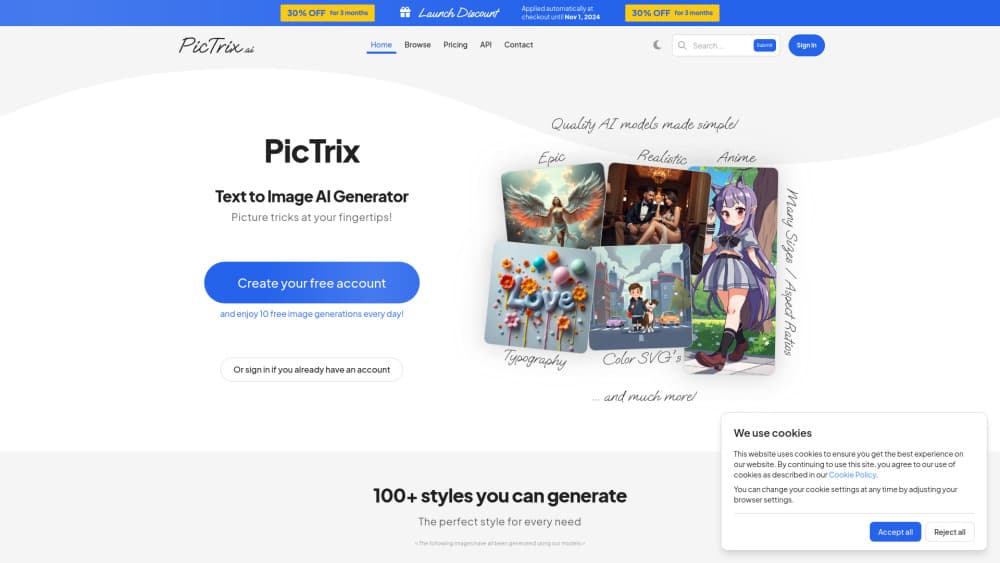
PicTrix AI is an AI SVG and pixel art generator that turns text prompts into color SVG, grayscale SVG, or pixel images, with guide images, queueing, and a Business API.
About PicTrix AI
What Is PicTrix AI
PicTrix AI is a web-based image generator built around vector and pixel output rather than standard photos. You type a prompt, pick a format (pixel, grayscale SVG, or color SVG) and a size, and the tool returns an asset you can drop into a design file. Its selling point is usable output: the SVG files are editable vectors, not flattened bitmaps, so they scale without losing edges and stay workable for logos, icons, and illustrations.
The people it suits are designers, indie creators, and small teams who need clean assets fast. The workflow leans on three ideas. Guide images let you hold the composition of an existing photo or sketch while the AI changes the style. A queue lets you start several generations and come back later. A public gallery lets you judge the range of styles before you spend credits. Those three features shape most of what PicTrix does.
The limits are worth knowing up front. Output quality still depends on the model behind it, and text inside images only holds up for short quoted phrases. Private images, commercial use, large sizes, and API access sit behind paid tiers, so free users test with public-only, smaller results. There is no desktop app; everything runs in the browser.
Getting Started
- Create a free PicTrix account with email or a social login. The free tier gives you 10 credits a day with no card.
- Describe your image in the prompt box, then choose image type (pixel, grayscale SVG, or color SVG) and size.
- Optionally upload a guide image (photo, sketch, or render) to keep the composition steady while you push the style.
- Generate. Each run costs credits based on type and size, and you can queue several runs and review them later.
- Download the result, or upgrade to Lite, Pro, or Business for color SVG, private images, commercial use, and API access.
Product Information
A quick look at PicTrix AI's pricing, supported platforms, and performance.
Best for
The users, tasks, and scenarios where this tool fits best.
Users
- Graphic and brand designers
- Indie game and app developers
- Content creators and marketers
Tasks
- Turning a rough idea into an editable vector
- Converting a photo or sketch into a new style
- Batch icon and sprite generation
Scenarios
- Branding a small project
- Building a game's asset sheet
- Filling a client deck quickly
Key features
AI text-to-SVG generation
PicTrix turns a written prompt into scalable vector graphics rather than flat images. You choose between pixel, grayscale SVG, and color SVG output, and the color option is the one most designers want for logos, icons, and interface work. Because the result is a vector, it stays sharp when you resize it and remains editable in tools like Illustrator or Figma.
Pixel art generation
Alongside vectors, PicTrix produces pixel art across dozens of named looks, from retro arcade and lowpoly to anime, isometric, and stained glass. For game developers and hobbyists, this covers both single sprites and full style sets, so a project can keep one visual language across many assets. The style list is long, which helps when you want variety without rebuilding a prompt each time.
Image guides for composition control
A guide image lets you keep the structure of a photo, sketch, or render while the model applies a new style. You upload the reference, and PicTrix follows its layout for depth and edges, so a revision focuses on mood and finish instead of rebuilding the scene. This is the feature that separates a controlled edit from a fresh roll of the dice, and it matters most when a client already approved a composition.
Generation queue
You can start several generations and leave them running, then return to a batch of finished results. Real teams rarely sit and watch one image at a time, so the queue turns a slow, click-and-wait loop into a set of jobs you review together. It pairs well with the credit model, since you can plan a session, spend credits deliberately, and judge the full set at once.
Public gallery and style range
The public library shows real output from other users, so you can size up the tool's range before you commit credits. Browsing across Bold Color SVG, Lineart, Silhouette, and dozens of pixel styles gives you a sense of taste and consistency that a sales page cannot. For anyone deciding whether to pay, this is the cheapest way to judge quality first.
Business API for production teams
The Business plan adds API access so a team can run PicTrix generation from its own systems. The API is asynchronous: you post a job, get a status URL, and poll until it finishes, with a versioned header, bearer-token auth, and standard error responses. For developers building image generation into a product or an internal tool, this is the tier that matters, and it also bundles a resell license and priority support.
Pros and cons
Pros
- Editable color and grayscale SVG output, not just flat bitmaps, so assets scale and stay workable.
- Free tier with 10 credits a day and no card, enough to test the workflow before paying.
- Image guides keep an approved composition intact while you change style and mood.
- Queueing and a public gallery let you judge a batch and the tool's range before spending.
- Business plan includes an asynchronous API, a resell license, and priority support.
Cons
- Color SVG, private images, and commercial use sit behind paid plans, so free output is public and smaller.
- Text inside images holds up only for short quoted phrases, so heavy typography needs another tool.
- Credits are consumed per run based on type and size, so large color SVG work adds up quickly.
- No desktop app or mobile app, so the workflow depends on a browser session.
Frequently asked questions
PicTrix AI turns text prompts into images, with a focus on editable SVG files and pixel art rather than standard photos. You describe what you want, pick a format and size, and download a vector or pixel asset.
Related content
Explore related tools, skills, and articles for PicTrix AI.
PicTrix AI Alternatives

Google EmbeddingGemma 2
Google DeepMind · Writing · Image · CodingGoogle EmbeddingGemma 2 is a 740M-parameter open model that turns text, code, images, audio, and video frames into vectors in one 768-dimension space, running on phones and laptops.

Tractionwave
TractionWave · Image · MarketingTractionWave is an AI attention heatmap tool for static ads. Upload a PNG or JPG and it returns predicted attention, ranked hotspots, and fixes before you spend budget.

Imejis.io
Imejis.io · Image · MarketingImejis.io is an AI design studio for agents and marketing teams. Describe an image in plain words, and it writes the copy, builds the layout, reflows it to every size, then exports a finished file.