

Pikzels
Pikzels LLC · Image · Video
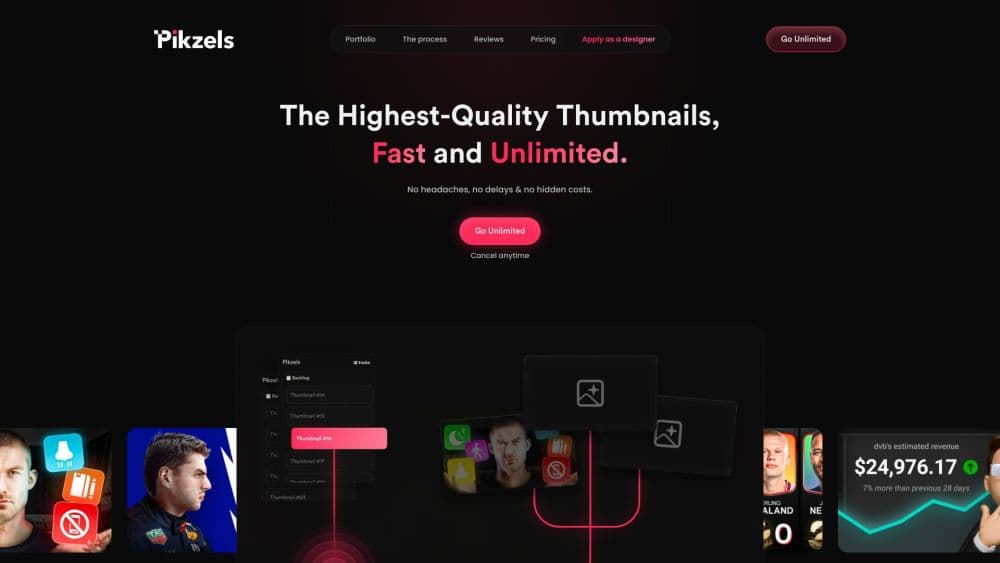
Pikzels is an AI thumbnail maker built for YouTube creators. It generates, recreates, and scores thumbnails and titles, then fixes weak packaging in one click.
About Pikzels
What Is Pikzels
Pikzels is a YouTube packaging tool that helps creators make thumbnails and titles people actually click. You type a short prompt, paste a reference link, or upload an existing thumbnail, and the platform turns it into ready-to-test visuals. What sets it apart from a general image generator is the feedback loop: it scores your packaging and then offers a one-click fix for the weak spots.
The problem it targets is simple. A good video still flops if the thumbnail gets ignored in the feed. Pikzels tries to shorten the gap between what a creator pictures and what viewers respond to, without making you learn design software.
Two limits shape when it fits. The tools are tuned for YouTube, so other platforms get less from the scoring and title features. And the output is still a starting point. You review, iterate, and decide what matches your channel voice before publishing.
Getting Started
- Create an account at pikzels.com and start with the free trial.
- Generate a thumbnail. Describe your video in one prompt, paste a YouTube link to recreate a format, or upload an image to edit.
- Train a Persona and Style if you want your face and visual look to stay consistent. Upload a few photos and a few thumbnails once.
- Run the Pikzels Score on your thumbnail and title to see how they rate across the five packaging pillars.
- Apply the One-Click Fix, generate CTR-ready titles, then download and publish.
Product Information
A quick look at Pikzels's pricing, supported platforms, and performance.
Best for
The users, tasks, and scenarios where this tool fits best.
Users
- YouTube creators
- Creators with an existing face and brand look
- Small teams and agencies
Tasks
- Packaging a new video fast
- Recreating a thumbnail that already works
- Fixing underperforming videos
- Writing click-optimized titles
Scenarios
- Publishing on a weekly schedule
- Testing several thumbnail directions
- Running a multi-language channel
Key features
Prompt-to-Thumbnail Generation
Type a one-line description of your video and Pikzels turns it into thumbnails ready to test. You skip the blank canvas and the design software entirely, and the first pass is something you can judge rather than something you have to build from nothing. For creators who post often, that's the difference between a thumbnail bottleneck and a quick step.
Recreate and Edit
Paste a YouTube link and Pikzels recreates that thumbnail's format so you can reuse a layout that already performs. From there, ask for changes with plain notes and it updates the image in seconds. This is useful when a competitor's structure works but the content is yours, or when you want to refresh a format you've used before.
Pikzels Score
The Score rates your thumbnail and title on five packaging pillars: Virality, Clarity, Idea, Curiosity, and Emotion. Instead of guessing why a video underperformed, you get a breakdown of what's holding it back. It's the feedback layer, and it's what separates this from a plain AI thumbnail creator.
One-Click Fix
When the Score flags a weak spot, the One-Click Fix applies data-backed improvements in a single step. It's aimed at creators who know a thumbnail is off but don't know which change would help. You still decide whether to keep the result, but you start from a better version.
Persona and Style
Upload a few photos once to train a Persona, and your face can appear in every thumbnail without a new shoot. Train a Style from a handful of thumbnails, and your channel keeps a consistent visual identity. Both features cut the repetitive setup that normally slows down consistent posting.
Titles and Multi-Language Support
Brief Pikzels on your video and it returns titles tuned for click-through rate rather than generic headlines. The whole toolkit works in any language: prompt in English, Spanish, French, or another language and the output follows. That matters for channels that publish across more than one market.
Pros and cons
Pros
- Thumbnails, titles, scoring, and fixes live in one tool, so you're not stitching four apps together.
- Recreate lets you build on formats that already work instead of starting from nothing.
- The Pikzels Score gives concrete reasons a thumbnail underperforms, not just a number.
- Persona and Style keep a channel visually consistent without repeated photo shoots.
- Prompting in any language means one workflow covers every market you publish to.
Cons
- The scoring and title tools are tuned for YouTube. Other platforms get less value from them.
- Credits are the real limit. Thumbnails cost 10 to 20 credits each, so heavy testing burns through a plan faster than the thumbnail count suggests.
- The output still needs review. The first pass may not match your channel voice, and edits cost credits too.
- Pricing starts at the Premium tier. There's a free trial, but no permanent free hosting-style tier for ongoing use.
Frequently asked questions
Pikzels makes and improves YouTube thumbnails and titles. You generate or recreate a thumbnail, score your packaging, and apply fixes, all aimed at earning more clicks. It's built for YouTube performance rather than general image creation.
Related content
Explore related tools, skills, and articles for Pikzels.
Pikzels Alternatives

Google EmbeddingGemma 2
Google DeepMind · Writing · Image · CodingGoogle EmbeddingGemma 2 is a 740M-parameter open model that turns text, code, images, audio, and video frames into vectors in one 768-dimension space, running on phones and laptops.

Tractionwave
TractionWave · Image · MarketingTractionWave is an AI attention heatmap tool for static ads. Upload a PNG or JPG and it returns predicted attention, ranked hotspots, and fixes before you spend budget.

Imejis.io
Imejis.io · Image · MarketingImejis.io is an AI design studio for agents and marketing teams. Describe an image in plain words, and it writes the copy, builds the layout, reflows it to every size, then exports a finished file.