

Pine Computer
Pine AI · Productivity · Business
Pine Computer is a cloud computer built for AI agents. A developer hands it a task through an API, and it works a browser, shell and files on its own, then returns the finished work.
About Pine Computer
What Is Pine Computer
Pine Computer is a cloud machine made by Pine AI, the company behind the pine.im assistant. It gives an AI agent a real Chrome browser, a bash shell, a working folder and a desktop that a person can watch. Your product submits a job through an API. The agent opens pages, fills forms, edits spreadsheets and saves receipts, then reports what it produced.
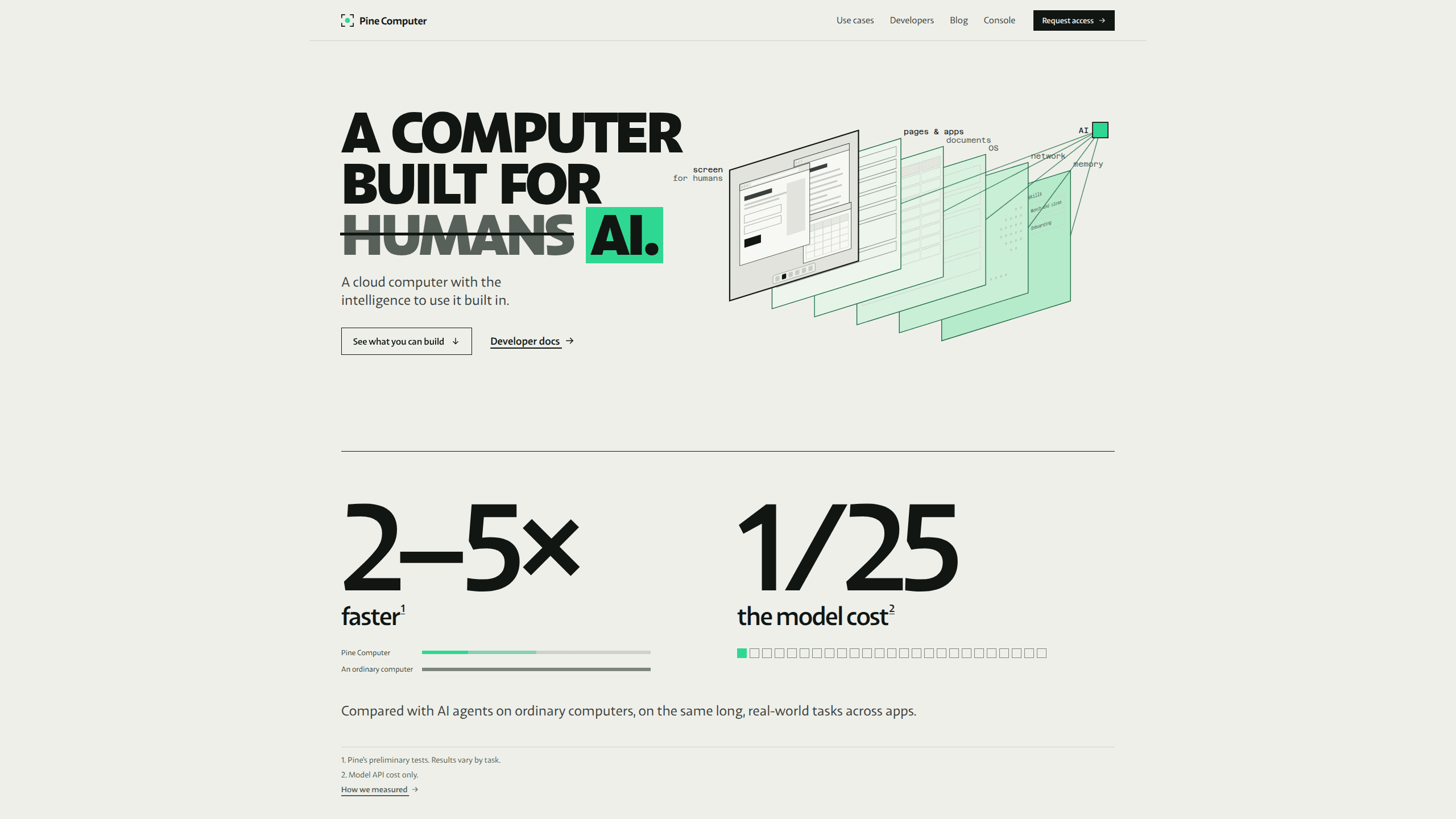
The difference sits in how the machine talks to the model. On a normal PC, an agent takes a screenshot, guesses what changed, and takes another screenshot. Pine Computer sends the model a notice when a page, an app or a file changes. The agent stops re-reading the screen after every step, so a cheaper model can finish more of a long task. Pine's own numbers on SaaS-Bench v1.1 put GPT-5.6 Luna on Pine Computer at a 78.3% checkpoint score for $1.02 in model tokens per task, against 74.3% and $26.50 for Opus 5 with Claude Code. Pine says those runs cost more in its consumer product, and that short tasks show a smaller gap.
This is developer infrastructure, not a consumer app. People reach it through products built on top of it, such as a property management tool that renews rental permits on city portals. The service is in private beta, so access comes through a waitlist. It also runs only in Pine's cloud, which rules out local machines and offline work.
Getting Started
- Join the waitlist at pinecomputer.io and wait for beta approval.
- Install a server SDK for Ruby, Go, TypeScript or Python, then create a project key in the console.
- Create a computer with a country setting and an optional ephemeral flag, then open a session with a browser.
- Run an agent task in plain language, stream its events, and collect the files it returns.
Product Information
A quick look at Pine Computer's pricing, supported platforms, and performance.
Best for
The users, tasks, and scenarios where this tool fits best.
Users
- Product teams adding an AI agent to existing software
- Software vendors whose customers still do work by hand on government or supplier portals
- Developers testing agent ideas before committing to infrastructure
Tasks
- Jobs on sites with no API
- Collecting invoices or statements from supplier sites
- Producing documents and decks
- Running the same workflow for many clients
Scenarios
- Quarterly permit renewals
- Pre-release checkout testing
- Back-office work that used to need a desk
Key features
A full desktop in the cloud
Each computer runs Chrome on a Linux desktop, with tabs, downloads and a bash shell beside it. The agent clicks, types, uploads files and reads what came back. It's a cloud desktop for AI, so your team never ships a browser extension or a headless wrapper.
Change events instead of screenshots
The browser, the apps and the operating system tell the model what changed, the way epoll tells a program which file descriptor moved. That gives the agent a short, precise context and cuts the token bill. Visual input stays available when a page needs eyes.
Sessions that share one identity
One computer holds several sessions, each with its own window, shell and folder. Sign-ins carry across all of them, so a customer logs in once and every workflow on that machine keeps working.
Skills learned from real runs
After the agent finishes a task, or a person demonstrates one, Pine turns the steps into a skill that you review before any agent uses it. Built-in skills already handle PDF filling, Word and Excel output, and basic video and audio edits.
A person can take the controls
The Web SDK embeds the live desktop in your product as a Web Component or a React or Vue component. When a task needs a password or a judgment call, the customer types it on that screen and hands control back to the agent.
State that survives a restart
Stopping a computer keeps its cookies, passkeys and learned skills. Starting it again restores them, encrypted with keys held on your server. A paused machine resumes in under a second.
Pros and cons
Pros
- Model tokens per task came in far below a Claude Code setup in Pine's published SaaS-Bench v1.1 comparison, which matters when a product runs thousands of jobs.
- Parallel computers per client keep logins and files apart without extra engineering.
- Human handoff is part of the product, so a sign-in or a CAPTCHA doesn't stall the job.
- Credentials stay on your backend, and browser sessions get only a short-lived desktop token.
- No customer hardware is involved, which suits products sold to people who don't own a PC.
Cons
- Access is invite-only during the beta, and Pine publishes no plan prices, so budgeting means asking for a quote.
- It runs only in Pine's cloud, so teams that need on-premise or offline execution can't use it.
- Bringing your own model isn't available yet, which limits control over model choice and cost.
- The Standard class caps a computer at 3 sessions, 10 tabs per session and 60 minutes per agent turn, so heavy parallel work needs a higher class.
Frequently asked questions
It runs AI agent work that touches real software: filling forms on portals, pulling invoices, building spreadsheets and testing a checkout. Your product sends the job through an API and gets files and a status back.
Related content
Explore related tools, skills, and articles for Pine Computer.
Pine Computer Alternatives

Base Code
Base44 (Wix) · Coding · ProductivityBase Code is a shared cloud development environment from Base44. Teammates describe changes to an existing GitHub codebase in chat, preview them live and send them back as pull requests.

Knocket
Knocket (Tencent RTC team) · Productivity · Business · ChatbotKnocket is a free live chat and contact page tool that lets visitors message you from your website, app, or a shareable link, with every reply handled from Telegram or one inbox.

FloorGen
Vinit Kumar (FloorGen) · Productivity · China AIFloorGen is a browser-based floor plan maker that turns a sentence or a sketch into an editable 2D plan and a 3D walkthrough. Export to PDF, DXF or video, and draw without an account.