

PixAI - AI Art Generator
Mewtant Inc. · Image · China AI
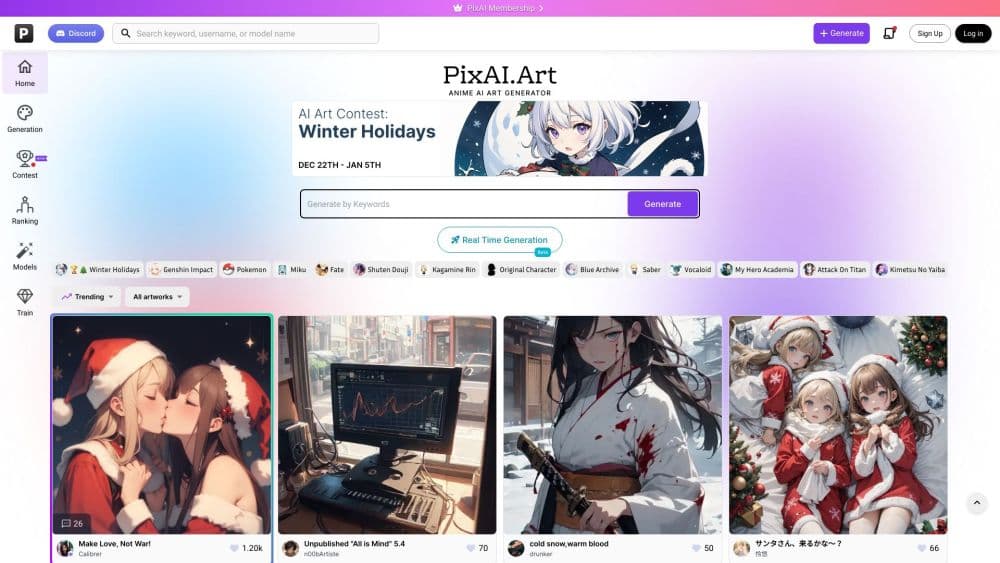
PixAI is a free anime AI art generator that turns short prompts into manga-style illustrations in seconds. It suits fan art and character design, and paid plans unlock HD, Turbo Mode and video.
About PixAI - AI Art Generator
What Is PixAI
PixAI is a browser-based AI art generator tuned for anime, manga, and illustration styles rather than photorealism. You type a description, pick a model from a library that stretches past 1.8 million community models and LoRAs, and get finished artwork back in seconds. There's no software to install and no GPU to buy, so a phone browser works as well as a desktop.
It grew into one of the best-known anime AI platforms by leaning on its community. The docs site states PixAI has more than 16 million registered creators, and members publish the models, LoRAs, and prompts behind their images so anyone can reuse a setup and add their own twist. That shared library is the main draw: instead of fighting a single default model, you borrow a style someone already tuned.
Mio, the platform mascot, plus a companion mobile app on iOS and Android round out the package. The catch is the credit system. Free users get a set number of daily credits, roughly 10,000, and heavier work such as HD output, private generations, and video quickly eats through them.
For a hobbyist who wants an anime look without touching a pipeline, the low barrier matters more than raw flexibility. PixAI hands you a working style in one click and lets you refine it later.
Getting Started
- Open pixai.art in any browser and sign up free, or grab the iOS or Android app. No credit card is needed to start, and daily login credits refresh your balance.
- Claim your free credits for the day, then pick a generation model or jump into the Model Market to borrow a community style.
- Write a prompt describing your character, scene, and mood. Tag-based and natural-language prompts both work, and you can stack LoRAs to push a specific look.
- Choose image dimensions and settings, then generate. Review the results and rerun with tweaked wording if a detail misses.
- Upload an existing image to the editors if you want to retouch, upscale, or swap styles, then download or share the output.
Product Information
A quick look at PixAI - AI Art Generator's pricing, supported platforms, and performance.
Best for
The users, tasks, and scenarios where this tool fits best.
Users
- Anime and manga fans
- Character designers and OC makers
- Beginner creators
Tasks
- Generating anime illustrations
- Editing photos into characters
- Training custom styles
Scenarios
- Making a profile picture or wallpaper
- Roughing out a comic or storyboard
- An experimental weekend project
Key features
Anime-Focused Generation Models
PixAI ships models designed for anime, manga, and illustration rather than photography. Its flagship Tsubaki.3 update adds a Color Palette feature and natural-language editing, and the wider Model Market holds more than 1.8 million community models and LoRAs. That range is what separates it from general-purpose generators that treat anime as one style among many.
Model Market and Shared LoRAs
The Model Market is a community library where creators publish the models, LoRAs, and prompts behind their best work. You browse a style you like, reuse its full setup in one click, and adjust the prompt to your subject. It turns other people's tuning into your starting point, which saves hours compared with building a look from scratch.
Image Editing and Reference Pro
The editing models work from an image rather than a blank canvas. PixAI Reference Pro accepts up to 10 reference images and outputs up to 4K, reading characters, poses, outfits, and composition before applying your natural-language changes. These tools skip LoRAs and negative prompts entirely, so they stay simple for users who just want to describe an edit.
LoRA Training
Members can train their own LoRAs from personal image sets, teaching the AI a custom character or art style. Plans include a fixed number of free monthly training slots, and trained LoRAs stay usable in your account even after a subscription lapses. It's the feature that turns PixAI from a toy into a repeatable character pipeline.
Video Generation Suite
Image-to-video and text-to-video let you animate a still or build a short clip from text, with members able to reach clips up to 10 seconds. Plus and Premium members can switch on Enhance Mode for sharper detail and smoother motion. The video tools sit behind a paid plan, so free users can't reach them at all.
Credit System and Daily Free Credits
PixAI runs on credits rather than unlimited generations. Every user can claim about 10,000 free credits per day, and heavier options like HD output and private generations cost more. Members get extra daily credits plus monthly credit drops, and top-up packs add a bonus depending on the plan.
Cross-Platform Access and API
PixAI runs in any modern browser, with native iOS and Android apps that share the same account. Developers can build on the platform through a REST API with webhooks and API key authentication, so the generator can be wired into apps and automated workflows rather than staying a browser-only tool.
Pros and cons
Pros
- Strong anime, manga, and illustration output rather than a single general-purpose style
- Library of 1.8 million community models and LoRAs you can reuse in one click
- Free daily credits and a no-cost entry point with no credit card
- Editing models that transform an uploaded image from plain-language instructions
- Public REST API with webhooks lets developers automate generation
Cons
- Credit-based limits mean HD, private, and video work burns through balances fast
- Video tools and custom LoRA training sit behind a paid membership
- Free and non-private generations can appear in the public gallery, which rules out confidential work
- Quality still depends on the model and prompt you choose, so results vary
Frequently asked questions
Yes. PixAI is free to start with no credit card, and every user can claim daily free credits, around 10,000 a day, to generate images. Free accounts can also browse and reuse the community model library. Paid features such as HD output, private generations, video, and LoRA training need a membership.
Related content
Explore related tools, skills, and articles for PixAI - AI Art Generator.
PixAI - AI Art Generator Alternatives

Google EmbeddingGemma 2
Google DeepMind · Writing · Image · CodingGoogle EmbeddingGemma 2 is a 740M-parameter open model that turns text, code, images, audio, and video frames into vectors in one 768-dimension space, running on phones and laptops.

Tractionwave
TractionWave · Image · MarketingTractionWave is an AI attention heatmap tool for static ads. Upload a PNG or JPG and it returns predicted attention, ranked hotspots, and fixes before you spend budget.

Imejis.io
Imejis.io · Image · MarketingImejis.io is an AI design studio for agents and marketing teams. Describe an image in plain words, and it writes the copy, builds the layout, reflows it to every size, then exports a finished file.