

PixarAI
PixarAI · Image
PixarAI turns text prompts or uploaded photos into Pixar style movie posters and pet portraits in a browser, with 3 free designs and paid plans from $4.90/mo.
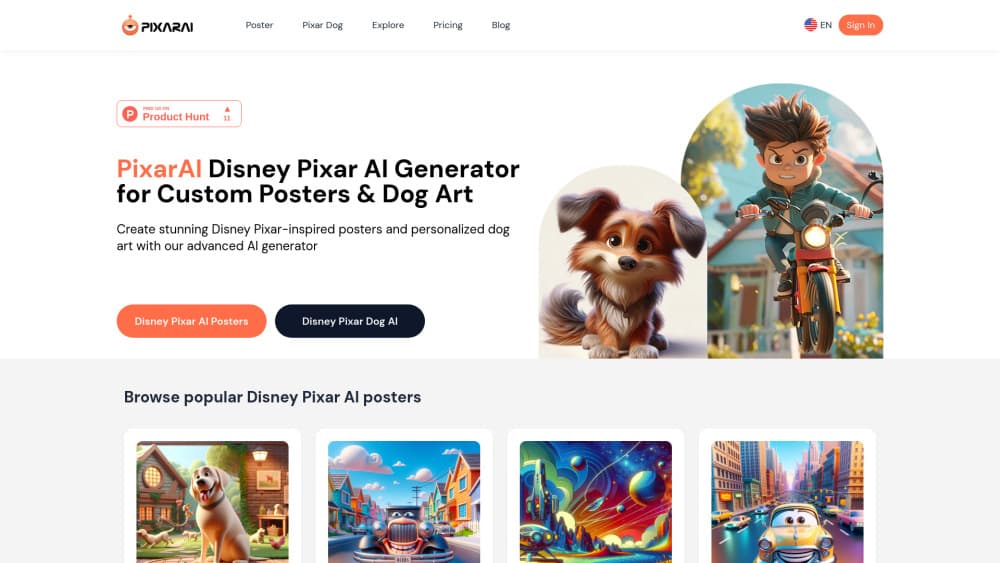
About PixarAI
What Is PixarAI
PixarAI is a browser based AI movie poster maker built around one look: the rounded, soft-lit 3D animation style most people associate with Pixar films. You describe a scene, or upload a photo of a pet or a person, and the site returns a Pixar style art piece with a title card feel.
The product is narrow on purpose. It doesn't try to be a general AI image generator or a design suite. There's no canvas, no layer panel, and no model picker. You get a prompt box, an upload button, a small set of theme categories, and a gallery of what other people made.
That focus is the main selling point and the main limit. If you want a poster of your dog as an animated hero, PixarAI gets you there in a couple of minutes. If you need a photoreal product shot or a logo, this isn't the tool.
PixarAI is an independent website. It isn't affiliated with Pixar Animation Studios or Disney, and the name describes a visual style rather than an official partnership.
Getting Started
- Create an account with an email address or a Google login. The free allowance of 3 posters is tied to that account.
- Choose a mode: the Poster generator for text prompts, or Pixar-Style Dog for photo uploads.
- Type what you want to see, or upload a clear, front-facing photo. Prompt detail matters more than prompt length. Name the subject, the setting, and the mood.
- Generate, review the result, and download it. After the third free design, you pick a monthly plan to keep going.
Product Information
A quick look at PixarAI's pricing, supported platforms, and performance.
Best for
The users, tasks, and scenarios where this tool fits best.
Users
- Pet owners
- Social media creators
- Small business owners making playful promos
Tasks
- Turning a family photo into a gift
- Making a fake movie poster for a birthday or a meme page
- Mocking up character concepts before commissioning an illustrator
- Filling a content calendar with themed visuals
Scenarios
- A weekend project where you want one great image, not a new hobby
- A pet-focused Instagram or TikTok account
- A classroom or club activity
Key features
Text Prompts to Movie-Style Posters
You describe a scene in plain language and PixarAI renders it as a poster, complete with the composition and lighting that make the style readable. The prompt box accepts a paragraph, so you can specify the subject, the background, and the expression. Results lean toward a hero shot with room for a title, which is why the output looks like a film one-sheet rather than a square illustration.
Photo Uploads for Pixar-Style Portraits
The Pixar-Style Dog mode takes an uploaded photo and turns it into an AI character portrait of the animal. It keeps the markings, ear shape, and general pose recognizable, then rebuilds the fur and eyes in the house style. Clear photos with one animal and a simple background give the cleanest result. Group shots and cluttered scenes get muddled.
Theme Categories to Start From
The site sorts examples into Poster, Meme, Dog, Car, Sci-Fi, and Animal. Those categories work as prompt shortcuts. Pick one, look at what other users wrote, and adapt the wording. It saves the blank-page problem that hits people who have never written an image prompt before.
A Public Gallery for Reference
The Explore feed shows what other people generated, with the prompt attached in many cases. It's the most useful research tool on the site. You can see how much detail a prompt needs before the model produces something usable, and where the Pixar style art tends to drift.
High-Resolution Exports and a Priority Queue
Paid plans unlock high-resolution downloads, which is the difference between a phone wallpaper and a file you can send to a printer. Premium and Pro also move your jobs ahead of free users in the queue, so iteration doesn't stall when the site is busy.
Commercial Rights on Paid Plans
Both paid tiers include commercial usage rights for what you generate. That matters for Etsy sellers, cafés, and anyone making client work. The rights cover the image itself. They don't resolve third-party trademark questions, so keep that in mind if a design leans on a recognizable franchise character.
Pros and cons
Pros
- The first usable poster takes minutes, and you don't need any design software.
- Photo uploads keep a pet's markings and expression, so the result still looks like your dog.
- Three free posters let you judge output quality before spending anything.
- At $4.90 per month, Premium undercuts most general AI image subscriptions.
- Everything runs in a browser, including on a phone, with nothing to install.
Cons
- The free allowance stops at 3 images, which is too few for a full campaign or a client round of revisions.
- Every output sits in the same visual style, so the tool can't cover photorealism, flat illustration, or brand-specific looks.
- There's no API and no mobile app, so teams can't automate batches and phone users are stuck with the mobile browser.
- PixarAI isn't affiliated with Pixar, and a commercial license doesn't settle the trademark risk of imitating a known studio look.
Frequently asked questions
It generates Pixar style posters from text descriptions and restyles uploaded pet photos into animated character portraits. The output is a single finished image, not an editable design file.
Related content
Explore related tools, skills, and articles for PixarAI.
PixarAI Alternatives

Google EmbeddingGemma 2
Google DeepMind · Writing · Image · CodingGoogle EmbeddingGemma 2 is a 740M-parameter open model that turns text, code, images, audio, and video frames into vectors in one 768-dimension space, running on phones and laptops.

Tractionwave
TractionWave · Image · MarketingTractionWave is an AI attention heatmap tool for static ads. Upload a PNG or JPG and it returns predicted attention, ranked hotspots, and fixes before you spend budget.

Imejis.io
Imejis.io · Image · MarketingImejis.io is an AI design studio for agents and marketing teams. Describe an image in plain words, and it writes the copy, builds the layout, reflows it to every size, then exports a finished file.