

PixCleaner
Proxima · Image
PixCleaner is an AI background remover for product photos and design work. It pairs one click cutouts with brush cleanup, bulk runs, and a credit billed API.
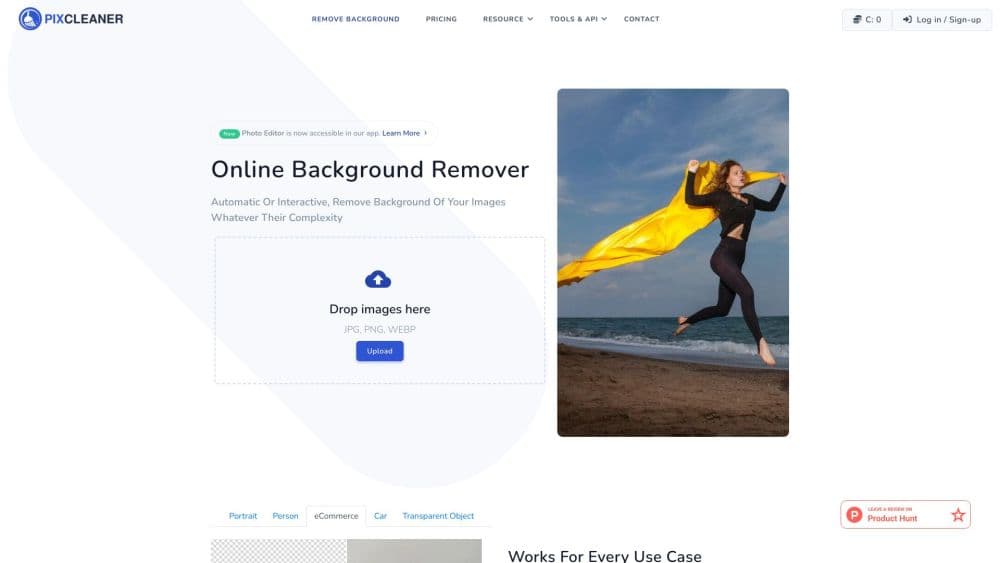
About PixCleaner
What Is PixCleaner
PixCleaner is a browser based image editor built around one job: separating a subject from its background. You upload a photo, the model traces the edges on its own, and a brush lets you fix what it missed. The result is a transparent PNG you can drop into a store listing, a slide deck, or a design file.
The tool covers more than a single cutout. One account also handles generated backdrops, text to image drafts, soft photo cleanup, and folder sized batches of product shots. Shops that process catalogs lean on the API, which charges per image in credits.
There's a catch worth knowing before you sign up. As of this writing, pixcleaner.com serves a conference site unrelated to image editing, and its pricing and API pages return errors. The Shopify listing has been pulled as well. Treat anything you read about plans as historical until a working signup page is back.
Getting Started
- Open pixcleaner.com and create an account, or add the Figma plugin if your work lives in design files.
- Upload a JPG, PNG, or WebP image. Everything runs in the browser, so there's no install step.
- Check the automatic mask, then zoom in and clean the edges with the brush. Hair, straps, and thin handles need the most attention.
- Choose a transparent, solid, or generated background, then export the PNG at full resolution.
Product Information
A quick look at PixCleaner's pricing, supported platforms, and performance.
Best for
The users, tasks, and scenarios where this tool fits best.
Users
- Online store owners
- Freelance designers
- Marketing teams
- Developers
Tasks
- Cutting a product out of a cluttered kitchen counter so it sits on clean white.
- Making transparent PNGs for slide decks and app store screenshots.
- Replacing a gray sky behind a portrait with a warmer generated backdrop.
Scenarios
- A seasonal catalog refresh where a few hundred images need the same treatment.
- Cleaning up a profile photo the night before a talk.
- Building Figma mockups where product shots sit on colored panels.
Key features
One Click Background Removal
The default pass finds the subject and returns a transparent PNG in a few seconds. It handles people, animals, products, and graphics, with the model doing the first pass and you approving the result. AI background removal quality is strongest on a clear separation between subject and backdrop. Busy scenes with similar tones need manual work.
Brush and Interactive Segmentation
Automatic masks miss things. Hair strands, thin straps, glass rims, and chair legs are the usual suspects. A brush lets you paint areas back in or out, and the segmentation tools snap your strokes to object edges. The workflow rewards a zoomed in second pass rather than a single click export.
Generated Background Replacement
After the cutout, PixCleaner can build a new backdrop from a text prompt or place the subject on a solid color. That saves a reshoot for teams that need a lifestyle look on a tight schedule. Check the composite at full size before you ship it, because lighting between subject and scene rarely matches on the first try.
Bulk Runs and Credit Estimates
Batch processing applies one set of removal settings to a whole folder and reports the credit cost before the job starts. A usage history then lists what each run consumed. That transparency matters when you price client work, and it beats most browser tools on the same job.
Background Remover API
The background remover API is listed on RapidAPI under the Pixcleaner account and runs on the same credit model. Developers send an image and get a mask or a cutout back. Endpoints, rate limits, and SDK notes live on the RapidAPI page rather than the main site, so the listing is your best reference point.
Figma and Shopify Integrations
A Figma plugin puts removal inside the design canvas, with the same account login. A Shopify app once did the same for product listings, and that listing is no longer live. For a design team, the Figma route saves the download and reupload cycle. For merchants, assume manual uploads until the store app returns.
Pros and cons
Pros
- Automatic and manual removal sit in one editor, so tricky edges get a second pass without a separate tool.
- Bulk processing shows a credit estimate before the run, which helps with catalog budgeting.
- API access through RapidAPI means no separate contract for a small integration.
- Generated backgrounds save a reshoot when you need a lifestyle look fast.
- Browser based, with no desktop install and a Figma plugin for design work.
Cons
- Service status is unclear. The main domain now shows unrelated content and pricing pages return errors.
- Credit costs are hard to plan without a live pricing page, so budgeting a large catalog turns into guesswork.
- Fine edges on hair and transparent objects still need manual brush work.
- No desktop app or offline mode, so every job depends on a stable connection.
Frequently asked questions
It removes backgrounds from images and returns a transparent PNG. The same editor replaces backgrounds with generated scenes, creates images from prompts, and cleans up photo quality.
Related content
Explore related tools, skills, and articles for PixCleaner.
PixCleaner Alternatives

Google EmbeddingGemma 2
Google DeepMind · Writing · Image · CodingGoogle EmbeddingGemma 2 is a 740M-parameter open model that turns text, code, images, audio, and video frames into vectors in one 768-dimension space, running on phones and laptops.

Tractionwave
TractionWave · Image · MarketingTractionWave is an AI attention heatmap tool for static ads. Upload a PNG or JPG and it returns predicted attention, ranked hotspots, and fixes before you spend budget.

Imejis.io
Imejis.io · Image · MarketingImejis.io is an AI design studio for agents and marketing teams. Describe an image in plain words, and it writes the copy, builds the layout, reflows it to every size, then exports a finished file.