

Pixel Art AI
Pixel Art AI · Image
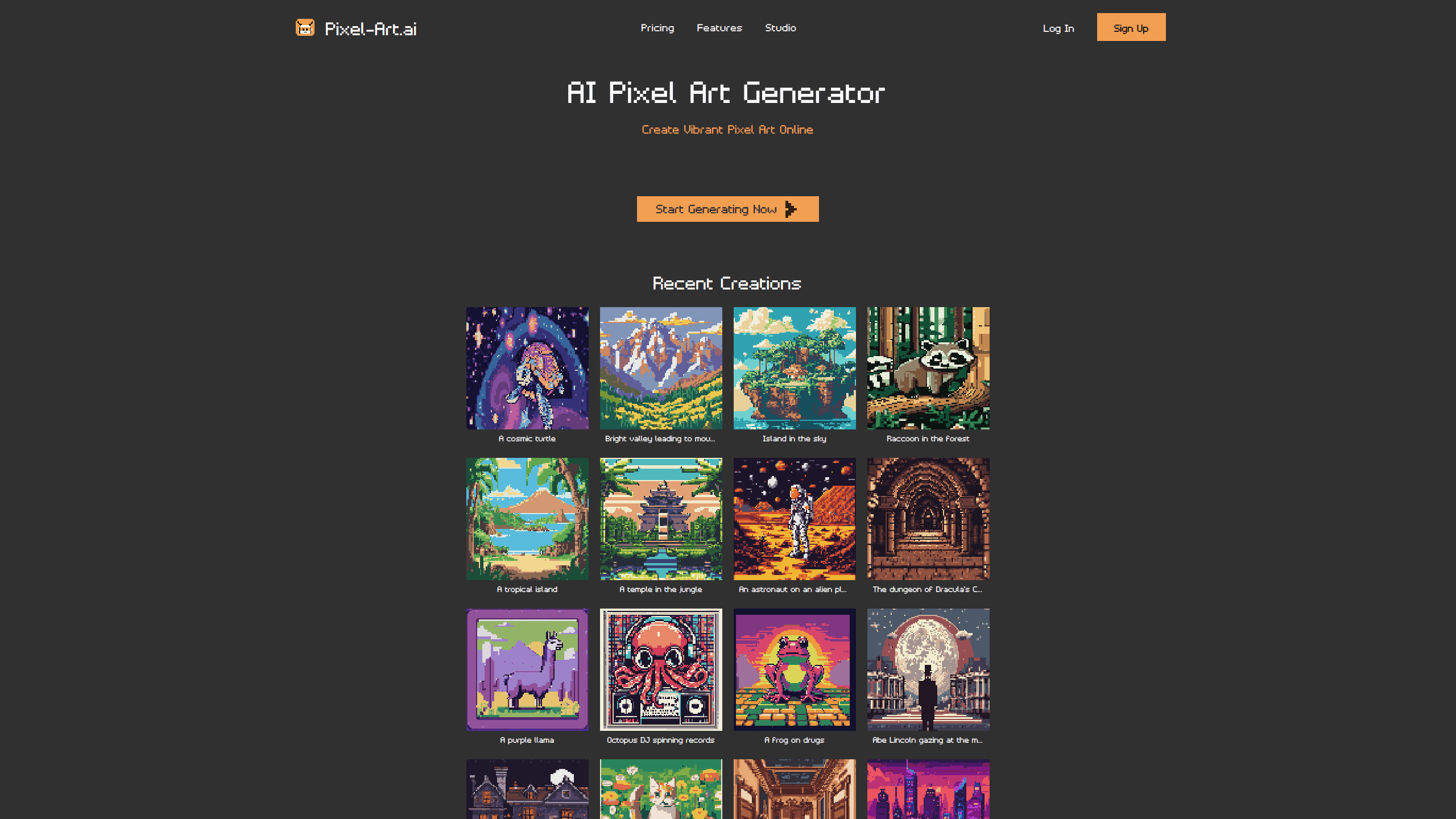
Pixel Art AI is a browser-based AI pixel art generator that turns a written prompt into pixel-perfect artwork in seconds, then hands it to you inside a built-in studio. You describe a scene, a character, or a background, and the tool returns a pixel image you can edit, layer, and export as PNG. It's aimed at game developers, indie designers, and pixel art fans who want usable art without hand-placing every pixel.
About Pixel Art AI
What Is Pixel Art AI
Pixel Art AI is a web tool for generating pixel art from text prompts. You type something like "a haunted house" or "side-scrolling level background," set a width and height, and the generator produces a pixel-style image. The bar to entry is low. No download. No model to configure. No drawing tablet required.
What sets it apart from a plain image generator is the studio attached to it. Once an image lands, you can keep it on one of several canvases, paint over it with brushes, stack layers, and copy or paste regions. There's also AI inpainting: select an area, describe the change, and the model redraws just that patch.
The main limit is control over the raw output. Text-to-art tools rarely nail a prompt on the first try, so expect to regenerate or paint in fixes. The editor covers that gap, but it still asks for some pixel discipline if you want a clean sprite sheet or tile set that lines up right.
The tool runs in the browser and is free to use, which makes it easy to test on a real project before committing to it. Treat it as an AI pixel art maker you can reach from any tab, not a locked-in app.
Getting Started
- Open the Pixel Art AI website and start a new canvas.
- Set the width and height for your target output, such as 32x32 for a small sprite.
- Type a prompt describing what you want, then run the generator.
- Pick the result you like and apply it to the canvas.
- Refine with brushes, layers, or AI inpainting, then export the finished piece as PNG.
Product Information
A quick look at Pixel Art AI's pricing, supported platforms, and performance.
Best for
The users, tasks, and scenarios where this tool fits best.
Users
- Game developers
- Indie designers working solo
- Pixel art hobbyists
Tasks
- Generating sprites from text
- Building scene backgrounds
- Editing existing art
- Exporting game assets
Scenarios
- Early prototyping
- Jam projects
- Learning pixel art
- Social or thumbnail art
Key features
Text to Pixel Art Generation
You describe an idea in plain words an AI pixel art generator can read, and the tool returns a pixel-style image. Prompts like "an astronaut on an alien planet" or "a purple llama" show the range it handles, from characters to full scenes. Width and height controls let you match the output to a sprite or a larger background. If you want to generate pixel art from text without touching a drawing app, this is the whole workflow. One prompt in. Pixel art out.
Built-In Pixel Art Studio
The generator doesn't drop you at a finished file. It opens a pixel art editor where you can keep creating, so you can push a rough result toward something usable. This is the feature that separates it from a one-click image tool. That gap matters. Without it, every bad detail would mean a full regeneration.
Multiple Canvases
You can spread work across several canvases instead of cramming everything onto one. That helps when a project has many sprites or scenes, since each piece gets its own space. It also keeps a growing asset list from turning into a mess. Messy asset lists kill momentum, and this avoids one.
Layers and Brushes
The editor supports copy and paste, layers, and brushes, which is the toolkit you need to clean up AI output. Layers let you separate a character from its background, and brushes handle small fixes by hand. For pixel work, that added control matters more than raw generation quality. Cleanup decides the final result.
AI Inpainting
Select an area you want to change, type a prompt, and the model redraws only that region. This is handy when most of an image works but one detail is off, so you avoid regenerating the whole piece. Apply the result to the canvas when it looks right. Simple as that.
PNG Export
Everything you make can be exported to PNG. That's the format most game engines and design tools expect, so a finished sprite or background moves straight into your workflow. There's no proprietary format locking your work in, which means you can reopen, re-edit, and reuse a piece across projects long after you first generated it inside the studio.
Pros and cons
Pros
- Free to use in the browser, with no download or setup.
- Combines generation with an editor, so you can fix output instead of restarting.
- Layers, brushes, and inpainting give real control over the final pixels.
- PNG export drops cleanly into game engines and design tools.
- Multiple canvases keep larger projects organized. That helps.
Cons
- Text prompts rarely produce a usable sprite on the first try, so expect iteration.
- There's no published API, which rules out automated pipelines for now.
- The pixel aesthetic limits it to retro or game-style projects.
Frequently asked questions
It's a browser-based AI pixel art generator that turns text prompts into pixel-style images. A bundled studio lets you edit, layer, and export the results as PNG.
Related content
Explore related tools, skills, and articles for Pixel Art AI.
Pixel Art AI Alternatives

X Ray Interpreter
X-ray Interpreter · ImageX Ray Interpreter is a web-based AI radiology tool that turns X-rays, CT scans, MRI, ultrasound, and PET images into plain-language reports. You upload a scan, get a preliminary X-ray interpretation in moments, then ask follow-up questions if something needs explaining. It works as a second opinion and a learning aid, not as a medical diagnosis.

Aieasypic
AIEasyPic · ImageAIEasyPic is an AI image generator that turns plain text prompts into finished artwork in seconds. You can also train custom models on your own photos, swap faces in existing images, and create short video clips from text, all from a browser. It suits casual creators who want quick visuals and hobbyists who want to build a personal model without touching any code.

Chargen
Chargen · ImageChargen is an AI character generator and worldbuilding toolkit built for Dungeons & Dragons and other tabletop RPGs. It turns a one-line idea into a painted character portrait, spins up NPCs, monsters, maps and encounters from the same session, and keeps every creature's details close at hand. The tabletop RPG art side runs on a credit system called Gold, while the text generators stay free for everyone.