
Pixelate Image
Pixelate Image · Image
Pixelate Image is a free online tool that pixelates photos right inside your browser. You drop in a JPG, PNG, or WebP file, set how chunky the blocks should be, and export a new image at the original resolution. There's nothing to install and nothing to sign up for. Privacy work, like how to censor faces and hide license plates in a street shot, and playful retro effects draw on the same core controls, but the tool treats them as different jobs. At heart it's a browser-based image editor with one sharp job.
About Pixelate Image
What Is Pixelate Image
Pixelate Image is a lightweight web app built for one task: dividing a picture into a grid of squares and filling each square with a single average color. It sounds narrow. The payoff is a tool that opens in seconds and asks nothing of you.
The reason people reach for pixelation is usually privacy. When you erase detail rather than blur it, the hidden information is genuinely gone from the exported file instead of smeared across nearby pixels. That distinction matters for faces in crowd photos, license plates on a car you're selling, and screenshots you want to post without leaking personal data.
The catch is that pixelation is stronger on faces than on text. Short strings drawn from a small set of options, like a six-digit number in a familiar font, can sometimes be guessed by pixelating each candidate and comparing the blocks. So what about blur vs pixelation? A blur spreads detail across neighbors and can be partly reversed. Pixelation deletes it. If your secret is a printed code, a solid shape hides it better. The tool is honest about this limit, and so are we.
Getting Started
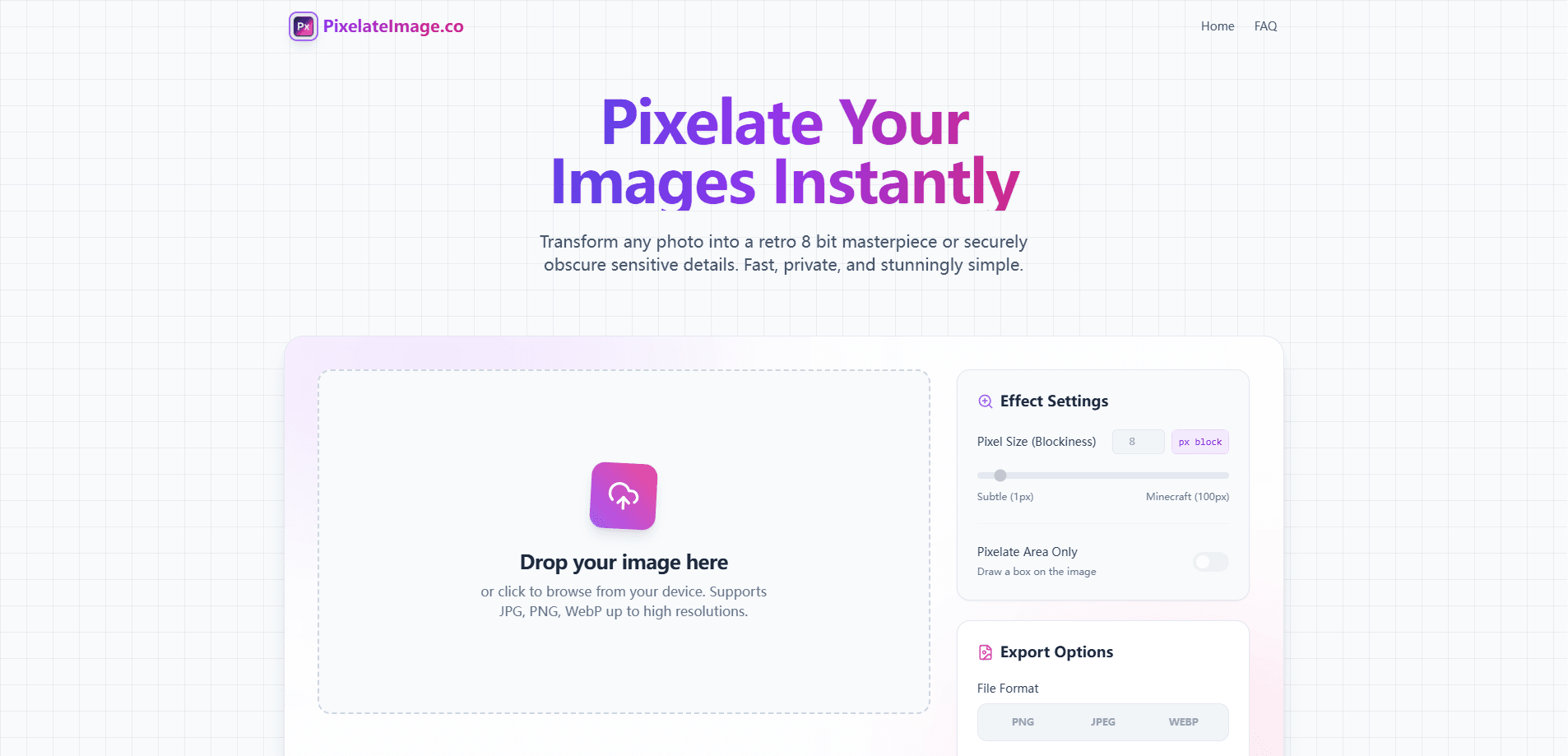
- Open the site and drag a photo onto the canvas, or click to browse your files. JPG, PNG, and WebP all work.
- Move the block size slider or type an exact pixel value. The 8px default gives an immediate retro look.
- Turn on "Pixelate Area Only" if you just want to cover one region, then draw and resize a box over the face, plate, or other detail.
- Pick your export format (PNG, JPG, or WebP) and download. The image saves at its original resolution with no watermark.
Everything runs on your own device, so there's no upload step to wait on and no account to create.
Product Information
A quick look at Pixelate Image's pricing, supported platforms, and performance.
Best for
The users, tasks, and scenarios where this tool fits best.
Users
- Everyday social media posters
- Hobbyist artists
- Privacy-conscious professionals
Tasks
- Censoring faces
- Hiding license plates
- Making retro 8-bit art
- Sanitizing screenshots
Scenarios
- Posting a street photo where a stranger's face is too clear
- Listing a used car online
- Drafting a class handout or tutorial
Key features
Client-Side Processing
The image never leaves your device. All the work happens in the browser using a canvas engine, so there's no upload queue and no copy of your photo sitting on a server. Nothing to wait for. For private material, that's the whole reason to pick this over desktop software or a cloud editor.
Adjustable Block Size
A slider and a numeric field control how coarse the pixelation effect gets. Small blocks keep it subtle. Large blocks flatten the image into bold color tiles. You can type an exact pixel value when you need a repeatable result rather than eyeballing it.
Precision Area Selection
Instead of pixelating the whole picture, you can switch on "Pixelate Area Only" and draw a resizable box over just the part you want gone. It's the difference between destroying an image and redacting a detail, which is what most privacy work actually calls for.
Multi-Format Export
Finished images download in PNG, JPG, or WebP at the source resolution. PNG holds onto hard edges best, which is why it's the sensible pick for 8-bit art, while JPG and WebP keep file sizes down for photos headed to the web. No watermark lands on the output.
No Signup, No Watermark
There's no account, no email, and no paywall. You open the page, do the work, and close the tab. Simple as that. For a tool you might use once every few months, that's a relief compared with services that gate downloads behind a login.
Built-In Guides and References
Short guides cover specific jobs, like how many blocks across a face you need and when pixelation actually fails against text. They read like notes from someone who has used the tool, not marketing copy, which helps you pick sane settings instead of guessing.
Pros and cons
Pros
- Free with no account, so there's no signup friction and nothing to cancel later.
- Photos stay on your device, which removes the biggest worry with uploading private images to a random site.
- Area-only mode targets a face or plate without wrecking the rest of the photo.
- Exports at full original resolution in three formats, with no watermark on the result.
- Works in a browser on desktop and mobile, so there's nothing to install.
Cons
- Pixelation is weak against short text such as plates and codes, so it isn't a universal redaction tool and you may need a solid bar instead.
- No batch processing, so clearing a folder of images means repeating the steps one file at a time.
- No API, which rules it out if you wanted to automate pixelation inside another app or workflow.
Frequently asked questions
Yes. The tool is free to use, with no account, no subscription, and no watermark on the downloaded image.
Related content
Explore related tools, skills, and articles for Pixelate Image.
Pixelate Image Alternatives

Google EmbeddingGemma 2
Google DeepMind · Writing · Image · CodingGoogle EmbeddingGemma 2 is a 740M-parameter open model that turns text, code, images, audio, and video frames into vectors in one 768-dimension space, running on phones and laptops.

Tractionwave
TractionWave · Image · MarketingTractionWave is an AI attention heatmap tool for static ads. Upload a PNG or JPG and it returns predicted attention, ranked hotspots, and fixes before you spend budget.

Imejis.io
Imejis.io · Image · MarketingImejis.io is an AI design studio for agents and marketing teams. Describe an image in plain words, and it writes the copy, builds the layout, reflows it to every size, then exports a finished file.