

PixelCrew
PixelCrew · Image · Coding · Productivity
PixelCrew is an AI design platform that runs a crew of named agents on a single written brief. You describe what you need, and a researcher, an art director, a UX designer, and a build crew work through the job in sequence, handing work off the way a real studio does. One brief in. A full deliverable out. The output is production-ready HTML with Tailwind, a full design system, and documentation you can ship or pass to any developer. It suits founders, product teams, and freelancers who need polished design fast without hiring a full agency. No design background required.
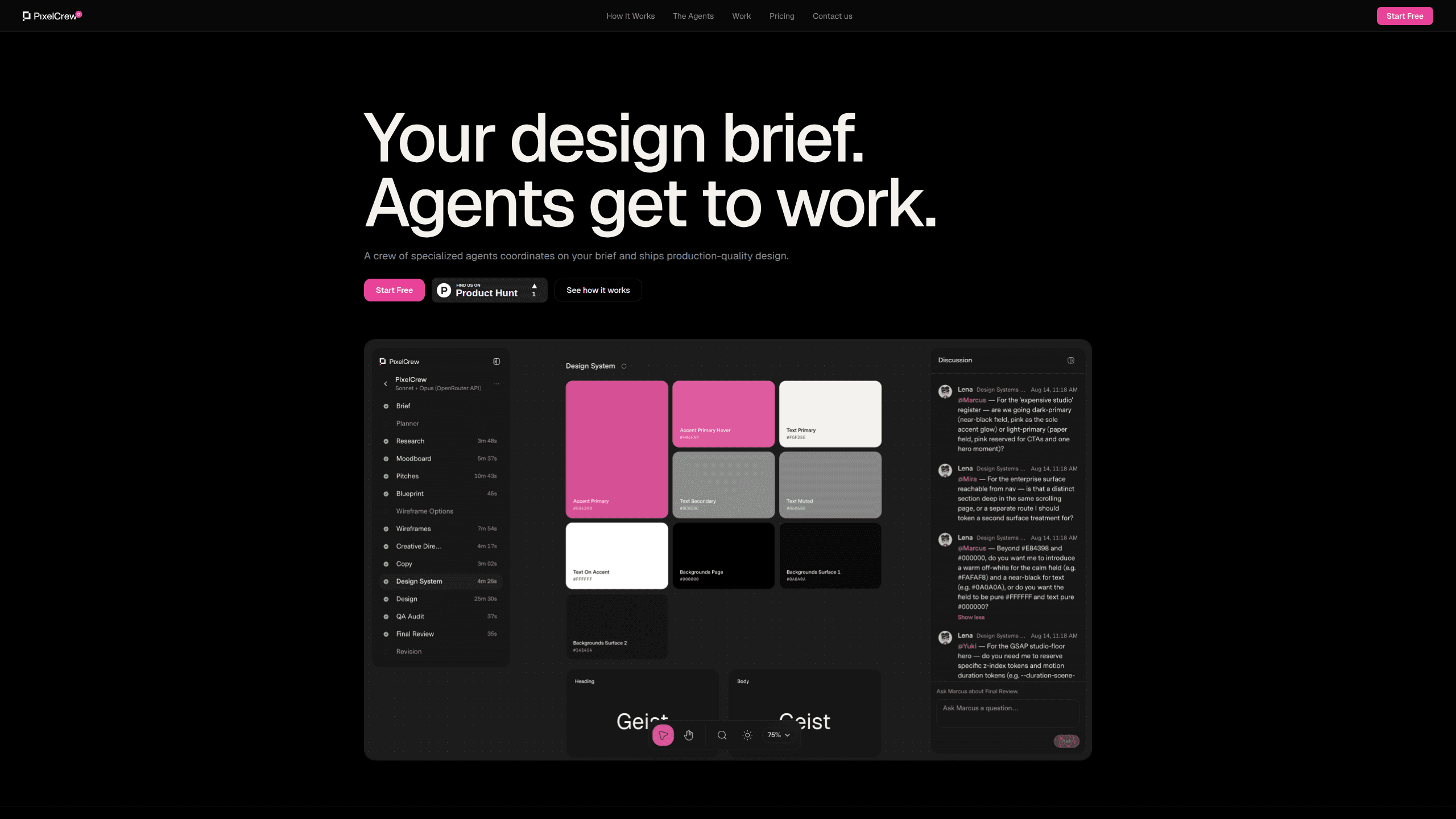
About PixelCrew
What Is PixelCrew
PixelCrew is a web-based AI design agent that replaces the back-and-forth of a traditional design project with an agent crew that coordinates on its own. Instead of chatting with one model and hoping it remembers your goals, you get a chain of specialized workers, each with a defined scope and a clear handoff. It works like a small AI design team you don't have to hire.
The core idea is that design is a process, not a single prompt. One agent reads your brief and runs structured discovery: audience personas, competitive analysis, jobs-to-be-done mapping, and an information architecture. Another sets creative direction with three visual pitches and a moodboard. A third turns that into wireframes and UX flows. Then a build crew assembles copy, design tokens, and components into production HTML. Simple enough in principle.
The main limits are scope and control. PixelCrew is built for web design work like landing pages, dashboards, and design systems, not for illustration, print, or native mobile apps. That matters if you're not building for the web. The whole run takes 25 to 45 minutes, so it favors people who can wait for a complete deliverable over those who want to tweak pixel by pixel in real time. No live canvas here.
Getting Started
- Go to pixelcrew.ai and submit your brief in plain text. Describe the deliverable, not the steps.
- Let the researcher agent run discovery on your audience and competitors.
- Review the creative direction, where three visual pitches get narrowed to one chosen look.
- Let the designer and build crew produce wireframes, copy, and the design system.
- Download the production HTML and Tailwind files, then ship them or hand them to a developer.
Product Information
A quick look at PixelCrew's pricing, supported platforms, and performance.
Best for
The users, tasks, and scenarios where this tool fits best.
Users
- Founders and solo builders
- Product and marketing teams
- Freelance designers and developers
Tasks
- Turning a written brief into wireframes
- Producing a design system
- Writing interface copy
Scenarios
- Early product exploration
- Pre-launch landing pages
- Handoff preparation
Key features
A named agent crew with real handoffs
PixelCrew splits the work across agents with names and roles instead of one general model. Elena handles research and strategy, Marcus sets art direction, Mira builds UX architecture, and a build crew finishes the HTML. Every agent passes a defined artifact to the next. Context carries forward instead of resetting at every step.
Brief-first input, no templates
You submit free text rather than filling in a form. No templates to pick from. The agents read your intent from a paragraph or two. That's faster to start. It also puts more weight on how clearly you describe the deliverable you want.
Research before visuals
Elena runs audience personas, competitive analysis, jobs-to-be-done mapping, and an information architecture before any design decision is made. You get a structured research document as the first output. That ordering is the point. It gives the later visual choices a stated reason rather than a gut call.
Three visual pitches and a moodboard
Marcus produces three distinct visual directions, selects the strongest, and writes a creative brief covering palette, typography, layout direction, and section composition. Seeing options at this stage is the main way you keep creative control. Not bad for a single brief.
Wireframes that cover edge cases
Mira works as the AI UX designer and turns the brief into UX flows, section architecture, interactions, and HTML wireframes, with an emphasis on resolving every screen and edge case including empty and error states. Gaps here are the usual reason a handoff stalls. The crew treats unresolved states as part of the job. Every screen gets addressed.
Production HTML with Tailwind and a design system
The final output is buildable HTML styled with Tailwind, plus design tokens, a type scale, and components. You can ship the code directly or pass it to any developer. That's the difference between a design concept and something a team can put into a product. Big difference.
Documented deliverables you can audit
Every stage writes a file, from a research brief to a creative brief to a QA report. The QA pass flags issues, revises them, and rechecks before output reaches you. Why care? Because a paper trail makes it easier to see why a given design decision was made and to pick up the project later.
Pros and cons
Pros
- Turns a single written brief into a complete deliverable: wireframes, design system, and production HTML with Tailwind.
- Named agents with defined scopes keep research, art direction, and UX work separate, so each output has a clear owner.
- Research-first flow means visual choices come with stated reasoning, not just a mood.
- Fast turnaround of 25 to 45 minutes per run compared with a multi-week agency schedule.
- Output is real code and tokens, so it slots into a developer's workflow instead of arriving as a static mockup.
Cons
- The 25 to 45 minute run time rules out live, pixel-level tweaking while you wait.
- Scope is limited to web design work, so illustration, print, and native mobile apps aren't covered.
- There's no API, which means you can't wire the crew into your own pipeline or automate runs programmatically.
- No free-form design canvas, so anyone used to dragging elements around in Figma will find the brief-based flow less direct.
Frequently asked questions
You get three visual directions narrowed to one, HTML wireframes, interface copy, a design system with tokens and components, and production-ready HTML with Tailwind. Every stage also writes a document, so you finish with both the design and the reasoning behind it.
Related content
Explore related tools, skills, and articles for PixelCrew.
PixelCrew Alternatives

Google EmbeddingGemma 2
Google DeepMind · Writing · Image · CodingGoogle EmbeddingGemma 2 is a 740M-parameter open model that turns text, code, images, audio, and video frames into vectors in one 768-dimension space, running on phones and laptops.

Tractionwave
TractionWave · Image · MarketingTractionWave is an AI attention heatmap tool for static ads. Upload a PNG or JPG and it returns predicted attention, ranked hotspots, and fixes before you spend budget.

Imejis.io
Imejis.io · Image · MarketingImejis.io is an AI design studio for agents and marketing teams. Describe an image in plain words, and it writes the copy, builds the layout, reflows it to every size, then exports a finished file.