

Planfit - Gym Workout Planner
Planfit Inc. · Leaning · AI Assistant
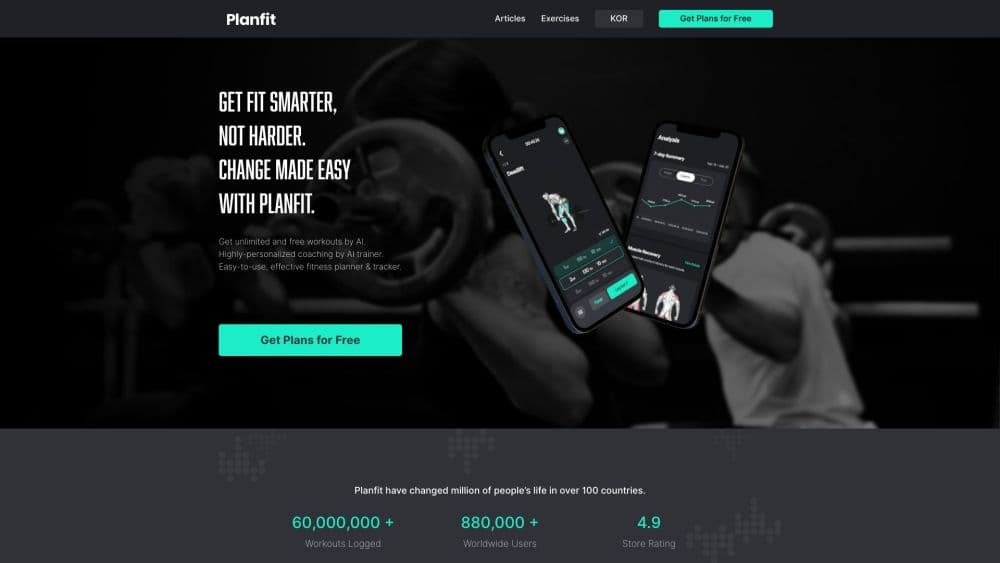
Planfit is an AI personal trainer app that builds gym and home workout plans around your goal, equipment and schedule, suggests the weights for each set and adjusts them as you log training.
About Planfit - Gym Workout Planner
What Is Planfit
Planfit is a mobile fitness app from Planfit Inc., a Korean company founded in June 2021 by Hyeonwoo Baek. It answers the question most gym regulars walk in with: what do I do today? You tell it your goal, the days you can train and the equipment in front of you, and it writes the session down to sets, reps and starting weight. The company says plans draw on more than 80 million workout data points and recognize equipment in over 245,000 gyms in 150 countries.
The app goes further than a plan generator. It logs every set you complete, then moves next week's numbers based on what you actually lifted. A video library and a real-time coach walk you through each movement, and a recovery screen shows which muscles still need rest. Planfit reports 4 million users, 87 million logged workouts and a 4.7 star average across more than 67,000 App Store and Google Play ratings.
The limits matter too. Planfit is built around strength training in a gym or with basic home gear. There's no food logging, no calorie tracking and no cardio program, so anyone who wants nutrition and lifting in one place will need a second app. Planfit also doesn't publish an API or a desktop version, which rules it out for teams that want their training data elsewhere.
Getting Started
- Download Planfit from the App Store or Google Play and sign in with an Apple, Google or email account. No payment is needed to start.
- Answer the setup questions: training experience, goal (build muscle, lose fat, get stronger or stay fit), days per week and session length.
- Pick the equipment you have. Planfit matches plans to a commercial gym, a home rack with dumbbells or bodyweight only.
- Open your first workout. Each exercise arrives with a video, target sets and reps, a suggested weight and a rest timer.
- Log each set as you finish it, then check the next session. Planfit reads those numbers and updates the weights for the following week.
Product Information
A quick look at Planfit - Gym Workout Planner's pricing, supported platforms, and performance.
Best for
The users, tasks, and scenarios where this tool fits best.
Users
- Gym regulars who've plateaued
- Complete beginners
- People training at home
- Lifters who keep skipping sessions
Tasks
- Building a weekly split
- Deciding what weight to lift
- Swapping an exercise on the spot
- Tracking progress over months
Scenarios
- A busy week with only three gym visits
- Training in a hotel gym with limited equipment
- Coming back after weeks off
- Managing soreness between sessions
Key features
Personalized Workout Planning
A gym workout planner lives or dies on whether the week fits your life, so Planfit starts there. It asks how many days you can train and how long each session can run, then lays out a week where each muscle group gets enough sets without overlapping. Three days becomes a full body split, four becomes upper/lower, five leans toward push-pull-legs. It also explains why it picked that structure, which helps when you're deciding whether to follow it or adjust.
Weight and Rep Recommendations
This is the part most people notice first. Every exercise comes with a suggested weight and a rep range, and the suggestion moves after you log how hard the set felt. Log a set as easy and next week's load goes up. Log it as a grind and Planfit backs off. Over a few months the numbers settle around what you can actually lift on a given day, which matters when sleep and work schedules aren't consistent.
Real-Time AI Coaching
Premium unlocks a coach that counts reps out loud, runs rest timers and talks you through form cues mid-set. It's the closest thing in the app to having someone stand next to the rack. The catch is that it runs on your phone screen, so it won't correct a movement the camera can't see.
Muscle Recovery Tracking
Each logged session feeds a body map that shows which muscles are recovering and which are ready. That's useful for anyone training four or more days a week, since it turns soreness into something you can plan around instead of guessing. It also helps explain why the planner spaces hard sessions apart.
Exercise Video Library and Equipment Guide
Every movement in a plan links to a demonstration video and written form cues. A separate equipment guide covers the machines in a typical commercial gym, so a first-timer can figure out what a leg extension is before walking up to it. The library is a big part of why the app works for people training without a coach.
Workout Log and Progress Analysis
The workout tracker is the other half of the AI workout planner. Logging takes a few taps per set: weight, reps and an effort rating. From there Planfit draws volume charts, strength trends and records per lift. Seeing a bench press stall for a month is the kind of signal that changes a program, and having it on a chart beats trying to remember what you did in March.
Pros and cons
Pros
- Plans adapt to the equipment you actually have, from a full commercial gym to a pair of dumbbells.
- Suggested weights move with your logs, so you don't spend each session deciding how much to load.
- Video guides and form cues make unfamiliar machines and lifts approachable without a trainer.
- The core planner and tracker stay free indefinitely, with no time limit on the basic plan.
- Logging is fast enough to do between sets without breaking your rhythm.
Cons
- There's no nutrition or calorie tracking, so you'll need another app if diet is part of your goal.
- Premium prices come from the App Store and Google Play and vary by country, with no single published rate.
- Strength training is the focus. Runners, cyclists and anyone after a cardio program won't find much here.
- No public API or web dashboard means your training history stays inside the app.
Frequently asked questions
Yes. The personalized workout plan, equipment guide, workout log and community are free for life according to Planfit. Premium features come with a 7-day free trial, then a subscription billed through the App Store or Google Play.
Related content
Explore related tools, skills, and articles for Planfit - Gym Workout Planner.
Planfit - Gym Workout Planner Alternatives

HireKey
HireKey · Voice & Language · Productivity · LeaningHireKey is an AI job search copilot built by a former tech recruiter. It checks role fit, tailors resumes, runs interview practice and tracks every application.

Lune
Retrograde Labs · Productivity · LeaningLune is a research search engine for scientific AI agents. It runs as an MCP server that lets Claude, ChatGPT and Cursor search peer-reviewed computer science papers and cite them.
Coddy
Coddy · Coding · LeaningCoddy is a gamified platform to learn to code through short interactive lessons in 20+ languages, with a browser editor, an AI tutor and free certificates.