

Plow
The Plow Collective, Inc. · Productivity · Chatbot
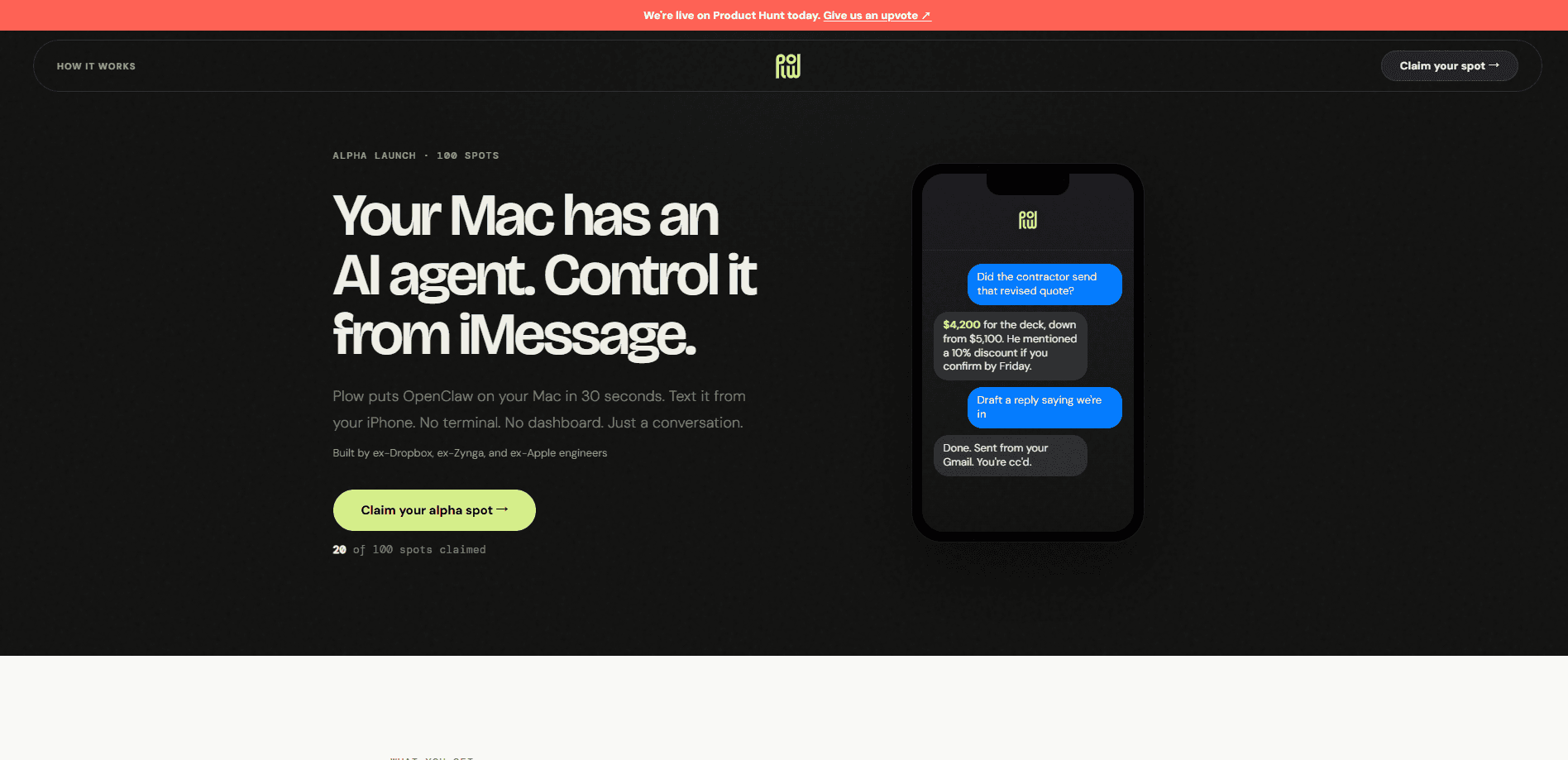
Plow is a privacy-first AI agent platform for Mac that turns AI agents into something you can text. Instead of a chat window you have to remember to open, your agent lives in iMessage, so you ask for what you need the way you'd text a friend. Plow hosts the agent, connects it to Gmail, Google Calendar, and Slack, and pairs with a Mac app called Latch when a task needs local access to your browser, files, or command line. It's aimed at people who want real automation on their own machine without giving an agent the keys to everything.
About Plow
What Is Plow
Plow is an agent infrastructure product built by The Plow Collective, Inc., a small team based in Menlo Park, California. The pitch is simple: you bring an agent or start from a ready-made template, and Plow handles the hosting, the chat layer, and the connectors so you never touch a developer account.
The thing that separates it from a typical AI assistant is where the conversation happens. Why iMessage? Because it's already open. You send a text, the agent works, and it replies in the same thread. It can act across Gmail, Google Calendar, Slack, a browser, your files, and the command line, which puts it closer to a general errand-runner than a single-purpose chatbot.
Availability is the catch. Plow is in a private preview, so you can't just sign up and start today. You have to get in first. It's also Mac-centric for local access, since the Latch app that bridges your machine runs on macOS.
A second limit worth knowing: Plow doesn't store your Google data on its servers once a request is handled, and it says that data is never sold or used for ads or model training. That's a meaningful promise for anyone handing an agent access to email and calendar, but you should read the privacy policy yourself before connecting accounts.
Getting Started
- Request access to the private preview and wait for your invite.
- Pick a starting point: a preconfigured Hermes or OpenClaw base image, or your own agent repo.
- Connect the accounts you want the agent to use, such as Gmail, Google Calendar, or Slack.
- Install Latch on your Mac if the agent needs local access to your browser, files, or commands.
- Text your agent to test it, then adjust its instructions or skills as needed.
Product Information
A quick look at Plow's pricing, supported platforms, and performance.
Best for
The users, tasks, and scenarios where this tool fits best.
Users
- Mac owners who want automation on their own machine
- People who live in iMessage
- Privacy-conscious early adopters
Tasks
- Reconciling expenses
- Handling recurring chores
- Drafting replies and events
Scenarios
- Running a shared household
- Founder or developer work
- Subscription cleanup
Key features
Texting Your Agent Through iMessage
The whole product revolves around iMessage. Plow's chat plugin lets an agent receive messages, send replies and scheduled updates, and work inside group threads. For most people that means zero new software to learn. You text a number the way you'd text anyone else. That's the whole interface. No dashboard, no web app, no onboarding tour.
Latch, the Mac Access Layer
Latch is a Mac app that connects a Plow agent to your logged-in accounts, browser, files, and command line. The Latch password manager keeps passwords in the Mac vault and fills them locally, so they're never revealed to the agent. Access is scoped to the specific job you approved, and anything outside that job gets blocked.
Per-Request Approvals
Every action is checked before it runs. When Latch needs to open a browser, read files, or run a command, it asks first and shows you what's being requested. You can review or revoke access at any time. That's the point. It keeps a long-running agent from quietly wandering outside its remit.
Built-In Connectors
Agents run on Gmail, Google Calendar, and Slack without you setting up a developer account. For example, an agent can search your mail, read your agenda, and draft a reply or put an event on your calendar. Plow says that data isn't stored on its servers once your request is handled, and it isn't sold or used for ads or model training.
Ready-Made Agent Templates
You don't have to build from scratch. Plow ships templates like a household assistant, a receipt matcher, a table-reservation agent, and a bill payer. Pick one and run it. You can also start from a working template, add your own instructions and skills, and publish it to the community.
OpenClaw and Hermes Base Images
Developers can pick a preconfigured Hermes or OpenClaw base image and skip the scaffolding. Plow handles hosting, chat, and connectors, so you write the agent's behavior and Plow runs it. The company says you can go from an agent repo to a hosted textable AI agent you can share in about ten minutes.
Pros and cons
Pros
- The iMessage interface means no separate app and no learning curve for anyone who already texts.
- Latch keeps passwords in the Mac vault and scopes access to the job you approved, so an agent can't grab more than it needs.
- Connectors for Gmail, Google Calendar, and Slack work without a developer account.
- OpenClaw and Hermes base images lower the bar for shipping a textable agent.
Cons
- Plow is in a private preview, so you can't sign up and use it immediately.
- Local access depends on Latch, which is a Mac app, so other operating systems are out.
- There's no published pricing or free plan yet, which makes cost hard to judge before you commit.
- Hooking an agent into email, calendar, and your Mac is a real security decision, and the approval model only helps if you actually read the prompts.
Frequently asked questions
Plow is used to run AI agents you interact with over iMessage. You text the agent a task, and it can act across Gmail, Google Calendar, Slack, your browser, files, and command line. It suits everyday errands, developer work, and household chores more than one-off chatbot questions.
Related content
Explore related tools, skills, and articles for Plow.
Plow Alternatives

Base Code
Base44 (Wix) · Coding · ProductivityBase Code is a shared cloud development environment from Base44. Teammates describe changes to an existing GitHub codebase in chat, preview them live and send them back as pull requests.

Knocket
Knocket (Tencent RTC team) · Productivity · Business · ChatbotKnocket is a free live chat and contact page tool that lets visitors message you from your website, app, or a shareable link, with every reply handled from Telegram or one inbox.

FloorGen
Vinit Kumar (FloorGen) · Productivity · China AIFloorGen is a browser-based floor plan maker that turns a sentence or a sketch into an editable 2D plan and a 3D walkthrough. Export to PDF, DXF or video, and draw without an account.