
Plugger
Plugger · Image
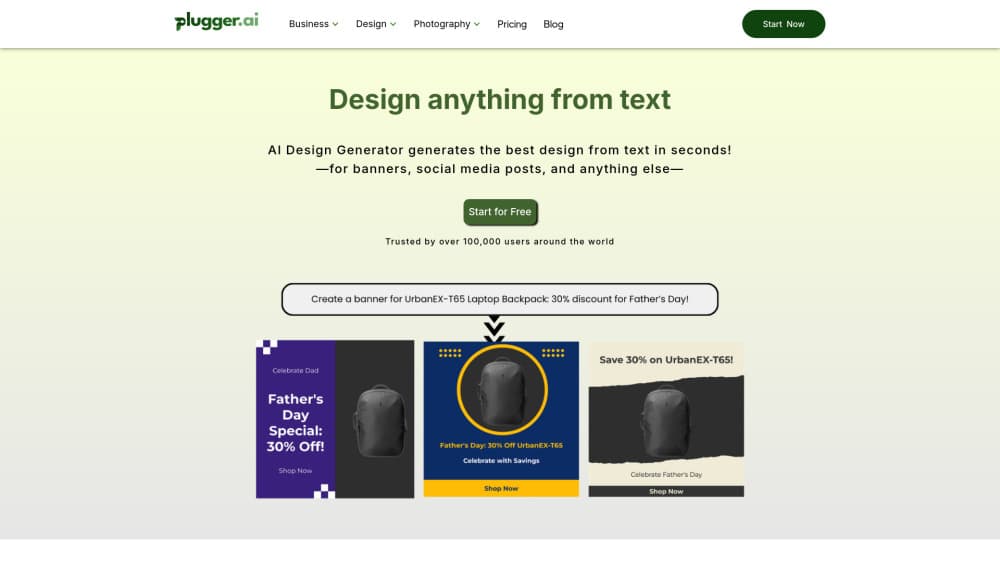
Plugger is an AI design generator that turns text prompts into social media posts, ad creatives, and brand visuals for marketing teams.
About Plugger
What Is Plugger
Plugger is a B2B SaaS platform for AI graphic design and brand design automation. You type a description, pick a format, and it produces finished visuals in seconds. That covers Instagram stories, Facebook ads, logos, icons, and stock photos. The company says over 100,000 people use it, mostly at startups, e-commerce stores, and marketing agencies.
The pitch is design automation without hiring. Instead of briefing a freelance designer and waiting days for revisions, a marketer can spin up thirty ad variations before lunch. Plugger handles the layout and rendering. You supply the product info and the brand rules.
Where it gets limited is control. Not ideal for everyone. Plugger works best when you give it clear direction and accept its template-driven output. If you need pixel-perfect typography or a one-off layout that breaks every rule you've set, you'll still want a human designer or a manual editor who can override the system. From what I can gather, export formats and fine-grained editing options are narrower than what full design suites offer.
Getting Started
- Sign up at platform.plugger.ai and start on the free tier to test the generator.
- Add your brand assets: upload fonts, logos, and reference images so output matches your identity.
- Pick a format from the social media or ad creative tools, then write a prompt describing the design you want.
- Review the generated designs, tweak the copy and layout, and download the ones you'll use.
- Upgrade to a paid plan once you hit generation limits or need unlimited output.
Product Information
A quick look at Plugger's pricing, supported platforms, and performance.
Best for
The users, tasks, and scenarios where this tool fits best.
Users
- Marketing teams
- Small businesses and e-commerce sellers
- Agencies managing multiple clients
Tasks
- Social media posts
- Ad creative production
- Logo and icon design
- Product imagery
Scenarios
- Launching a campaign on a tight deadline
- Testing many ad variations
- Keeping a small brand consistent
Key features
Text-to-Design Generation
You describe what you want, and Plugger builds the design. It reads your prompt and produces a finished layout, not just a raw picture. What you get back is closer to a ready-to-post asset than a rough concept. That gap matters when you're posting daily across a stack of platforms and don't have time to clean up an image before it goes out.
Social Media and Ad Formats
Plugger has dedicated generators for Instagram posts and stories, LinkedIn posts and carousels, Facebook posts, X posts, and Reddit posts. It also handles wide and square banners for ads. Each format is sized for its platform. No manual resizing. That kills the step most designers hate.
Brand Management
You upload your fonts, logos, and reference images once, and Plugger applies them across every new design you generate from then on. For an agency juggling several clients at the same time, that means each brand keeps its own look without you rebuilding the rules every single time.
Product and Design Management
You can store your products inside Plugger and drop them into new designs. A seller with a catalog of items can pull any product into a promo asset instead of hunting for the right photo file. It works like a lightweight design automation platform for a whole catalog.
AI Image Tools
The AI image generator side goes well beyond marketing graphics. Plugger includes anime, persona, cartoon, comic book, logo, icon, T-shirt, sticker, coloring page, and pattern generators. There's also a photo upscaler that pushes images toward 4K or 8K for print.
Prompt-Based Customization
Every generated design can be adjusted by changing the prompt or the copy. You keep iterating in text. No dragging elements around a canvas. Is that faster? Once you learn how the tool reads your instructions, yes.
Pros and cons
Pros
- Produces finished, platform-sized designs from a short text prompt in seconds, so a single marketer can cover a whole campaign without touching layout software.
- Covers social posts, ad creatives, logos, icons, and stock-style images in one place.
- Brand management keeps fonts and images consistent across campaigns. Set it once.
- Free tier lets you test the generator before paying. Paid plans start at $15/mo.
- No design software to learn; the whole workflow runs on prompts and a web browser.
Cons
- Output leans on built-in templates, so distinctive or highly custom layouts are hard to get, and two campaigns built from similar prompts can end up looking alike.
- Fine editing and export control are narrower than a full design suite, which matters if you need specific file formats or print-ready specs.
- Brand setup takes time upfront, and the results only look polished once your assets are loaded.
- Plugger doesn't publish clear API details, so teams hoping to automate design inside their own tools may hit a wall.
Frequently asked questions
Plugger generates marketing and design visuals from text prompts. You describe the design, pick a format like an Instagram post or a banner ad, and it renders a finished graphic you can download and post.
Related content
Explore related tools, skills, and articles for Plugger.
Plugger Alternatives

Google EmbeddingGemma 2
Google DeepMind · Writing · Image · CodingGoogle EmbeddingGemma 2 is a 740M-parameter open model that turns text, code, images, audio, and video frames into vectors in one 768-dimension space, running on phones and laptops.

Tractionwave
TractionWave · Image · MarketingTractionWave is an AI attention heatmap tool for static ads. Upload a PNG or JPG and it returns predicted attention, ranked hotspots, and fixes before you spend budget.

Imejis.io
Imejis.io · Image · MarketingImejis.io is an AI design studio for agents and marketing teams. Describe an image in plain words, and it writes the copy, builds the layout, reflows it to every size, then exports a finished file.