
Poster Generator
Poster Generator · Image
Poster Generator is a free online AI poster maker that turns a text prompt and a few title fields into a custom poster you can download as a PNG.
About Poster Generator
What Is Poster Generator
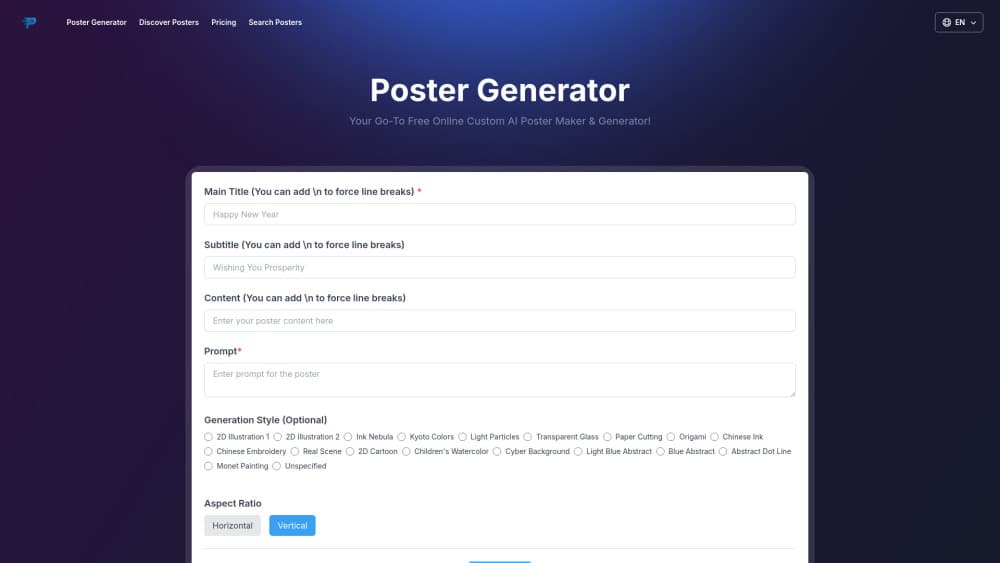
Poster Generator is a browser tool for making posters with AI. As a text to poster service, you fill in a main title, a subtitle, some body copy and a prompt, then pick a visual style and let the generator render a finished poster. No design background is needed.
The pull is speed and price. The free plan gives you three generations a month, the paid plans start at $4.9, and the site also hosts a public gallery of more than 12,000 posters you can browse for ideas before you make your own.
The trade-off is control. You steer the look through a prompt and a preset style rather than a full canvas editor, so moving a single element where you want it still takes trial and error. And the tool lives in English, which limits the copy you can drop in.
Getting Started
- Open postergenerator.online in a browser. No install is required, and you can start on the free plan.
- Type a main title, subtitle and content, then describe the image you want in the prompt box.
- Pick a style such as 2D Illustration, Ink Nebula or Real Scene, and set the aspect ratio to horizontal or vertical.
- Generate the poster, then download the PNG, including a version with a transparent background.
Product Information
A quick look at Poster Generator's pricing, supported platforms, and performance.
Best for
The users, tasks, and scenarios where this tool fits best.
Users
- Small business owners
- Social media managers
- Students and event organizers
Tasks
- Making an event poster
- Creating social promos
- Mocking up a concept
Scenarios
- A shop needs a sale poster today
- A meetup group posts a last-minute notice
- A creator tests thumbnail and cover ideas
Key features
Prompt-to-poster generation
You describe the poster you want and the AI builds the full layout, image and all. The generator takes a main title, subtitle and content block, so your text lands in the design rather than being pasted on top later.
AI prompt expansion
The AI Extended Prompt Generation option rewrites a short idea into a longer, more detailed prompt before rendering. It helps people who know what they want to say but not how to describe a visual style.
Twenty-plus visual styles
You can choose from styles such as 2D Illustration, Ink Nebula, Kyoto Colors, Paper Cutting, Origami, Chinese Ink, Real Scene, Children's Watercolor and Monet Painting. The range lets a business poster and a birthday flyer share one tool.
Horizontal and vertical aspect ratios
Every poster can be set to a horizontal or vertical format. Vertical suits flyers and phone screens, while horizontal fits banners and web headers, and you keep the same content across both.
Transparent background downloads
On the free plan and above, you can download images with a transparent background. That matters when you want to drop a poster or its elements onto a colored or branded backdrop.
Free public poster gallery
The site hosts a searchable collection of more than 12,000 free PNG posters. You browse it for reference or reuse, which gives new users a starting point for poster design online before they write their own prompt.
Pros and cons
Pros
- Runs entirely in the browser, so there is nothing to install and it works on a phone or laptop.
- The free plan covers three posters a month, which is enough to test whether it fits your needs.
- Style presets and title fields keep weak designs from happening, even for people with no design background.
- Transparent PNG exports and a 1024x1024 resolution suit web use without extra editing.
Cons
- It is built around prompt and preset styles, so positioning one element or one headline exactly still takes repeated tries.
- The interface and generated copy are English-only, which gets in the way if your audience reads another language.
- Heavy or print-grade output is off the table; the export tops out at 1024x1024, which is soft for a large printed poster.
- Paid tiers are billed yearly for the discounted rate, so the cheap $4.9 price means paying for a full year up front.
Frequently asked questions
Poster Generator makes posters from a text prompt. You add a title and content, choose a style and an aspect ratio, and the AI renders a poster you can download as a PNG for events, promotions or social posts.
Related content
Explore related tools, skills, and articles for Poster Generator.
Poster Generator Alternatives

Google EmbeddingGemma 2
Google DeepMind · Writing · Image · CodingGoogle EmbeddingGemma 2 is a 740M-parameter open model that turns text, code, images, audio, and video frames into vectors in one 768-dimension space, running on phones and laptops.

Tractionwave
TractionWave · Image · MarketingTractionWave is an AI attention heatmap tool for static ads. Upload a PNG or JPG and it returns predicted attention, ranked hotspots, and fixes before you spend budget.

Imejis.io
Imejis.io · Image · MarketingImejis.io is an AI design studio for agents and marketing teams. Describe an image in plain words, and it writes the copy, builds the layout, reflows it to every size, then exports a finished file.