
ProfilePicture.AI
HeadshotPro (ProfilePicture.AI) · Image
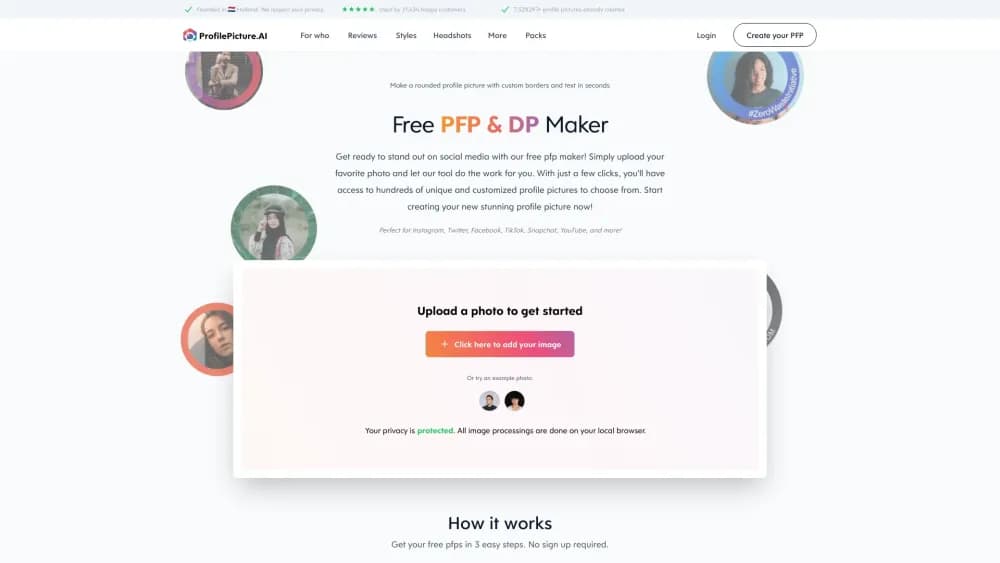
ProfilePicture.AI is a free browser-based profile picture maker. It removes backgrounds, adds circle crops and borders, and exports sizes for Instagram, Discord, and LinkedIn.
About ProfilePicture.AI
What Is ProfilePicture.AI
ProfilePicture.AI is a free online profile picture maker that runs entirely in a web browser. You upload a photo you already have, cut the subject out, drop in a color, gradient, or pattern behind them, and export a finished image at the exact size each platform expects. No install, no sign-up, no watermark.
The product sits at the simple end of a crowded category. Plenty of AI tools promise to invent a new portrait from a selfie, and this one doesn't. It cleans up the photo you already took: better framing, cleaner background, a crop that survives a round frame. For a lot of people that's the actual job, especially when the alternative is paying for a studio session or wrestling with a full editor for one image.
The limit follows from that focus. Background removal works well on a sharp, well-lit subject and struggles with flyaway hair or busy edges. Complex retouching still needs a real photo editor, and anyone who wants a generated studio portrait has to head to HeadshotPro, the paid AI headshot product the site links to. This editor stays free either way.
Getting Started
- Open the site in any modern browser. Nothing to install and no account to create.
- Upload a selfie or any photo from your phone's camera roll or your desktop. JPG and PNG both work.
- Let the background remover cut the subject out, then pick a plain color, gradient, or pattern and drag the circle crop until the framing sits right.
- Add a border, frame, filter, or text if you want one, then download a preset size or the 1024×1024 HD square as PNG or JPEG.
Product Information
A quick look at ProfilePicture.AI's pricing, supported platforms, and performance.
Best for
The users, tasks, and scenarios where this tool fits best.
Users
- Social media users who want a clean round DP
- Job seekers and freelancers
- Community and channel owners
Tasks
- Making a circle profile picture with a border
- Cutting a background out of a selfie
- Resizing one photo for several platforms
- Building a matching set with a friend
Scenarios
- Refreshing a dating or social profile on short notice
- Sending a CV photo with a job application
- Setting up a new Discord server or YouTube channel
Key features
In-Browser Background Removal
The cutout runs locally in your browser rather than on a server, so the photo isn't uploaded for that step. It works on people, pets, and objects, and it's the piece that makes the rest of the editor possible: once the subject is isolated, a new background is one tap away. Sharp, evenly lit photos cut cleanly; wispy hair against a busy backdrop is where it slips.
Export Presets for Every Major Platform
One tap gives you the size the platform actually renders: 320×320 for Instagram, 500×500 for WhatsApp, 512×512 for Discord, 200×200 for TikTok, 800×800 for YouTube, 400×400 for X and LinkedIn, and 600×600 for a CV. There's also a 1024×1024 square that downscales cleanly anywhere else. Files come out as PNG or JPEG at HD quality.
Circle Crop and Positioning
A live round preview shows exactly what survives the circular frame while you zoom and drag the image. That preview is the difference between a profile picture that looks intentional and one where the top of your head is missing. Lock the crop, then export.
Borders, Frames, and Background Styles
You can build a circle profile picture with a thin outline, a gradient ring, or a heavier frame, and set any thickness you like. Solid colors, soft gradients, and patterns cover the backdrop. The site's own advice is sound: add the profile picture border last and keep it thin, since a busy ring fights the face at small sizes.
Text and Filters in the Same Editor
Type a name or handle and set it straight or curved around the edge of a round image, which is handy for fan accounts and shared profiles. Classic photo filters are one tap away if the original looks flat. Neither tool is a substitute for real retouching, but both save a trip to a second app for a single image.
A Paid Path to AI Headshots
When a recrop isn't enough, the site points to HeadshotPro, which turns selfies into studio-style portraits with an AI profile picture generator. That's a separate paid product with its own pricing, and the free editor doesn't get you credits for it. Worth knowing before you assume the two are one purchase.
Pros and cons
Pros
- Free from start to finish, with no account, no watermark, and no credit card.
- Background removal happens in the browser, so the photo stays on your device for that step.
- Presets match the real display sizes for Instagram, WhatsApp, Discord, TikTok, YouTube, X, LinkedIn, and CV photos.
- Three steps and no layer panels, which makes it usable on a phone in under five minutes.
- Runs on mobile browsers, so a camera roll photo is enough to start.
Cons
- No manual masking or layer editing, so flyaway hair and cluttered edges need a proper editor afterward.
- It can't generate a new portrait. Anyone expecting an AI profile picture generator that creates faces will be disappointed.
- Sizes are fixed presets plus the 1024 square, so odd custom dimensions mean resizing the export elsewhere.
- Output quality tracks the source photo, and a soft or badly lit selfie stays soft no matter how clean the background looks.
Frequently asked questions
Yes. The editor is free to use, and you can download an HD profile picture without creating an account or adding a card. There's no watermark on the export.
Related content
Explore related tools, skills, and articles for ProfilePicture.AI.
ProfilePicture.AI Alternatives

Google EmbeddingGemma 2
Google DeepMind · Writing · Image · CodingGoogle EmbeddingGemma 2 is a 740M-parameter open model that turns text, code, images, audio, and video frames into vectors in one 768-dimension space, running on phones and laptops.

Tractionwave
TractionWave · Image · MarketingTractionWave is an AI attention heatmap tool for static ads. Upload a PNG or JPG and it returns predicted attention, ranked hotspots, and fixes before you spend budget.

Imejis.io
Imejis.io · Image · MarketingImejis.io is an AI design studio for agents and marketing teams. Describe an image in plain words, and it writes the copy, builds the layout, reflows it to every size, then exports a finished file.